WPF - 控件级别
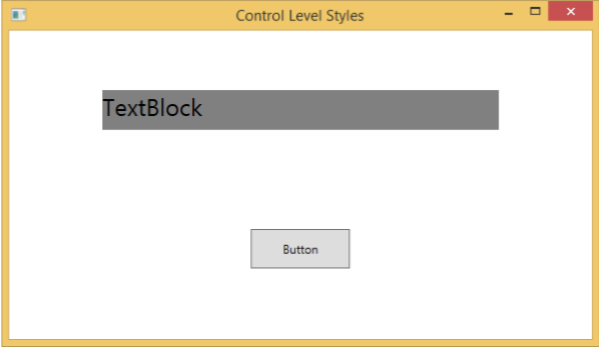
在控件级别定义样式只能应用于该特定控件。 下面给出了一个控制级别的示例,其中按钮和 TextBlock 具有自己的样式。
<Window x:Class = "XAMLControlLevelStyle.MainWindow"
   xmlns = "http://schemas.microsoft.com/winfx/2006/xaml/presentation"
   xmlns:x = "http://schemas.microsoft.com/winfx/2006/xaml"
   Title = "Control Level Styles" Height = "350" Width = "604">

   <StackPanel Margin = "10" VerticalAlignment = "Top">

      <TextBlock Text = "TextBlock">
         <TextBlock.Style>
            <Style>
               <Setter Property = "TextBlock.FontSize" Value = "24" />
               <Setter Property = "TextBlock.Width" Value = "400" />
               <Setter Property = "TextBlock.Height" Value = "40" />
               <Setter Property = "TextBlock.Background" Value = "Gray" />
               <Setter Property = "TextBlock.Margin" Value = "50" />
            </Style>
         </TextBlock.Style>
      </TextBlock>

      <Button Content = "Button">
         <Button.Style>
            <Style>
               <Setter Property = "TextBlock.Width" Value = "100" />
               <Setter Property = "TextBlock.Height" Value = "40" />
               <Setter Property = "TextBlock.Margin" Value = "50" />
            </Style>
         </Button.Style>
      </Button>

   </StackPanel>

</Window>
上面的代码编译执行后,会产生如下窗口−