
WPF - DataGrid 数据网格控件
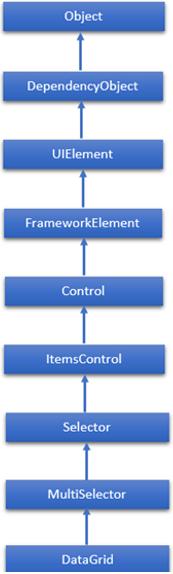
DataGrid 是一个在可自定义网格中显示数据的控件。 它提供了一种灵活的方式来按行和列显示数据集合。 DataGrid类的层次继承如下−
DataGrid 常用属性
| 序号 | 属性与描述 |
|---|---|
| 1 | AlternatingRowBackground 获取或设置用于交替行的背景画笔。 |
| 2 | AreRowDetailsFrozen 获取或设置一个值,该值指示行详细信息是否可以水平滚动。 |
| 3 | AutoGenerateColumns 获取或设置一个值,该值指示是否自动创建列。 |
| 4 | CanUserAddRows 获取或设置一个值,该值指示用户是否可以向 DataGrid 添加新行。 |
| 5 | CanUserDeleteRows 获取或设置一个值,该值指示用户是否可以从 DataGrid 中删除行。 |
| 6 | CanUserReorderColumns 获取或设置一个值,该值指示用户是否可以通过用鼠标拖动列标题来更改列显示顺序。 |
| 7 | CanUserResizeColumns 获取或设置一个值,该值指示用户是否可以使用鼠标调整列的宽度。 |
| 8 | CanUserResizeRows 获取或设置一个值,该值指示用户是否可以使用鼠标调整行高。 |
| 9 | CanUserSortColumns 获取或设置一个值,该值指示用户是否可以通过单击列标题对列进行排序。 |
| 10 | ColumnHeaderHeight 获取或设置列标题行的高度。 |
| 11 | ColumnHeaderStyle 获取或设置应用于 DataGrid 中所有列标题的样式。 |
| 12 | Columns 获取包含 DataGrid 中所有列的集合。 |
| 13 | ColumnWidth 获取或设置 DataGrid 中列和标题的标准宽度和大小调整模式。 |
| 14 | CurrentCell 获取或设置具有焦点的单元格。 |
| 15 | CurrentColumn 获取或设置包含当前单元格的列。 |
| 16 | CurrentItem 获取绑定到包含当前单元格的行的数据项。 |
| 17 | FrozenColumnCount 获取或设置非滚动列的数量。 |
| 18 | HorizontalScrollBarVisibility 获取或设置一个值,该值指示水平滚动条在 DataGrid 中的显示方式。 |
| 19 | IsReadOnly 获取或设置一个值,该值指示用户是否可以编辑 DataGrid 中的值。 |
| 20 | RowBackground 获取或设置行背景的默认画笔。 |
| 21 | RowHeight 获取或设置所有行的建议高度。 |
| 22 | SelectedCells 获取当前选定的单元格列表。 |
DataGrid 常用方法
| 序号 | 方法和说明 |
|---|---|
| 1 | BeginEdit 调用 BeginEdit 命令,该命令会将当前单元格或行置于编辑模式。 |
| 2 | CancelEdit 为当前处于编辑模式的单元格或行调用 CancelEditCommand 命令。 |
| 3 | ClearDetailsVisibilityForItem 清除表示指定数据项的 DataGridRow 的 DetailsVisibility 属性。 |
| 4 | ColumnFromDisplayIndex 获取指定索引处的DataGridColumn。 |
| 5 | CommitEdit 为当前处于编辑模式的单元格或行调用 CommitEditCommand 命令。 |
| 6 | GenerateColumns 为对象的指定属性生成列。 |
| 7 | GetDetailsVisibilityForItem 获取表示指定数据项的 DataGridRow 的 DetailsVisibility 属性。 |
| 8 | OnApplyTemplate 当在派生类中重写时,只要应用程序代码或内部进程调用ApplyTemplate,就会调用该函数。 (重写 FrameworkElement.OnApplyTemplate()。) |
| 9 | ScrollIntoView 垂直滚动 DataGrid 以显示指定数据项的行。 |
| 10 | SelectAllCells 选择 DataGrid 中的所有单元格。 |
| 11 | SetDetailsVisibilityForItem 设置包含指定对象的 DataGridRow 的 DetailsVisibility 属性的值。 |
| 12 | UnselectAllCells 取消选择 DataGrid 中的所有单元格。 |
DataGrid 常用事件
| 序号 | 事件和描述 |
|---|---|
| 1 | AddingNewItem 在将新项目添加到 DataGrid 之前发生。 |
| 2 | AutoGeneratedColumns 所有列的自动生成完成时发生。 |
| 3 | AutoGeneratingColumn 自动生成单个列时发生。 |
| 4 | BeginningEdit 在行或单元格进入编辑模式之前发生。 |
| 5 | CellEditEnding 在提交或取消单元格编辑之前发生。 |
| 6 | ColumnDisplayIndexChanged 当其中一列的 DisplayIndex 属性更改时发生。 |
| 7 | ColumnHeaderDragCompleted 当用户使用鼠标拖动列标题后释放该列标题时发生。 |
| 8 | ColumnHeaderDragDelta 每次用户拖动列标题时鼠标位置发生变化时都会发生。 |
| 9 | ColumnHeaderDragStarted 当用户开始使用鼠标拖动列标题时发生。 |
| 10 | ColumnReordered 当列移动到显示顺序中的新位置时发生。 |
| 11 | ColumnReordering 在列移动到显示顺序中的新位置之前发生。 |
| 12 | CopyingRowClipboardContent 在准备好默认行内容后发生。 |
| 13 | CurrentCellChanged 当 CurrentCell 属性的值发生更改时发生。 |
| 14 | InitializingNewItem 创建新项目时发生。 |
| 15 | LoadingRow 在实例化 DataGridRow 之后发生,以便您可以在使用它之前对其进行自定义。 |
| 16 | LoadingRowDetails 当新的行详细信息模板应用于行时发生。 |
| 17 | PreparingCellForEdit 当单元格进入编辑模式时发生。 |
| 18 | RowDetailsVisibilityChanged 当行详细信息元素的可见性发生更改时发生。 |
| 19 | RowEditEnding 在提交或取消行编辑之前发生。 |
| 20 | SelectedCellsChanged 当 SelectedCells 集合更改时发生。 |
| 21 | Sorting 对列进行排序时发生。 |
| 22 | UnloadingRow 当 DataGridRow 对象可供重用时发生。 |
| 23 | UnloadingRowDetails 当行详细信息元素可供重用时发生。 |
示例
让我们创建一个名为 WPFDataGridControl 的新 WPF 项目。
从工具箱中拖动数据网格。
以下示例演示如何在 DataGrid 中显示数据。 下面给出的是 XAML 代码,其中使用一组属性和事件创建两个数据网格。
<Window x:Class = "WPFDataGridControl.MainWindow"
   xmlns = "http://schemas.microsoft.com/winfx/2006/xaml/presentation"
   xmlns:x = "http://schemas.microsoft.com/winfx/2006/xaml"
   xmlns:core = "clr-namespace:System;assembly = mscorlib"
   xmlns:local = "clr-namespace:WPFDataGridControl"
   Title = "MainWindow" Height = "350" Width = "525">

   <Window.Resources>
      <ObjectDataProvider x:Key = "myEnum" MethodName = "GetValues"
         ObjectType = "{x:Type core:Enum}">

         <ObjectDataProvider.MethodParameters>
            <x:TypeExtension Type = "local:Party" />
         </ObjectDataProvider.MethodParameters>

      </ObjectDataProvider>
   </Window.Resources>

   <Grid>
      <DataGrid Name = "dataGrid" AlternatingRowBackground = "LightBlue"
         AlternationCount = "2" AutoGenerateColumns = "False">

         <DataGrid.Columns>
            <DataGridTextColumn Header = "Name" Binding = "{Binding Name}" />
            <DataGridTextColumn Header = "Title" Binding = "{Binding Title}" />
            <DataGridCheckBoxColumn Header = "ReElected?" Binding = "{Binding WasReElected}"/>
            <DataGridComboBoxColumn Header = "Party" SelectedItemBinding = "{Binding Affiliation}"
               ItemsSource = "{Binding Source = {StaticResource myEnum}}" />
         </DataGrid.Columns>

      </DataGrid>
   </Grid>

</Window>
这是两个不同类的C# 实现。
using System;
using System.Collections.Generic;
using System.Linq;
using System.Text;
using System.Threading.Tasks;

using System.Windows;
using System.Windows.Controls;
using System.Windows.Data;
using System.Windows.Documents;
using System.Windows.Input;
using System.Windows.Media;
using System.Windows.Media.Imaging;
using System.Windows.Navigation;
using System.Windows.Shapes;

namespace WPFDataGridControl {
   /// <summary>
      /// Interaction logic for MainWindow.xaml
   /// </summary>

   public partial class MainWindow : Window {

      public MainWindow() {
         InitializeComponent();
         dataGrid.ItemsSource = Employee.GetEmployees();
      }
   }

   public enum Party {
      Indepentent,
      Federalist,
      DemocratRepublican,
   }

   public class Employee : INotifyPropertyChanged {
      private string name;

      public string Name {
         get { return name; }
         set {
            name = value;
            RaiseProperChanged();
         }
      }

      private string title;

      public string Title {
         get { return title; }
         set {
            title = value;
            RaiseProperChanged();
         }
      }

      private bool wasReElected;

      public bool WasReElected {
         get { return wasReElected; }
         set {
            wasReElected = value;
            RaiseProperChanged();
         }
      }

      private Party affiliation;

      public Party Affiliation {
         get { return affiliation; }
         set {
            affiliation = value;
            RaiseProperChanged();
         }
      }

      public static ObservableCollection<Employee> GetEmployees() {
         var employees = new ObservableCollection<Employee>();

         employees.Add(new Employee() { Name = "Ali", Title = "Minister", WasReElected = true,
            Affiliation = Party.Indepentent });

         employees.Add(new Employee() { Name = "Ahmed", Title = "CM", WasReElected = false,
            Affiliation = Party.Federalist });

         employees.Add(new Employee() { Name = "Amjad", Title = "PM", WasReElected = true,
            Affiliation = Party.DemocratRepublican });

         employees.Add(new Employee() { Name = "Waqas", Title = "Minister",
            WasReElected = false, Affiliation = Party.Indepentent });

         employees.Add(new Employee() { Name = "Bilal", Title = "Minister",
            WasReElected = true, Affiliation = Party.Federalist });

         employees.Add(new Employee() { Name = "Waqar", Title = "Minister",
            WasReElected = false, Affiliation = Party.DemocratRepublican });

         return employees;
      }

      public event PropertyChangedEventHandler PropertyChanged;

      private void RaiseProperChanged([CallerMemberName] string caller = "") {

         if (PropertyChanged != null) {
            PropertyChanged(this, new PropertyChangedEventArgs(caller));
         }
      }

   }

}
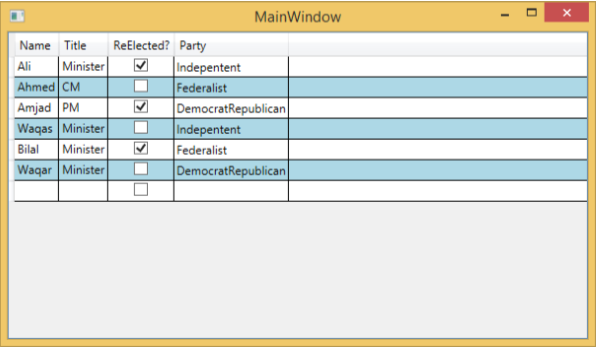
当您编译并执行上述代码时,将产生以下窗口。
我们建议您执行上面的示例代码并尝试 DataGrid 的一些其他属性和事件。

