
WPF - GridPanel 网格面板控件
GridPanel 网格面板提供了一个由行和列组成的灵活区域。 在网格中,子元素可以以表格形式排列。 可以使用 Grid.Row 和 Grid.Column 属性将元素添加到任何特定的行和列
默认情况下,创建的网格面板具有一行和一列。 多个行和列由 RowDefinitions 和 ColumnDefinitions 属性创建。 行高和列宽可以通过以下三种方式定义 −
Fixed value − 分配固定大小的逻辑单元(1/96 英寸)
Auto − 它将占用该特定行/列中的控件所需的空间。
Star (*) − 当自动和固定大小填满时,将占用剩余空间。
GridPanel 类的层次继承如下。
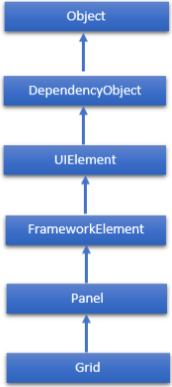
Grid 类常用属性
| Sr. No. | 属性和描述 |
|---|---|
| 1 | Background 获取或设置填充面板内容区域的Brush。 (继承自Panel) |
| 2 | Children 获取此面板的子元素的 UIElementCollection。 (继承自Panel。) |
| 3 | ColumnDefinitions 获取在此 Grid 实例上定义的 ColumnDefinition 对象的列表。 |
| 4 | Height 获取或设置元素的建议高度。 (继承自FrameworkElement。) |
| 5 | ItemHeight 获取或设置一个值,该值指定 WrapPanel 中包含的所有项目的高度。 |
| 6 | ItemWidth 获取或设置一个值,该值指定 WrapPanel 中包含的所有项目的宽度。 |
| 7 | Margin 获取或设置元素的外边距。 (继承自FrameworkElement。) |
| 8 | Name 获取或设置元素的标识名称。 该名称提供了一个引用,以便代码隐藏(例如事件处理程序代码)可以在 XAML 处理器处理期间构造标记元素后引用该标记元素。 (继承自FrameworkElement。) |
| 9 | Orientation 获取或设置一个值,该值指定子内容排列的维度。 |
| 10 | Parent 获取该元素的逻辑父元素。 (继承自FrameworkElement。) |
| 11 | Resources 获取或设置本地定义的资源字典。 (继承自FrameworkElement。) |
| 12 | RowDefinitions 获取在此 Grid 实例上定义的 RowDefinition 对象的列表。 |
| 13 | Style 获取或设置此元素在呈现时使用的样式。 (继承自FrameworkElement。) |
| 14 | Width 获取或设置元素的宽度。 (继承自 FrameworkElement。) |
Grid 类常用方法
| Sr. No. | 方法和说明 |
|---|---|
| 1 | GetColumn 从指定的 FrameworkElement 获取 Grid.Column XAML 附加属性的值。 |
| 2 | GetColumnSpan 从指定的 FrameworkElement 获取 Grid.ColumnSpan XAML 附加属性的值。 |
| 3 | GetRow 从指定的 FrameworkElement 获取 Grid.Row XAML 附加属性的值。 |
| 4 | SetColumn 设置指定 FrameworkElement 上的 Grid.Column XAML 附加属性的值。 |
| 5 | SetRow 设置指定 FrameworkElement 上的 Grid.Row XAML 附加属性的值。 |
| 6 | SetRowSpan 设置指定 FrameworkElement 上的 Grid.RowSpan XAML 附加属性的值。 |
示例
以下示例演示如何将子元素添加到 Grid 中以以表格形式指定它。 在以下 XAML 实现中,文本块添加到网格的第一列中,文本框添加到第二列中。
<Window x:Class = "WPFGrid.MainWindow"
   xmlns = "http://schemas.microsoft.com/winfx/2006/xaml/presentation"
   xmlns:x = "http://schemas.microsoft.com/winfx/2006/xaml"
   xmlns:d = "http://schemas.microsoft.com/expression/blend/2008"
   xmlns:mc = "http://schemas.openxmlformats.org/markup-compatibility/2006"
   xmlns:local = "clr-namespace:WPFGrid"
   mc:Ignorable = "d" Title = "MainWindow" Height = "350" Width = "604">

   <Grid x:Name = "FormLayoutGrid" Background = "AliceBlue">
      <Grid.ColumnDefinitions>
         <ColumnDefinition Width = "Auto" />
         <ColumnDefinition />
      </Grid.ColumnDefinitions>

      <Grid.RowDefinitions>
         <RowDefinition Height = "*" />
         <RowDefinition Height = "*" />
         <RowDefinition Height = "*" />
      </Grid.RowDefinitions>

      <TextBlock Grid.Row = "0" Grid.Column = "0" Text = "Name" Margin = "10"
         HorizontalAlignment = "Left" VerticalAlignment = "Center" Width = "100" />
      <TextBox Grid.Row = "0" Grid.Column = "1" Margin = "10" />
      <TextBlock Grid.Row = "1" Grid.Column = "0" Text = "ID" Margin = "10"
         HorizontalAlignment = "Left" VerticalAlignment = "Center" Width = "100" />
      <TextBox Grid.Row = "1" Grid.Column = "1" Margin = "10" />
      <TextBlock Grid.Row = "2" Grid.Column = "0" Text = "Age" Margin = "10"
         HorizontalAlignment = "Left" VerticalAlignment = "Center" Width = "100" />
      <TextBox Grid.Row = "2" Grid.Column = "1" Margin = "10" />
   </Grid>

</Window>
当您编译并执行上述代码时,将产生以下窗口。
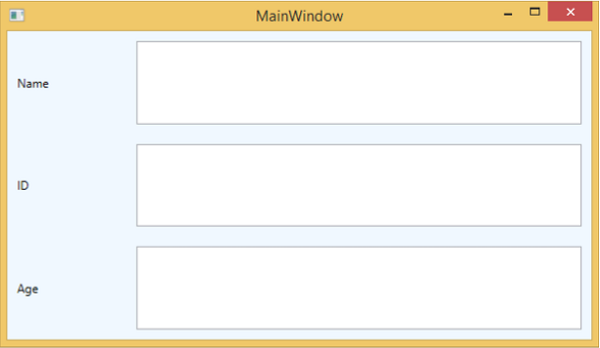
我们建议您执行上面的示例代码并尝试该类的一些其他属性。

