
WPF - ProgressBar 进度条控件
ProgressBar 进度条是一个指示操作进度的控件,其中典型的视觉外观是一个随着进度的继续而对填充区域进行动画处理的条形。 它可以以以下两种样式之一显示进度 −
- 显示重复模式的条形图,或
- 根据值填充的栏。
ProgressBar类的层次继承如下 −
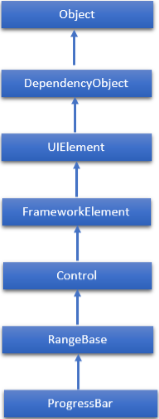
ProgressBar常用属性
| 序号 | 属性和描述 |
|---|---|
| 1 | IsIndeterminate 获取或设置一个值,该值指示进度栏是报告具有重复模式的一般进度还是基于 Value 属性报告进度。 |
| 2 | IsInminatedProperty 标识 IsInminated 依赖属性。 |
| 3 | ShowError 获取或设置一个值,该值指示进度条是否应使用向用户传达错误状态的视觉状态。 |
| 4 | ShowErrorProperty 标识 ShowError 依赖属性。 |
| 5 | ShowPaused 获取或设置一个值,该值指示进度条是否应使用向用户传达暂停状态的视觉状态。 |
| 6 | ShowPausedProperty 标识 ShowPaused 依赖属性。 |
| 7 | TemplateSettings 获取一个对象,该对象提供计算值,在为 ProgressBar 控件定义模板时可以将这些值引用为 TemplateBinding 源。 |
ProgressBar 类常用事件
| 序号 | 事件和描述 |
|---|---|
| 1 | ManipulationCompleted 在 UIElement 上的操作完成时发生。 (继承自UIElement) |
| 2 | ManipulationDelta 当输入设备在操作期间改变位置时发生。 (继承自UIElement) |
| 3 | ManipulationInertiaStarting 当输入设备在操作期间失去与 UIElement 对象的接触并且惯性开始时发生。 (继承自UIElement) |
| 4 | ManipulationStarted 当输入设备开始对 UIElement 进行操作时发生。 (继承自UIElement) |
| 5 | ManipulationStarting 首次创建操作处理器时发生。 (继承自UIElement) |
| 6 | ValueChanged 当范围值更改时发生。 (继承自RangeBase) |
ProgressBar类常用方法
| 序号 | 方法及描述 |
|---|---|
| 1 | OnManipulationCompleted 在 ManipulationCompleted 事件发生之前调用。 (继承自Control) |
| 2 | OnManipulationDelta 在 ManipulationDelta 事件发生之前调用。 (继承自Control) |
| 3 | OnManipulationInertiaStarting 在 ManipulationInertiaStarting 事件发生之前调用。 (继承自Control) |
| 4 | OnManipulationStarted 在 ManipulationStarted 事件发生之前调用。 (继承自Control) |
| 5 | OnManipulationStarting 在 ManipulationStarting 事件发生之前调用。 (继承自Control) |
| 6 | OnMaximumChanged 当 Maximum 属性更改时调用。 (继承自RangeBase) |
| 7 | OnMinimumChanged 当Minimum 属性更改时调用。 (继承自RangeBase) |
| 8 | OnValueChanged 触发 ValueChanged 路由事件。 (继承自RangeBase) |
| 9 | SetBinding 使用提供的绑定对象将绑定附加到 FrameworkElement。 (继承自FrameworkElement) |
| 10 | SetValue 设置 DependencyObject 上的依赖属性的本地值。 (继承自DependencyObject) |
示例
让我们创建一个名为 WPFProgressBarControl 的新 WPF 项目。
以下示例演示如何使用 ProgressBar 控件。 下面是创建并初始化两个 ProgressBar 控件的 XAML 代码。
<Window x:Class = "WPFProgressBarControl.MainWindow"
   xmlns = "http://schemas.microsoft.com/winfx/2006/xaml/presentation"
   xmlns:x = "http://schemas.microsoft.com/winfx/2006/xaml"
   xmlns:d = "http://schemas.microsoft.com/expression/blend/2008"
   xmlns:mc = "http://schemas.openxmlformats.org/markup-compatibility/2006"
   xmlns:local = "clr-namespace:WPFProgressBarControl"
   mc:Ignorable = "d" Title = "MainWindow" Height = "350" Width = "604">

   <Grid>
      <StackPanel x:Name = "LayoutRoot" Margin = "20">

         <Border BorderThickness = "5" BorderBrush = "Green">
            <StackPanel Background = "White">
               <TextBlock HorizontalAlignment = "Center" Margin = "10"
                  Text = "Value-Based Progress Bar" />
               <ProgressBar x:Name = "pg1" Value = "100"  Margin = "10" Maximum = "200"
                  Height = "15" IsIndeterminate = "False" />
            </StackPanel>
         </Border>

         <Border BorderThickness = "5" BorderBrush = "Green">
            <StackPanel Background = "White">
               <TextBlock HorizontalAlignment = "Center"
                  Margin = "10" Text = "Indeterminate Progress Bar" />
               <ProgressBar x:Name = "pg2" Margin = "10" Height = "15"
                  IsIndeterminate = "True" />
            </StackPanel>
         </Border>

      </StackPanel>
   </Grid>

</Window>
当您编译并执行上述代码时,将产生以下窗口。
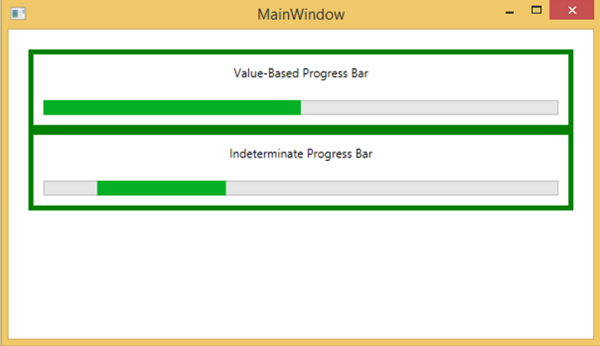
我们建议您执行上面的示例代码并尝试 ProgressBar 类的其他属性和事件。

