
WPF - RoatedCommands 路由命令
RoatedCommands 可以在更语义的层面上进行输入处理。 这些实际上是简单的指令,如新建、打开、复制、剪切和保存。 这些命令非常有用,可以从菜单或键盘快捷键访问它们。 如果命令不可用,它会禁用控件。 以下示例定义了菜单项的命令。
让我们创建一个名为 WPFCommandsInput 的新 WPF 项目。
将菜单控件拖动到堆栈面板并设置以下属性和命令,如以下 XAML 文件中所示。
<Window x:Class = "WPFContextMenu.MainWindow"
   xmlns = "http://schemas.microsoft.com/winfx/2006/xaml/presentation"
   xmlns:x = "http://schemas.microsoft.com/winfx/2006/xaml"
   xmlns:d = "http://schemas.microsoft.com/expression/blend/2008"
   xmlns:mc = "http://schemas.openxmlformats.org/markup-compatibility/2006"
   xmlns:local = "clr-namespace:WPFContextMenu"
   mc:Ignorable = "d" Title = "MainWindow" Height = "350" Width = "525">

   <Grid>
      <StackPanel x:Name = "stack" Background = "Transparent">

         <StackPanel.ContextMenu>
            <ContextMenu>
               <MenuItem Header = "New" Command = "New" />
               <MenuItem Header = "Open" Command = "Open" />
               <MenuItem Header = "Save" Command = "Save" />
            </ContextMenu>
         </StackPanel.ContextMenu>

         <Menu>
            <MenuItem Header = "File" >
               <MenuItem Header = "New" Command = "New" />
               <MenuItem Header = "Open" Command = "Open" />
               <MenuItem Header = "Save" Command = "Save" />
            </MenuItem>
         </Menu>

      </StackPanel>
   </Grid>

</Window>
这是处理不同命令的 C# 代码。
using System.Windows;
using System.Windows.Input;

namespace WPFContextMenu {
   /// <summary>
      /// Interaction logic for MainWindow.xaml
   /// </summary>

   public partial class MainWindow : Window {

      public MainWindow() {
         InitializeComponent();
         CommandBindings.Add(new CommandBinding(ApplicationCommands.New, NewExecuted, CanNew));
         CommandBindings.Add(new CommandBinding(ApplicationCommands.Open, OpenExecuted, CanOpen));
         CommandBindings.Add(new CommandBinding(ApplicationCommands.Save, SaveExecuted, CanSave));
      }

      private void NewExecuted(object sender, ExecutedRoutedEventArgs e) {
         MessageBox.Show("You want to create new file.");
      }

      private void CanNew(object sender, CanExecuteRoutedEventArgs e) {
         e.CanExecute = true;
      }

      private void OpenExecuted(object sender, ExecutedRoutedEventArgs e) {
         MessageBox.Show("You want to open existing file.");
      }

      private void CanOpen(object sender, CanExecuteRoutedEventArgs e) {
         e.CanExecute = true;
      }

      private void SaveExecuted(object sender, ExecutedRoutedEventArgs e) {
         MessageBox.Show("You want to save a file.");
      }
      private void CanSave(object sender, CanExecuteRoutedEventArgs e) {
         e.CanExecute = true;
      }
   }

}
上面的代码编译执行后,会产生如下窗口−
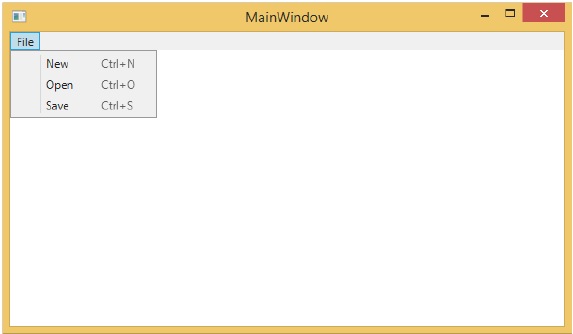
现在您可以通过菜单或快捷键命令访问此菜单项。 无论选择哪一个选项,它都会执行命令。

