
AJAX - 请求类型
AJAX 是一种用于创建动态网页的网络技术。 它允许网页更新其内容而无需重新加载整个页面。 一般来说,AJAX支持四种类型的请求,它们是 −
GET 请求
POST 请求
PUT 请求
DELETE 请求
GET 请求
GET 请求用于从服务器检索数据。 在此请求中,数据作为附加在请求末尾的 URL 的一部分发送。 我们可以通过 open() 方法使用此请求。
语法
open(GET, url, true)
其中,open()方法采用三个参数 −
GET − 它用于从服务器检索数据。
url − url 代表将在网络服务器上打开的文件。
true − 对于异步连接,将该值设置为 true。 或者对于同步连接,将该值设置为 false。 该参数的默认值为true。
示例
<!DOCTYPE html>
<html>
<body>
<script>
   function displayRecords() {
      // Creating XMLHttpRequest object
      var zhttp = new XMLHttpRequest();
      // 创建回调函数
      zhttp.onreadystatechange = function() {
         if (this.readyState == 4 && this.status == 200) {
            document.getElementById("example").innerHTML = this.responseText;
         }
      };
      // Open the given file
      zhttp.open("GET", "https://jsonplaceholder.typicode.com/todos/6", true);
      // Sending the request to the server
      zhttp.send();
   }
</script>
<div id="example">
   <p>Please click on the button to fetch 6th record from the server</p>
   <button type="button" onclick="displayRecords()">Click Here</button>
</div>
</body>
</html>
输出
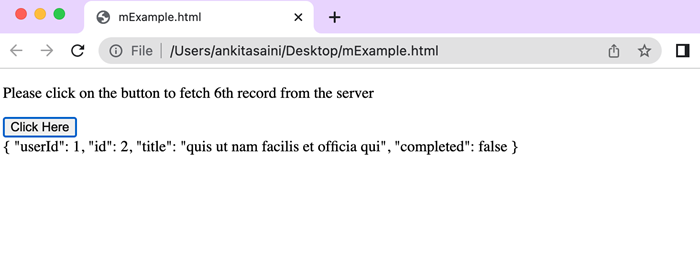
在上面的示例中,我们使用 XMLHttpRequest 中的 GET 请求 "https://jsonplaceholder.typicode.com/todos/6" API 从服务器获取第 6 条记录。 所以点击按钮后,我们将从服务器获取第6条记录。
POST 请求
POST 请求用于将数据从网页发送到 Web 服务器。 在此请求中,数据在与 URL 分开的请求正文中发送。 我们可以通过 open() 方法使用此请求。
语法
open('POST', url, true)
其中,open()方法采用三个参数 −
POST − 它用于向网络服务器发送数据。
url − url 代表服务器(文件)位置。
true − 对于异步连接,将该值设置为 true。 或者对于同步连接,将该值设置为 false。 该参数的默认值为true。
示例
<!DOCTYPE html>
<html>
<body>
<script>
   function sendDoc() {
      // Creating XMLHttpRequest object
      var qhttp = new XMLHttpRequest();
      // 创建回调函数
      qhttp.onreadystatechange = function() {
         if (this.readyState == 4 && this.status == 201) {
            document.getElementById("sample").innerHTML = this.responseText;
            console.log("Data Send Successfully")
         }
      };
      // Open the given file
      qhttp.open("POST", "https://jsonplaceholder.typicode.com/todos", true);
      // Setting HTTP request header
      qhttp.setRequestHeader('Content-type', 'application/json')
      // Sending the JSON document to the server
      qhttp.send(JSON.stringify({
         "title": "MONGO",
         "userId": 11,
         "id": 21,
         "body": "est rerum tempore"
      }));
   }
</script>
<h2>Example of POST Request</h2>
<button type="button" onclick="sendDoc()">Post Data</button>
<div id="sample"></div>
</body>
</html>
输出

在上面的示例中,我们使用 PUT 请求使用下面给出的数据更新记录。
"https://jsonplaceholder.typicode.com/todos/21" API:
{
   "title": "MONGO",
   "userId": 11,
   "id": 21,
   "body": "est rerum tempore"
}
DELETE 请求
DELETE 请求用于从 Web 服务器删除数据。 在此请求中,要删除的数据在请求正文中发送,Web 服务器将从其存储中删除该数据。
语法
open('DELETE', url, true)
其中,open()方法采用三个参数 −
DELETE − 它用于从网络服务器删除数据。
url − 它代表将在 Web 服务器上打开的文件 url。 或者我们可以说服务器(文件)位置。
true − 对于异步连接,将该值设置为 true。 或者对于同步连接,将该值设置为 false。 该参数的默认值为true。
示例
<!DOCTYPE html>
<html>
<body>
<script>
   function delDoc() {
      // Creating XMLHttpRequest object
      var qhttp = new XMLHttpRequest();
      // 创建回调函数
      qhttp.onreadystatechange = function() {
         if (this.readyState == 4 && this.status == 200) {
            document.getElementById("sample").innerHTML = this.responseText;
            console.log("Record Deleted Successfully")
         }
      };
      // Deleting given file
      qhttp.open("DELETE", "https://jsonplaceholder.typicode.com/todos/2", true);
      // Sending the request to the server
      qhttp.send();
   }
</script>
<div id="sample">
   <h2>Example of DELETE Request</h2>
   <button type="button" onclick="delDoc()">Deleteing Data</button>
</div>
</body>
</html>
输出
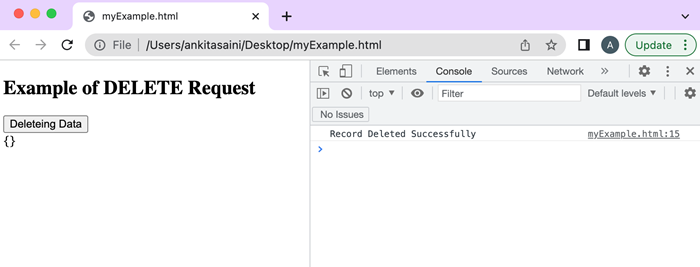
在上面的示例中,我们使用 DELETE 请求 "https://jsonplaceholder.typicode.com/todos/2" API 删除 Id = 2 上存在的记录。
AJAX 还支持一些其他请求,例如 OPTIONS、HEAD 和 TRACE,但它们是 AJAX 应用程序最不常用的请求。 在下一篇文章中,我们将了解 AJAX 如何处理响应。

