Angular 6 - 模板
Angular 6 使用 <ng-template> 作为标签,类似于 Angular 4,而不是 Angular2 中使用的 <template>。 Angular 4 将 <template> 更改为 <ng-template> 的原因是因为 <template> 标签和 html <template> 标准标签之间存在名称冲突。 它将完全弃用。
现在让我们将模板与 if else 条件一起使用并查看输出。
app.component.html
<!--以下内容只是占位符,可以替换。-->
<div style = "text-align:center">
   <h1>
      Welcome to {{title}}.
   </h1>
</div>
<div> Months :
   <select (change) = "changemonths($event)" name = "month">
      <option *ngFor = "let i of months">{{i}}</option>
   </select>
</div>
<br/>
<div>
   <span *ngIf = "isavailable;then condition1 else condition2">Condition is valid.</span>
   <ng-template #condition1>模板中的条件有效</ng-template>
   <ng-template #condition2>模板中的条件无效</ng-template>
</div>
<button (click) = "myClickFunction($event)">Click Me</button>
对于 Span 标记,我们添加了带有 else 条件的 if 语句,并将调用模板条件 1 和 else 条件 2。
模板的调用方式如下 −
<ng-template #condition1>模板中的条件有效</ng-template>
<ng-template #condition2>模板中的条件无效</ng-template>
如果条件为 true,则调用条件 1 模板,否则调用条件 2。
app.component.ts
import { Component } from '@angular/core';
@Component({
   selector: 'app-root',
   templateUrl: './app.component.html',
   styleUrls: ['./app.component.css']
})
export class AppComponent {
   title = 'Angular 6 Project!';
   //array of months.
   months = ["January", "February", "March", "April",
      "May", "June", "July", "August", "September",
      "October", "November", "December"];
   isavailable = false;
   myClickFunction(event) {
      this.isavailable = false;
   }
   changemonths(event) {
      alert("Changed month from the Dropdown");
      console.log(event);
   }
}
浏览器中的输出如下 −
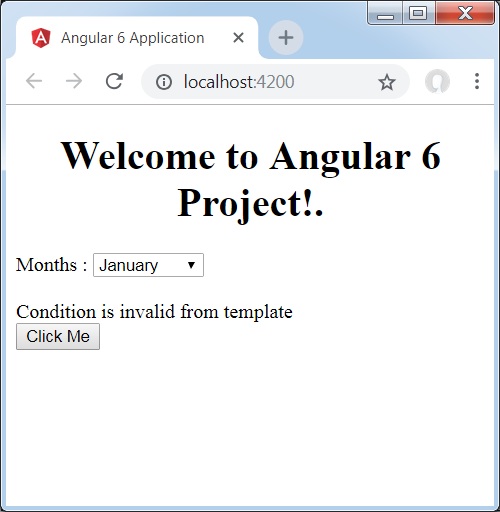
变量 isavailable 为 false,因此打印了 condition2 模板。 如果单击该按钮,将调用相应的模板。 如果你检查浏览器,你会发现你永远不会在 dom 中获得 span 标签。 下面的例子将帮助您理解这一点。
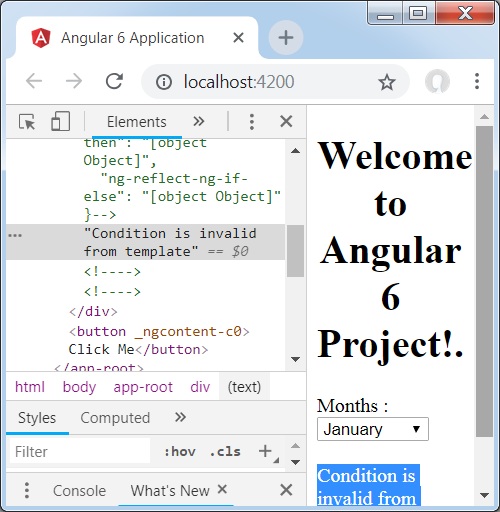
如果你检查浏览器,你会发现 dom 没有 span 标签。 它在 dom 中具有 模板中的条件无效。
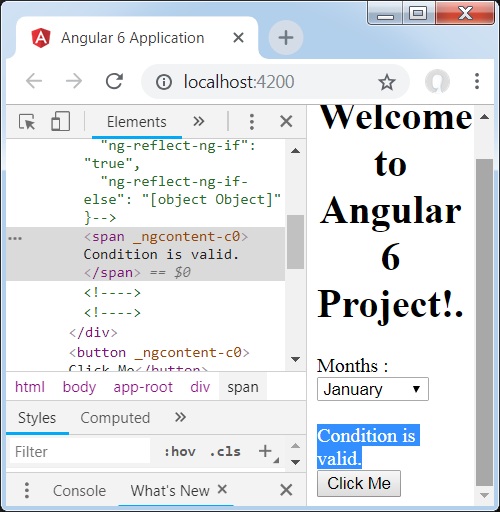
下面这行html代码将帮助我们获取dom中的span标签。
<!--以下内容只是占位符,可以替换。-->
<div style = "text-align:center">
   <h1>
      Welcome to {{title}}.
   </h1>
</div>
<div> Months :
   <select (change) = "changemonths($event)" name = "month">
      <option *ngFor = "let i of months">{{i}}</option>
   </select>
</div>
<br/>
<div>
   <span *ngIf = "isavailable; else condition2">Condition is valid.</span>
   <ng-template #condition1>模板中的条件有效</ng-template>
   <ng-template #condition2>模板中的条件无效</ng-template>
</div>
<button (click)="myClickFunction($event)">Click Me</button>
如果我们删除then条件,我们会在浏览器中收到"Condition is valid(条件有效)"消息,并且span标签在dom中也可用。 例如,在 app.component.ts 中,我们将 isavailable 变量设置为 true。