Angular CLI - ng test 命令
本章通过示例解释了 ng test 命令的语法、参数和选项。
语法
ng test 命令语法如下 −
ng test <project> [options]
ng t <project> [options]
ng test 在 Angular 应用程序代码上运行单元测试用例。
参数
ng test 命令参数如下 −
| 序号 | 参数 & 语法 | 说明 |
|---|---|---|
| 1 | <project> | 要测试的项目名称。 |
选项
Options 是可选参数。
| 序号 | 选项 & 语法 | 说明 |
|---|---|---|
| 1 | --browsers=browsers | 覆盖运行测试的浏览器。 |
| 2 | --codeCoverage=true|false |
输出代码覆盖率报告。 默认: false |
| 3 | --codeCoverageExclude | 要从代码覆盖率中排除的 Glob。 |
| 4 | --configuration=configuration |
命名的构建目标,如 angular.json 的"configurations"部分中所指定。 每个命名目标都附有该目标的选项默认配置。 显式设置此选项会覆盖"--prod"标志 别名: -c |
| 5 | --help=true|false|json|JSON |
在控制台中显示此命令的帮助消息。 默认: false |
| 6 | --include | 相对于工作区或项目根目录要包含的文件组。 有2种特殊情况 −
|
| 7 | --karmaConfig=karmaConfig | Karma 配置文件的名称。 |
| 8 | --main=main | 主入口点文件的名称。 |
| 9 | --poll | 启用并定义文件监视轮询时间段(以毫秒为单位)。 |
| 10 | --polyfills=polyfills | polyfills 文件的名称。 |
| 11 | --preserveSymlinks=true|false |
解析模块时不要使用真实路径。 默认: false |
| 12 | --prod=true|false | “--configuration=Production”的简写。 如果为 true,则将构建配置设置为生产目标。 默认情况下,生产目标是在工作区配置中设置的。 |
| 13 | --progress=true|false | 构建时将进度记录到控制台。 |
| 13 | --progress=true|false | 构建时将进度记录到控制台。 |
| 14 | --reporters | Karma reporters to use. Directly passed to the karma runner. |
| 15 | --sourceMap=true|false |
输出 sourcemaps. 默认值: true |
| 16 | --tsConfig=tsConfig | TypeScript 配置文件的名称。 |
| 17 | --watch=true|false | 当文件更改时运行构建。 |
| 18 | --webWorkerTsConfig=webWorkerTsConfig | Web Worker 模块的 TypeScript 配置。 |
首先转到使用 ng build 命令更新的 Angular 项目。本章的链接是 https://www.cainiaomax.com/angular_cli/angular_cli_ng_build.htm。
现在运行测试命令。
示例
下面给出了 ng test 命令的示例 −
\>Node\>TutorialsPoint> ng test
...
WARN: ''app-goals' is not a known element:
1. If 'app-goals' is an Angular component, then verify that it is part of this module.
2. If 'app-goals' is a Web Component then add 'CUSTOM_ELEMENTS_SCHEMA' to the '@NgModule.schemas' of this component to suppress this message.'
Chrome 83.0.4103 (Windows 7.0.0): Executed 0 of 4 SUCCESS (0 secs / 0 secs)
...
AppComponent should render title FAILED
   TypeError: Cannot read property 'textContent' of null
      at <Jasmine>
      at UserContext.<anonymous> (http://localhost:9876/_karma_webpack_/src/app/app.component.spec.ts:33:51)
            ...
Chrome 83.0.4103 (Windows 7.0.0): Executed 1 of 4 (1 FAILED) (0 secs / 0.203 secs)
...
Chrome 83.0.4103 (Windows 7.0.0): Executed 2 of 4 (1 FAILED) (0 secs / 0.221 secs)
...
Chrome 83.0.4103 (Windows 7.0.0): Executed 4 of 4 (1 FAILED) (0 secs / 0.244 sec
Chrome 83.0.4103 (Windows 7.0.0): Executed 4 of 4 (1 FAILED) (0.282 secs / 0.244
 secs)
TOTAL: 1 FAILED, 3 SUCCESS
Now to fix failures update the app.component.spec.ts
app.component.spec.ts
import { TestBed, async } from '@angular/core/testing';
import { RouterTestingModule } from '@angular/router/testing';
import { AppComponent } from './app.component';

describe('AppComponent', () => {
   beforeEach(async(() => {
      TestBed.configureTestingModule({
         imports: [
            RouterTestingModule
         ],
         declarations: [
            AppComponent
         ],
      }).compileComponents();
   }));

   it('should create the app', () => {
      const fixture = TestBed.createComponent(AppComponent);
      const app = fixture.componentInstance;
      expect(app).toBeTruthy();
   });
});
现在运行测试命令。
示例
下面给出一个例子 −
\>Node\>TutorialsPoint> ng test
...
WARN: ''app-goals' is not a known element:
1. If 'app-goals' is an Angular component, then verify that it is part of this m
odule.
2. If 'app-goals' is a Web Component then add 'CUSTOM_ELEMENTS_SCHEMA' to the '@
NgModule.schemas' of this component to suppress this message.'
Chrome 83.0.4103 (Windows 7.0.0): Executed 1 of 2 SUCCESS (0 secs / 0.053 secs)
...
Chrome 83.0.4103 (Windows 7.0.0): Executed 2 of 2 SUCCESS (0.097 secs / 0.073 se
cs)
TOTAL: 2 SUCCESS
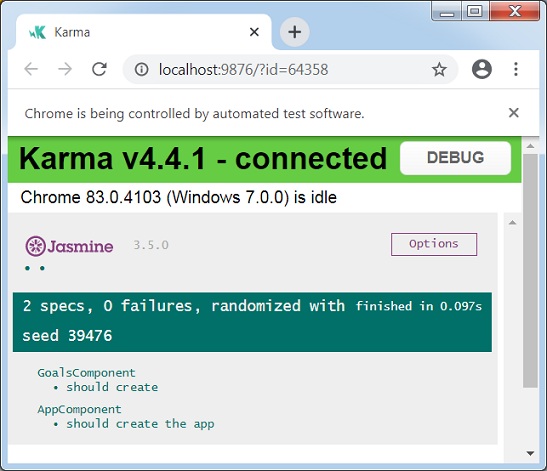
ng test 还会打开浏览器并显示测试状态。