Apache POI - 公式
本章将带您了解使用 Java 编程在单元格上应用不同公式的过程。 Excel应用程序的基本目的是通过对其应用公式来维护数值数据。
在公式中,我们传递动态值或值在 Excel 工作表中的位置。 执行此公式时,您将获得所需的结果。 下表列出了 Excel 中常用的几个基本公式。
| 操作 | 语法 |
|---|---|
| 添加多个数字 | = SUM(Loc1:Locn) or = SUM(n1,n2,) |
| 统计 | = COUNT(Loc1:Locn) or = COUNT(n1,n2,) |
| 两个数的幂 | = POWER(Loc1,Loc2) or = POWER(number, power) |
| 多个数的最大值 | = MAX(Loc1:Locn) or = MAX(n1,n2,) |
| 乘积 | = PRODUCT(Loc1:Locn) or = PRODUCT(n1,n2,) |
| 阶乘 | = FACT(Locn) or = FACT(number) |
| 绝对数 | = ABS(Locn) or = ABS(number) |
| 今天日期 | =TODAY() |
| 转换小写 | = LOWER(Locn) or = LOWER(text) |
| 平方根 | = SQRT(locn) or = SQRT(number) |
以下代码用于将公式添加到单元格并执行它。
import java.io.File;
import java.io.FileOutputStream;
import org.apache.poi.xssf.usermodel.XSSFCell;
import org.apache.poi.xssf.usermodel.XSSFRow;
import org.apache.poi.xssf.usermodel.XSSFSheet;
import org.apache.poi.xssf.usermodel.XSSFWorkbook;

public class Formula {
   public static void main(String[] args)throws Exception {
      XSSFWorkbook workbook = new XSSFWorkbook();
      XSSFSheet spreadsheet = workbook.createSheet("formula");
      XSSFRow row = spreadsheet.createRow(1);
      XSSFCell cell = row.createCell(1);

      cell.setCellValue("A = ");
      cell = row.createCell(2);
      cell.setCellValue(2);
      row = spreadsheet.createRow(2);
      cell = row.createCell(1);
      cell.setCellValue("B = ");
      cell = row.createCell(2);
      cell.setCellValue(4);
      row = spreadsheet.createRow(3);
      cell = row.createCell(1);
      cell.setCellValue("Total = ");
      cell = row.createCell(2);

      // Create SUM formula
      cell.setCellFormula("SUM(C2:C3)");
      cell = row.createCell(3);
      cell.setCellValue("SUM(C2:C3)");
      row = spreadsheet.createRow(4);
      cell = row.createCell(1);
      cell.setCellValue("POWER =");
      cell=row.createCell(2);

      // Create POWER formula
      cell.setCellFormula("POWER(C2,C3)");
      cell = row.createCell(3);
      cell.setCellValue("POWER(C2,C3)");
      row = spreadsheet.createRow(5);
      cell = row.createCell(1);
      cell.setCellValue("MAX = ");
      cell = row.createCell(2);

      // Create MAX formula
      cell.setCellFormula("MAX(C2,C3)");
      cell = row.createCell(3);
      cell.setCellValue("MAX(C2,C3)");
      row = spreadsheet.createRow(6);
      cell = row.createCell(1);
      cell.setCellValue("FACT = ");
      cell = row.createCell(2);

      // Create FACT formula
      cell.setCellFormula("FACT(C3)");
      cell = row.createCell(3);
      cell.setCellValue("FACT(C3)");
      row = spreadsheet.createRow(7);
      cell = row.createCell(1);
      cell.setCellValue("SQRT = ");
      cell = row.createCell(2);

      // Create SQRT formula
      cell.setCellFormula("SQRT(C5)");
      cell = row.createCell(3);
      cell.setCellValue("SQRT(C5)");
      workbook.getCreationHelper().createFormulaEvaluator().evaluateAll();
      FileOutputStream out = new FileOutputStream(new File("formula.xlsx"));
      workbook.write(out);
      out.close();
      System.out.println("fromula.xlsx written successfully");
   }
}
将上述代码另存为Formula.java,然后在命令提示符下编译并执行如下 −
$javac Formula.java
$java Formula
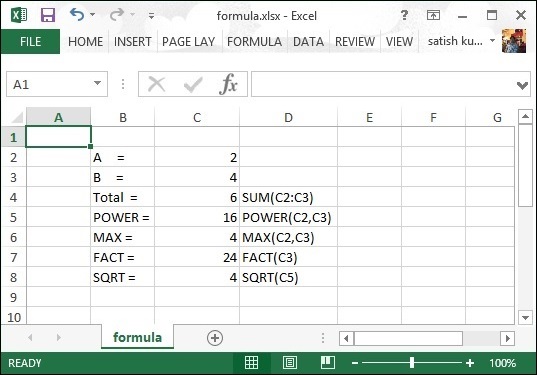
它将在您的当前目录中生成一个名为 formula.xlsx 的 Excel 文件,并在命令提示符下显示以下输出。
fromula.xlsx written successfully
formula.xlsx 文件如下所示 −