Apache POI Word - 表格
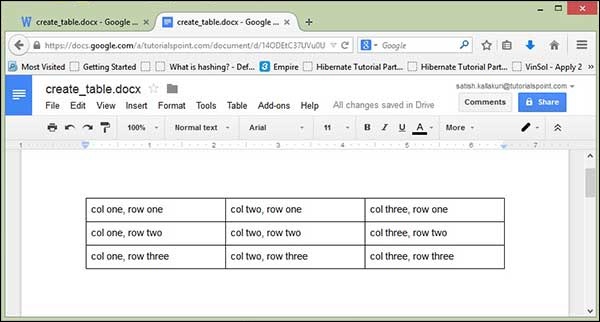
在本章中,您将学习如何在文档中创建数据表。您可以使用 XWPFTable 类创建表格数据。通过将每个 Row 添加到表格并将每个 cell 添加到 Row,您将获得表格数据。
创建表格
以下代码用于在文档中创建表格 −
import java.io.File;
import java.io.FileOutputStream;
import org.apache.poi.xwpf.usermodel.XWPFDocument;
import org.apache.poi.xwpf.usermodel.XWPFTable;
import org.apache.poi.xwpf.usermodel.XWPFTableRow;

public class CreateTable {

   public static void main(String[] args)throws Exception {

    //空白文档
    XWPFDocument document = new XWPFDocument();

    //将文档写入文件系统
    FileOutputStream out = new FileOutputStream(new File("create_table.docx"));

    //创建表格
    XWPFTable table = document.createTable();

    //创建第一行
    XWPFTableRow tableRowOne = table.getRow(0);
    tableRowOne.getCell(0).setText("col one, row one");
    tableRowOne.addNewTableCell().setText("col two, row one");
    tableRowOne.addNewTableCell().setText("col three, row one");

    //创建第二行
    XWPFTableRow tableRowTwo = table.createRow();
    tableRowTwo.getCell(0).setText("col one, row two");
    tableRowTwo.getCell(1).setText("col two, row two");
    tableRowTwo.getCell(2).setText("col three, row two");

    //创建第三行
    XWPFTableRow tableRowThree = table.createRow();
    tableRowThree.getCell(0).setText("col one, row three");
    tableRowThree.getCell(1).setText("col two, row three");
    tableRowThree.getCell(2).setText("col three, row three");

    document.write(out);
    out.close();
    System.out.println("create_table.docx 已成功写入");
   }
}
将上述代码保存在名为 CreateTable.java 的文件中。编译并从命令提示符执行它,如下所示 −
$javac CreateTable.java
$java CreateTable
它会在当前目录中生成一个名为 createtable.docx 的 Word 文件,并在命令提示符上显示以下输出 −
createtable.docx 已成功写入
createtable.docx 文件如下所示 −