
Apex - 批处理
在本章中,我们将了解 Apex 中的批处理。 考虑这样一个场景,我们每天都会处理大量的记录,可能是清理数据,也可能是删除一些未使用的数据。
什么是批量 Apex?
Batch Apex 是 Apex 代码的异步执行,专门为处理大量记录而设计,并且在调控器限制方面比同步代码具有更大的灵活性。
何时使用 Batch Apex?
当您想要每天甚至在特定时间间隔处理大量记录时,您可以选择 Batch Apex。
此外,当您希望操作异步时,您可以实现 Batch Apex。 Batch Apex 公开为必须由开发人员实现的接口。 可以使用 Apex 在运行时以编程方式调用批处理作业。 Batch Apex 对小批量记录进行操作,覆盖整个记录集并将处理分解为可管理的数据块。
使用批量 Apex
当我们使用Batch Apex时,我们必须实现Salesforce提供的接口Database.Batchable,然后以编程方式调用该类。
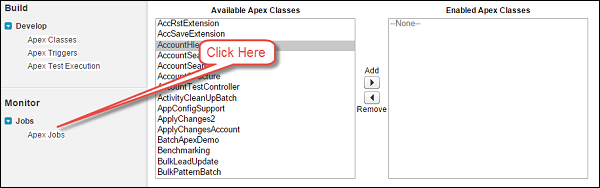
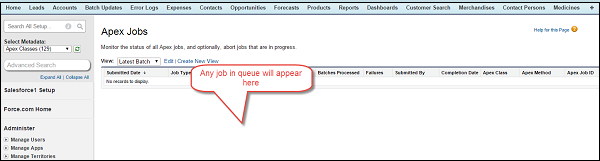
您可以按照以下步骤监控课程 −
要监视或停止批处理 Apex Batch 作业的执行,请转到 Setup → Monitoring → Apex Jobs or Jobs → Apex Jobs。
Database.Batchable接口有以下三个方法需要实现 −
- Start
- Execute
- Finish
现在让我们详细了解每种方法。
Start
Start方法是Database.Batchable接口的三个方法之一。
语法
global void execute(Database.BatchableContext BC, list<sobject<) {}
此方法将在批处理作业开始时调用,并收集批处理作业将运行的数据。
考虑以下几点来理解该方法 −
当您使用简单查询生成批处理作业中使用的对象范围时,请使用 Database.QueryLocator 对象。 在这种情况下,SOQL 数据行限制将被绕过。
当您有复杂的条件来处理记录时,请使用可迭代对象。 Database.QueryLocator 确定应处理的记录范围。
Execute
现在让我们了解 Database.Batchable 接口的 Execute 方法。
语法
global void execute(Database.BatchableContext BC, list<sobject<) {}
其中, list<sObject< 由 Database.QueryLocator 方法返回。
此方法在 Start 方法之后调用,并执行批处理作业所需的所有处理。
Finish
我们现在将讨论 Database.Batchable 接口的 Finish 方法。
语法
global void finish(Database.BatchableContext BC) {}
此方法在最后被调用,您可以执行一些完成活动,例如发送包含有关已处理的批处理作业记录和状态的信息的电子邮件。
批量 Apex 示例
让我们考虑现有公司的一个示例,并假设我们需要更新客户记录的客户状态和客户描述字段,这些记录已标记为活动且创建日期为今天。 这应该每天完成,并且应该向用户发送一封关于批处理状态的电子邮件。 将客户状态更新为"已处理",并将客户描述更新为"通过批处理作业更新"。
// 用于处理记录的批处理作业
global class CustomerProessingBatch implements Database.Batchable<sobject> {
   global String [] email = new String[] {'test@test.com'};
   // 在此添加您的电子邮件地址

   // Start Method
   global Database.Querylocator start (Database.BatchableContext BC) {
      return Database.getQueryLocator('Select id, Name, APEX_Customer_Status__c,
      APEX_Customer_Decscription__c From APEX_Customer__c WHERE createdDate = today
      AND APEX_Active__c = true');
      // 查询将确定获取相同记录的范围
   }

   // Execute method
   global void execute (Database.BatchableContext BC, List<sobject> scope) {
      List<apex_customer__c> customerList = new List<apex_customer__c>();
      List<apex_customer__c> updtaedCustomerList = new List<apex_customer__c>();

      // 保留更新客户的列表
      for (sObject objScope: scope) {
         APEX_Customer__c newObjScope = (APEX_Customer__c)objScope ;

         // 从通用 sOject 到 APEX_Customer__c 的类型转换
         newObjScope.APEX_Customer_Decscription__c = 'Updated Via Batch Job';
         newObjScope.APEX_Customer_Status__c = 'Processed';
         updtaedCustomerList.add(newObjScope); // Add records to the List
         System.debug('Value of UpdatedCustomerList '+updtaedCustomerList);
      }

      if (updtaedCustomerList != null && updtaedCustomerList.size()>0) {
         // 检查List是否为空
         Database.update(updtaedCustomerList); System.debug('List Size '
          + updtaedCustomerList.size());
         // Update the Records
      }
   }

   // Finish Method
   global void finish(Database.BatchableContext BC) {
      Messaging.SingleEmailMessage mail = new Messaging.SingleEmailMessage();

      // 下面的代码将获取作业 ID
      AsyncApexJob a = [Select a.TotalJobItems, a.Status, a.NumberOfErrors,
      a.JobType, a.JobItemsProcessed, a.ExtendedStatus, a.CreatedById,
      a.CompletedDate From AsyncApexJob a WHERE id = :BC.getJobId()];

      // get the job Id
      System.debug('$$$ Jobid is'+BC.getJobId());

      // 下面的代码将向用户发送有关状态的电子邮件
      mail.setToAddresses(email);
      mail.setReplyTo('test@test.com'); // Add here your email address
      mail.setSenderDisplayName('Apex Batch Processing Module');
      mail.setSubject('Batch Processing '+a.Status);
      mail.setPlainTextBody('The Batch Apex job processed'
         + a.TotalJobItems+'batches with '+a.NumberOfErrors+'failures'+'Job Item
      processed are'+a.JobItemsProcessed);
      Messaging.sendEmail(new Messaging.Singleemailmessage [] {mail});
   }
}
要执行此代码,请先保存它,然后将以下代码粘贴到"执行匿名"中。 这将创建类的对象,并且 Database.execute 方法将执行批处理作业。 作业完成后,一封电子邮件将发送到指定的电子邮件地址。 确保您的客户记录已被选中有效。
// 粘贴到开发者控制台
CustomerProessingBatch objClass = new CustomerProessingBatch();
Database.executeBatch (objClass);
执行此类后,请检查您提供的电子邮件地址,您将在其中收到包含信息的电子邮件。 此外,您还可以通过"监控"页面和上面提供的步骤检查批处理作业的状态。
如果您检查调试日志,则可以找到列表大小,该大小指示已处理的记录数。
限制
我们一次只能处理 5 个批处理作业。 这是 Batch Apex 的限制之一。
使用 Apex 详细信息页面安排 Apex 批量作业
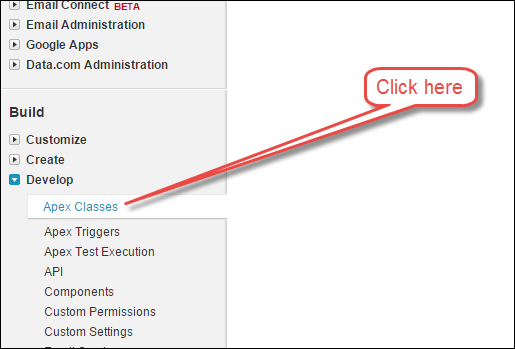
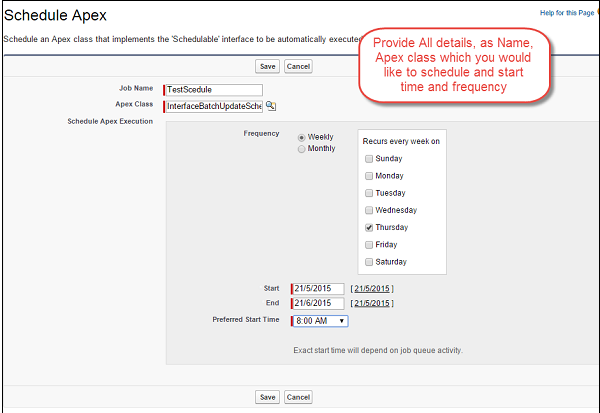
您可以通过 Apex 详细信息页面安排 Apex 课程,如下所示 −
步骤 1 − 转到 Setup ⇒ Apex 类,单击 Apex 类。
步骤 2 − 单击"安排 Apex"按钮。
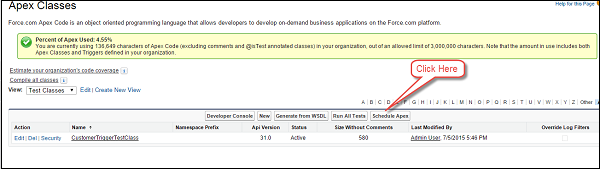
步骤 3 − 提供详细信息。
使用可调度接口调度 Apex 批处理作业
您可以使用可调度接口来调度 Apex 批处理作业,如下所示 −
// 用于处理记录的批处理作业
global class CustomerProessingBatch implements Database.Batchable<sobject> {
   global String [] email = new String[] {'test@test.com'};
   // 在此添加您的电子邮件地址

   // Start Method
   global Database.Querylocator start (Database.BatchableContext BC) {
      return Database.getQueryLocator('Select id, Name, APEX_Customer_Status__c,
      APEX_Customer_Decscription__c From APEX_Customer__c WHERE createdDate = today
      AND APEX_Active__c = true');
      // 查询将确定获取相同记录的范围
   }

   // Execute method
   global void execute (Database.BatchableContext BC, List<sobject> scope) {
      List<apex_customer__c> customerList = new List<apex_customer__c>();
      List<apex_customer__c> updtaedCustomerList = new
      List<apex_customer__c>();//List to hold updated customer

      for (sObject objScope: scope) {
         APEX_Customer__c newObjScope = (APEX_Customer__c)objScope ;//type
         casting from generic sOject to APEX_Customer__c
         newObjScope.APEX_Customer_Decscription__c = 'Updated Via Batch Job';
         newObjScope.APEX_Customer_Status__c = 'Processed';
         updtaedCustomerList.add(newObjScope);//Add records to the List
         System.debug('Value of UpdatedCustomerList '+updtaedCustomerList);
      }

      if (updtaedCustomerList != null && updtaedCustomerList.size()>0) {
         // 检查List是否为空
         Database.update(updtaedCustomerList); System.debug('List Size'
            + updtaedCustomerList.size());
         // Update the Records
      }
   }

   // Finish Method
   global void finish(Database.BatchableContext BC) {
      Messaging.SingleEmailMessage mail = new Messaging.SingleEmailMessage();

      // 下面的代码将获取作业 ID
      AsyncApexJob a = [Select a.TotalJobItems, a.Status, a.NumberOfErrors,
      a.JobType, a.JobItemsProcessed, a.ExtendedStatus, a.CreatedById,
      a.CompletedDate From AsyncApexJob a WHERE id = :BC.getJobId()];//get the job Id
      System.debug('$$$ Jobid is'+BC.getJobId());

      // 下面的代码将向用户发送有关状态的电子邮件
      mail.setToAddresses(email);
      mail.setReplyTo('test@test.com');//Add here your email address
      mail.setSenderDisplayName('Apex Batch Processing Module');
      mail.setSubject('Batch Processing '+a.Status);
      mail.setPlainTextBody('The Batch Apex job processed'
         + a.TotalJobItems+'batches with '+a.NumberOfErrors+'failures'+'Job Item
      processed are'+a.JobItemsProcessed);
      Messaging.sendEmail(new Messaging.Singleemailmessage [] {mail});
   }

   // Scheduler 方法来安排课程
   global void execute(SchedulableContext sc) {
      CustomerProessingBatch conInstance = new CustomerProessingBatch();
      database.executebatch(conInstance,100);
   }
}

// 粘贴到开发者控制台
CustomerProessingBatch objClass = new CustomerProcessingBatch();
Database.executeBatch (objClass);

