
使用 CSS 设置字体样式的实用指南
CSS 在字体样式中扮演着关键角色。CSS 字体属性允许我们更改字体系列 (font-family)、字体大小 (font-size)、字体粗细 (font-weight)、字体字距 (font-kerning) 以及更多其他属性。CSS 字体属性是字体样式 (font-style)、字体变量 (font-variant)、字体粗细 (font-weight)、字体大小/行高 (font-size/line-height) 和字体系列 (font-family) 的简写。此外,我们可以通过 CSS 的 text-decoration 属性(例如 text-shadow、text-stroke、text-fill-color、color 等)为文本添加样式。
color
此属性用于更改文本的颜色。
font-family
此属性用于设置元素的字体。
font-kerning
为了使字符间距均匀并提高可读性,可以使用 font-kerning 属性。但是,此属性是特定于字体的。
font-size
font-size 属性设置字体的大小。
font-stretch
某些字体具有其他字体,例如 condensed、bold 等。font-stretch 属性用于指定这些字体。
font-style
要按一定角度将文本斜体化,请使用 font-style 属性。
font-variant
font-variant 允许我们指定元素是否应以小型大写字母显示。
font-weight
字符的粗细由 font-weight 属性指定。
line-height
此属性设置两个行。
text-decoration
要为其添加下划线或上划线并设置样式,请使用 text-decoration。
text-shadow
与 box-shadow 类似,此属性可根据需要为字符添加阴影。
此外,还有一些文本布局属性,例如 text-indent、text-overflow、white-space、word-break、direction、hyphens、text-orientation、word-wrap 等。
语法
font 属性的语法如下 −
Selector {
   font-property: /*value*/
}
示例
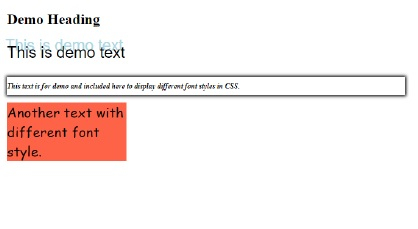
以下示例说明了 CSS 字体属性 −
<!DOCTYPE html>
<html>
<head>
<style>
p {
   font: 1.6em arial;
   text-shadow: -3px -12px lightblue;
}
p + p {
   font: italic bold 12px/30px menu;
   text-shadow: unset;
   box-shadow: 0 0 5px 1px black;
}
div {
   width: 30%;
   font-size: 1.4em;
   font-family: cursive;
   background-color: tomato;
}
</style>
</head>
<body>
<h2>Demo Heading</h2>
<p>This is demo text</p>
<p>This text is for demo and included here to display different font styles in CSS.</p>
<div>Another text with different font style.</div>
</body>
</html>
输出
这将给出以下输出 −
示例
<!DOCTYPE html>
<html>
<head>
<style>
p {
   font: oblique 5deg small-caps bold 1.3em/0.5px cursive;
   border: 3px solid lightcyan;
}
</style>
</head>
<body>
<p>This is demo text</p>
<p>This is another demo text</p>
</body>
</html>
输出
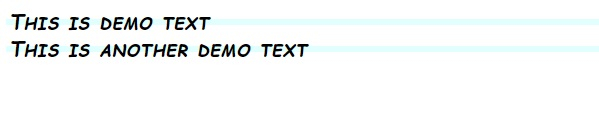
这将给出以下输出 −
相关文章
有用资源
css 参考教程 - 该教程包含有关 css 的更多信息:https://www.cainiaomax.com/css/

