
CSS 中的字体属性
cssweb developmentfront end technology更新于 2025/1/14 10:20:17
CSS 字体属性允许我们修改文本的外观。以下属性可帮助我们设置文本样式。
font-family
此属性用于设置元素的字体。
font-kerning
为了使字符间距均匀并提高可读性,我们使用了 font-kerning 属性。但是,此属性是字体特有的。
font-size
font-size 属性设置字体的大小。
font-stretch
某些字体还有其他字体,例如 condensed、bold 等。font-stretch 属性用于指定这些字体。
font-style
要按一定角度将文本斜体化,请使用 font-style 属性。
font-variant
font-variant 允许我们指定元素是否应以小型大写字母显示。
font-weight
字符的粗体由 font-weight 属性指定。
我们也可以使用 font 属性,它是上述所有属性的简写。属性。
语法
字体属性的语法如下 −
Selector {
   font: /*value*/
}
以下示例说明 CSS 字体属性 −
示例
<!DOCTYPE html>
<html>
<head>
<style>
div {
   margin: 3px;
   float: left;
   font-family: "Matura MT Script Capitals";
   font-size: 200%;
}
#a {
   font-style: normal;
}
#b {
   font-style: italic;
}
#c {
   font-style: oblique 40deg;
   font-family: "Harlow Solid Italic";
}
</style>
</head>
<body>
<div id="a">Normal Demo</div>
<div id="b">Italic Demo</div>
<div id="c">Oblique Demo</div>
</body>
</html>
输出
这将给出以下输出 −

示例
<!DOCTYPE html>
<html>
<head>
<style>
* {
   font-size: 1.1em;
   list-style: circle;
}
li:first-child {
   background-color: seashell;
   font-family: cursive;
}
li:nth-child(2) {
   background-color: azure;
   font-family: "Brush Script Std", serif;
}
li:last-child {
   background-color: springgreen;
   font-family: "Gigi", Arial;
}
</style>
</head>
<body>
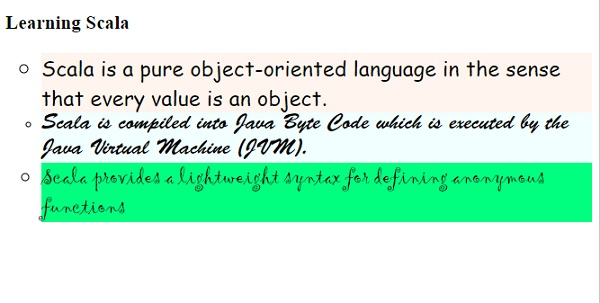
<h2>Learning Scala</h2>
<ul>
<li>Scala is a pure object-oriented language in the sense that every value is an object.</li>
<li>Scala is compiled into Java Byte Code which is executed by the Java Virtual Machine (JVM).</li>
<li>Scala provides a lightweight syntax for defining anonymous functions</li>
</ul>
</body>
</html>
输出
这将给出以下输出 −
相关文章
有用资源
css 参考教程 - 该教程包含有关 css 的更多信息:https://www.cainiaomax.com/css/

