
使用 CSS 为表格添加边框
cssweb developmentfront end technology更新于 2025/1/6 18:20:17
CSS border 属性用于定义元素的边框。CSS border 属性的语法如下:
语法
选择器 {
   border: /*value*/
}
示例
以下示例演示了 CSS border 属性 −
<!DOCTYPE html>
<html>
<head>
<style>
table {
   margin: 1em;
   border: 3px double green;
   border-right-style: dashed;
   border-left-width: 17px;
   border-bottom-color: orange;
}
td {
   font-size: 24px;
   border-right-style: dotted;
   border-width: 3px;
   border-right-color: red;
}
</style>
</head>
<body>
<table>
<tr>
<td>demo</td>
<td>text</td>
</tr>
<tr>
<td>goes</td>
<td>here</td>
</tr>
</table>
</body>
</html>
输出
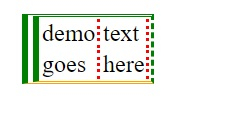
这将给出以下输出 −
示例
<!DOCTYPE html>
<html>
<head>
<style>
table {
   margin: auto;
   caption-side: bottom;
   border: 2px dashed black;
}
td {
   border: 2px solid midnightblue;
   text-align: center;
}
td[colspan] {
   box-shadow: inset 0 0 10px lightblue;
   text-align: center;
}
caption {
   font-size: 16px;
   font-weight: bold;
}
</style>
</head>
<body>
<h2<Ranking</h2>
<table>
<caption>Men's ODI Player Ranking</caption>
<tr>
<th>Player</th>
<th>Rank</th>
</tr>
<tr>
<td>Virat Kohli</td>
<td>1</td>
</tr>
<tr>
<td>Rohit Sharma</td>
<td>2</td>
</tr>
<tr>
<td>Babar Azam</td>
<td>3</td>
</tr>
<tr>
<td>Ross Taylor</td>
<td>4</td>
</tr>
<tr>
<td colspan="2">Sept2019</td>
</tr>
</table>
</body>
</html>
输出
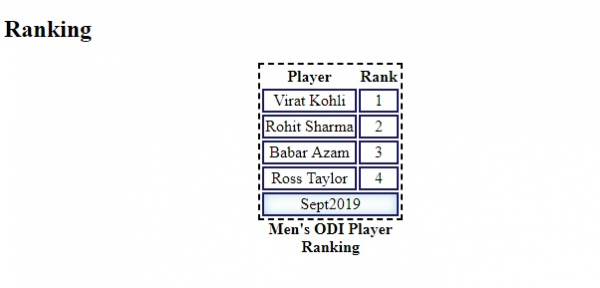
这将给出以下输出 −
相关文章
有用资源
css 参考教程 - 该教程包含有关 css 的更多信息:https://www.cainiaomax.com/css/

