
在 CSS 中定义各边的内边距
cssweb developmentfront end technology更新于 2025/1/6 18:52:17
CSS 允许我们为元素设置特定边距。padding-top、padding-right、padding-bottom 和 padding-right 属性分别定义顶部、右侧、底部和左侧的内边距。padding 简写属性也可以通过按顺时针方向指定值来实现相同的效果。
语法
CSS padding 属性的语法如下 −
Selector {
   padding-top: /*value*/
   padding-right: /*value*/
   padding-bottom: /*value*/
   padding-left: /*value*/
}
以下示例说明了列表的样式 −
示例
<!DOCTYPE html>
<html>
<head>
<style>
article {
   margin: 2em 1em;
   padding: 3%;
   background-color: plum;
   letter-spacing: 0.05em;
}
span {
   padding: 0 53%;
   border-right: dashed;
   background-image: linear-gradient(to right, lavenderblush, lightblue);
   font-size: 1.4em;
   font-style: italic;
}
</style>
</head>
<body>
<h2>What is Xamarin?</h2>
<article>
<span>Xamarin is a software company based in San Francisco. Xamarin is built on the .NET Framework.</span> It provides commercial software development tools that allow a user to develop applications for Android, iOS and Windows using C# language and the .NET framework.
</article>
</body>
</html>
输出

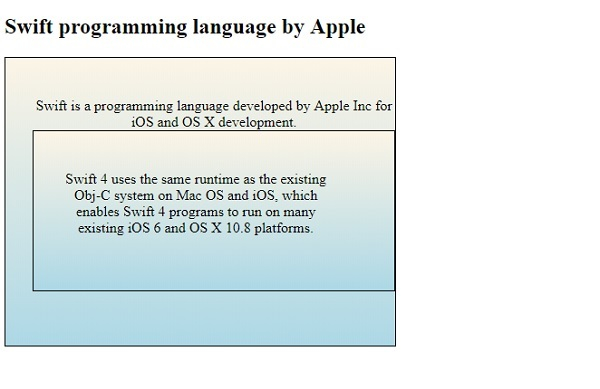
示例
<!DOCTYPE html>
<html>
<head>
<style>
div {
   max-width: 400px;
   padding-left: 30px;
   padding-top: 44px;
   padding-bottom: 60px;
   background-image: linear-gradient(to bottom, oldlace, lightblue);
   border: thin solid;
   text-align: center;
}
div > div {
   padding-right: 70px;
}
</style>
</head>
<body>
<h2>Swift programming language by Apple</h2>
<div>Swift is a programming language developed by Apple Inc for iOS and OS X development.
<div>Swift 4 uses the same runtime as the existing Obj-C system on Mac OS and iOS, which enables Swift 4 programs to run on many existing iOS 6 and OS X 10.8 platforms.
</div>
</div>
</body>
</html>
输出
相关文章
有用资源
css 参考教程 - 该教程包含有关 css 的更多信息:https://www.cainiaomax.com/css/

