
CSS 中的相邻兄弟选择器
cssweb developmentfront end technology更新于 2025/1/19 8:12:17
CSS 相邻兄弟选择器用于选择元素的相邻兄弟元素。它仅用于选择紧跟在第一个选择器之后的元素。
语法
CSS 相邻兄弟选择器的语法如下 −
element + element {
   /*declarations*/
}
示例
以下示例说明了 CSS 相邻兄弟选择器 −
<!DOCTYPE html>
<html>
<head>
<style>
div {
   margin: 8px;
   height: 50px;
   width: 60px;
   display: flex;
   float: left;
   border-radius: 5%;
   border: 2px solid brown;
   box-shadow: inset 0 2px 12px olivedrab;
}
div + div {
   border-radius: 50%;
   background-color: orchid;
}
</style>
</head>
<body>
<div></div>
<hr>
<div></div>
<div></div>
</body>
</html>
输出
这将给出以下输出 −
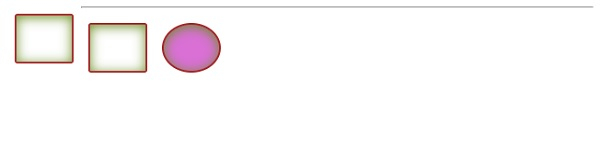
示例
<!DOCTYPE html>
<html>
<head>
<style>
p {
   font-size: 1.5em;
}
span {
   background-color: lavender;
}
span + span {
   background-color: darkseagreen;
}
</style>
</head>
<body>
<p>
<span>Demo text</span>   <span>goes here</span>
</p>
</body>
</html>
输出
这将给出以下输出 −

相关文章
有用资源
css 参考教程 - 该教程包含有关 css 的更多信息:https://www.cainiaomax.com/css/

