
使用 CSS 进行文本缩进
cssweb developmentfront end technology更新于 2025/1/19 8:44:17
CSS 的 text-indent 属性帮助我们设置元素首行的缩进。
语法
CSS text-indent 属性的语法如下 −
Selector {
   text-indent: /*value*/
}
示例
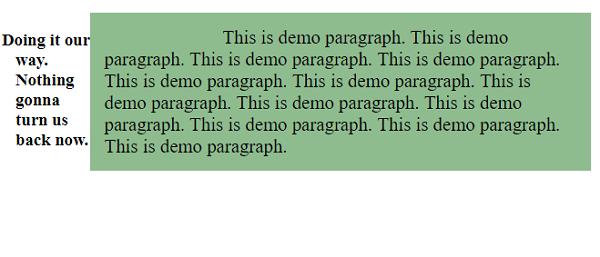
以下示例说明了 CSS 文本缩进属性。
<!DOCTYPE html>
<html>
<head>
<style>
div {
   display: flex;
   float: left;
   margin: auto;
   padding: 10px;
}
article {
   text-indent: 25%;
   background-color: darkseagreen;
   padding: 15px;
   font-size: 1.3em;
}
h3 {
   text-indent: -0.8em;
}
</style>
</head>
<body>
<div>
<h3>Doing it our way. Nothing gonna turn us back now.</h3>
<article>
This is demo paragraph. This is demo paragraph. This is demo paragraph.
This is demo paragraph. This is demo paragraph. This is demo paragraph.
This is demo paragraph. This is demo paragraph. This is demo paragraph.
This is demo paragraph. This is demo paragraph. This is demo paragraph. </article>
</div>
</body>
</html>
输出
这将给出以下输出 −
示例
<!DOCTYPE html>
<html>
<head>
<style>
ul {
   list-style: none;
   display: flex;
   float: left;
   text-indent: 23px;
   background-image: url("https://www.cainiaomax.com/angular4/images/angular-4.jpg");
   font-size: 1.5em;
}
li {
   border: thin solid;
}
</style>
</head>
<body>
<ul>
<li>This is demo text. This is demo text.</li>
<li>Angular 4 is a JavaScript framework for building web applications and apps in JavaScript, html, and TypeScript, which is a superset of JavaScript. </li>
<li>Angular provides built-in features for animation, http service, and materials which in turn has features such as auto-complete, navigation, toolbar, menus, etc</li>
<li>This is demo text. This is demo text.</li>
</ul>
</body>
</html>
输出
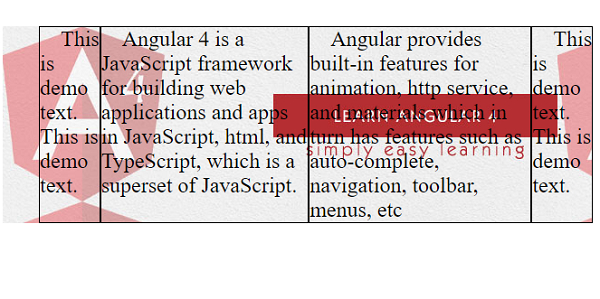
这将给出以下输出 −
相关文章
有用资源
css 参考教程 - 该教程包含有关 css 的更多信息:https://www.cainiaomax.com/css/

