
使用 CSS 中的position属性对齐元素
cssweb developmentfront end technology更新于 2025/1/10 14:04:17
我们可以使用 CSS 定位模式方法(固定、相对、绝对和静态)和属性(左、右、上和下)来对齐元素。
示例
让我们看一个使用定位模式对齐元素的示例 −
<!DOCTYPE html>
<html>
<head>
<title>Alignment using CSS Position</title>
<style>
.screen {
   padding: 10px;
   width: 70%;
   margin: 0 auto;
   background-color: #f06d06;
   text-align: center;
   color: white;
   border-radius: 0 0 50px 50px;
   border: 4px solid #000;
}
.backSeats div{
   margin: 10px;
   padding: 10px;
   color: white;
   border: 4px solid #000;
   background-color: #dc3545;
}
.rightAbsolute{
   position: absolute;
   right: 0px;
   top: 80px;
}
.backLeftSeat{
   background-color: #dc3545;
   max-height: 100px;
   height: 70px;
   margin: 20px;
   width: 300px;
   display: inline-block;
   position: relative;
   resize: vertical;
   overflow: auto;
   border: 4px solid #000;
}
.withPosition{
   position: absolute;
   top: 50%;
   left: 20px;
   right: 20px;
   color: white;
   padding: 20px;
   transform: translateY(-50%);
}
</style></head>
<body>
<div class="screen">Screen</div>
<div class="backLeftSeat">
<div class="withPosition">Premium Readjustable Sofa</div>
</div>
<div class="backSeats">
<div class="rightAbsolute">Premium Absolute Positioned Seat</div>
</div>
</div>
</body>
</html>
输出
这将产生以下输出 −
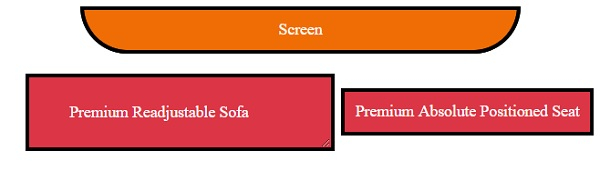
示例
让我们看另一个使用定位模式对齐元素的示例 −
<!DOCTYPE html>
<html>
<head>
<style>
div {
   border: 2px double #a43356;
   margin: 5px;
   padding: 5px;
}
#d1 {
   position: relative;
   height: 10em;
}
#d2 {
   position: absolute;
   width: 20%;
   bottom: 10px; /*relative to parent d1*/
}
#d3 {
   position: fixed;
   width: 30%;
   top:10em; /*relative to viewport*/
}
</style>
</head>
<body>
<div id="d1">In HBase, tables are split into regions and are served by the region servers. Regions are vertically divided by column families into “Stores”. Stores are saved as files in HDFS. HBase has three major components: the client library, a master server, and region servers. Region servers can be added or removed as per requirement.<mark>relative</mark>
<div id="d2"><mark>absolute</mark></div>
<div id="d3"><mark>fixed</mark></div>
</div>
</body>
</html>
输出
这将产生以下输出 −
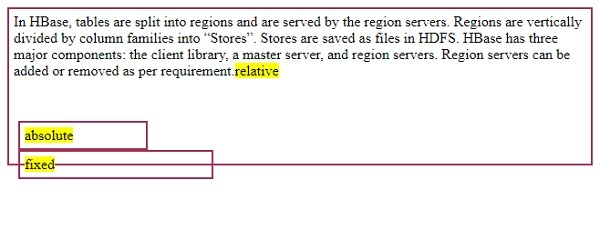
相关文章
有用资源
css 参考教程 - 该教程包含有关 css 的更多信息:https://www.cainiaomax.com/css/

