
在 Tkinter 中将滚动条附加到列表框而不是窗口
tkinterpythongui-programming更新于 2025/5/20 3:24:17
列表框小部件包含项目列表,例如数字或字符列表。假设您想使用列表框小部件创建一个长项目列表。然后,应该有一种适当的方法来查看列表中的所有项目。在这种情况下,将滚动条添加到列表框小部件将很有帮助。
要添加新的滚动条,您必须使用 Listbox(parent, bg, fg, width, height, bd, **options) 构造函数。创建 Listbox 后,您可以通过创建 Scrollbar(**options) 对象来向其添加滚动条。
示例
#导入所需库
from tkinter import *
from tkinter import ttk

#创建 Tkinter Frame 实例
win = Tk()

#设置 Tkinter Frame 的几何形状
win.geometry("700x350")

#创建垂直滚动条
scrollbar= ttk.Scrollbar(win, orient= 'vertical')
scrollbar.pack(side= RIGHT, fill= BOTH)

#添加列表框小部件
listbox = Listbox(win, width= 350, bg= 'bisque')
listbox.pack(side= LEFT, fill= BOTH)

for values in range(100):
   listbox.insert(END, values)

listbox.config(yscrollcommand= scrollbar.set)
#配置滚动条
scrollbar.config(command= listbox.yview)

win.mainloop()
输出
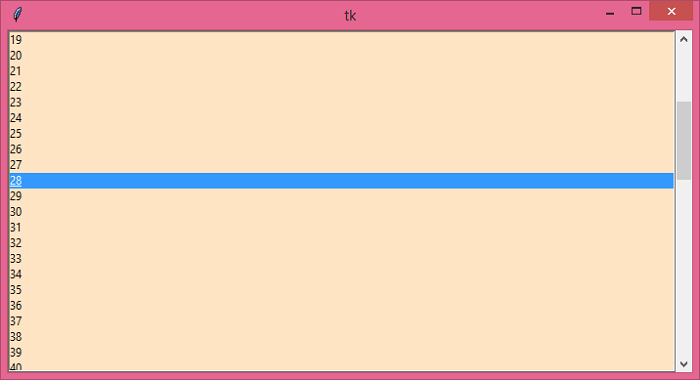
运行上述代码将显示一个窗口,其中包含一个包含多个项目的列表框小部件。垂直滚动条附加到列表框小部件。
相关文章
有用资源
python 参考教程 - 该教程包含有关 python 的更多信息:https://www.cainiaomax.com/python/

