
在 Tkinter 中更改滚动条的外观(使用 ttk 样式)
tkinterpythongui-programming更新于 2025/5/20 2:52:17
滚动条用于在框架或窗口中包装一定数量的文本或字符。它提供了一个文本小部件,可以包含用户想要的任意数量的字符。
滚动条可以有两种类型:水平滚动条和垂直滚动条。
每当文本小部件中的字符数增加时,滚动条的长度就会发生变化。我们可以使用 ttk.Scrollbar配置滚动条的样式。Ttk 提供了许多内置功能和属性,可用于配置滚动条。
示例
在此示例中,我们将在文本小部件中添加垂直滚动条。我们将使用 ttk 样式主题来自定义滚动条的外观。我们在这里使用了"经典"主题。 请参阅此链接,获取完整的 ttk 主题列表。
# 导入所需库
from tkinter import *
from tkinter import ttk

# 创建 Tkinter Frame 实例
win = Tk()

# 设置 Tkinter Frame 的几何形状
win.geometry("700x250")

style=ttk.Style()
style.theme_use('classic')
style.configure("Vertical.TScrollbar", background="green", bordercolor="red", arrowcolor="white")

# 创建垂直滚动条
scrollbar = ttk.Scrollbar(win, orient='vertical')
scrollbar.pack(side=RIGHT, fill=BOTH)

# 添加文本小部件
text = Text(win, width=15, height=15, wrap=CHAR,
yscrollcommand=scrollbar.set)

for i in range(1000):
   text.insert(END, i)

text.pack(side=TOP, fill=X)

# 配置滚动条
scrollbar.config(command=text.yview)

win.mainloop()
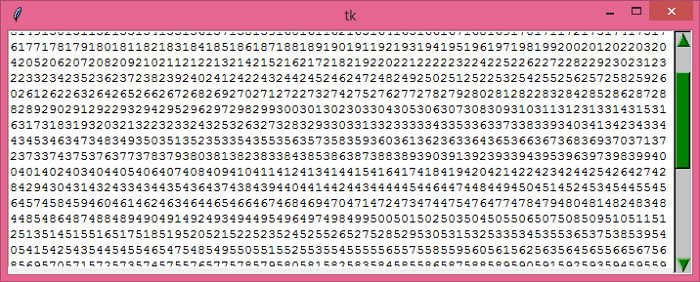
输出
运行上述代码将显示一个带有文本小部件和自定义垂直滚动条的窗口。
相关文章
有用资源
python 参考教程 - 该教程包含有关 python 的更多信息:https://www.cainiaomax.com/python/

