
配置 exim4 smtp 中继服务器
本文将指导您配置 Exim4 SMTP 中继服务器,该服务器允许您仅向已知域名和 IP 地址的用户中继邮件。通常,此类服务用于中继服务器健康状态报告通知邮件(当实际邮件地址不存在时)或发送自动回复邮件。
简介
Exim4 是由剑桥大学开发的消息传输代理 (MTA),用于连接到互联网的 Unix 系统。 Exim4 可以用于替代 Sendmail 或 Postfix,尽管 Exim4 的配置与 Sendmail 的配置有很大不同。
安装
要安装 exim4,请使用以下命令 –
# hostname testserver.com
# sudo –i(以 root 权限进入)
# apt-get update
# apt-get install exim4
示例输出应如下所示 –
Reading package lists... Done
Building dependency tree
Reading state information... Done
The following extra packages will be installed:
exim4-base exim4-config exim4-daemon-light heirloom-mailx
Suggested packages:
mail-reader eximon4 exim4-doc-html exim4-doc-info spf-tools-perl swaks
Recommended packages:
mailx
The following NEW packages will be installed:
exim4 exim4-base exim4-config exim4-daemon-light heirloom-mailx
0 upgraded, 5 newly installed, 0 to remove and 66 not upgraded.
Need to get 1,862 kB of archives.
After this operation, 4,258 kB of additional disk space will be used.
Do you want to continue? [Y/n] y
Get:1 http://us.archive.ubuntu.com/ubuntu/ wily/main exim4-config all 4.86-3 ubuntu1 [299 kB]
Get:2 http://us.archive.ubuntu.com/ubuntu/ wily/main exim4-base amd64 4.86-3ubuntu1 [869 kB]
Get:3 http://us.archive.ubuntu.com/ubuntu/ wily/main exim4-daemon-light amd64 4.86-3ubuntu1 [465 kB]
Get:4 http://us.archive.ubuntu.com/ubuntu/ wily/main exim4 all 4.86-3ubuntu1 [7,916 B]
Get:5 http://us.archive.ubuntu.com/ubuntu/ wily/universe heirloom-mailx amd64 12.5-5 [221 kB]
Fetched 1,862 kB in 49s (37.7 kB/s)
Preconfiguring packages ...
Selecting previously unselected package exim4-config.
(Reading database ... 91615 files and directories currently installed.)
Preparing to unpack .../exim4-config_4.86-3ubuntu1_all.deb ...
Unpacking exim4-config (4.86-3ubuntu1) ...
................................................
我们需要配置 exim4 来转发邮件。
# dpkg-reconfigure exim4-config
输出应该像这样 –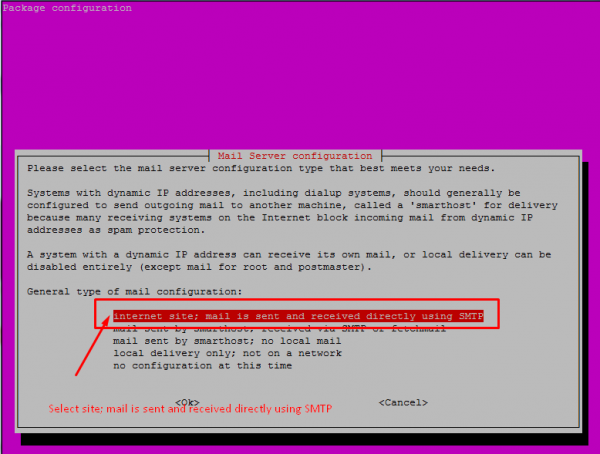
选择"internet site;邮件直接使用 SMTP 发送和接收"选项
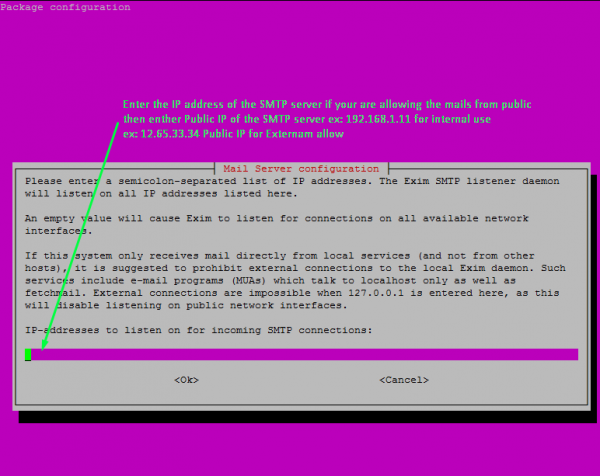
请提供 Exim4 SMTP 服务器的名称。默认情况下,它将采用机器的主机名。
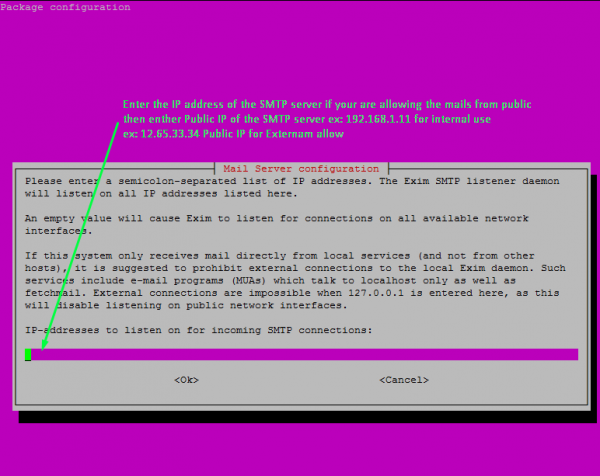
提供您想要接收请求和发送电子邮件的 IP 地址。
在这里,您可以为多个 IP 地址提供一个以分号分隔的 IP 地址列表。
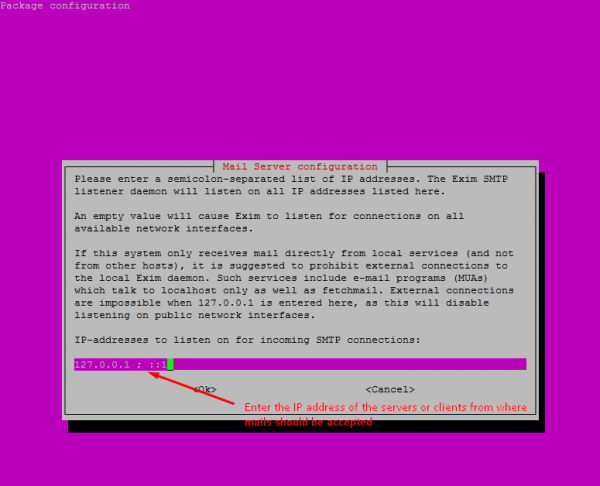
输入客户端的域名地址此 SMTP 将为其中继邮件的收件人域。
请注意,您可以为多个域提供以分号分隔的域地址列表。
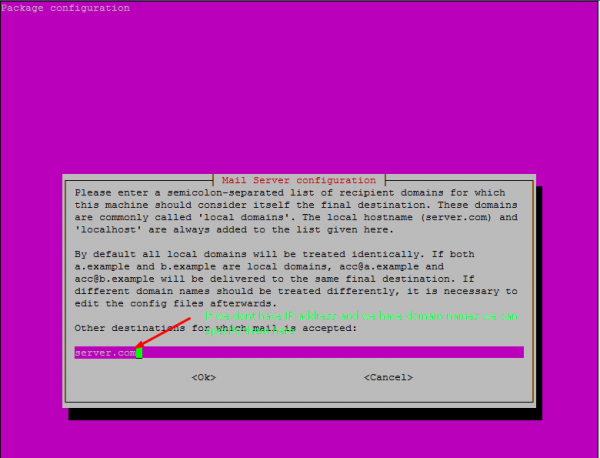
输入以分号分隔的 IP 地址范围列表,此系统将无条件地为其中继邮件。(用作智能主机)。这通常是将要使用的本地主机。
将保持最少的 DNS 查询数量(按需拨号)设置为否(以前我们使用的是拨号连接,但现在大多数互联网用户都使用宽带连接)
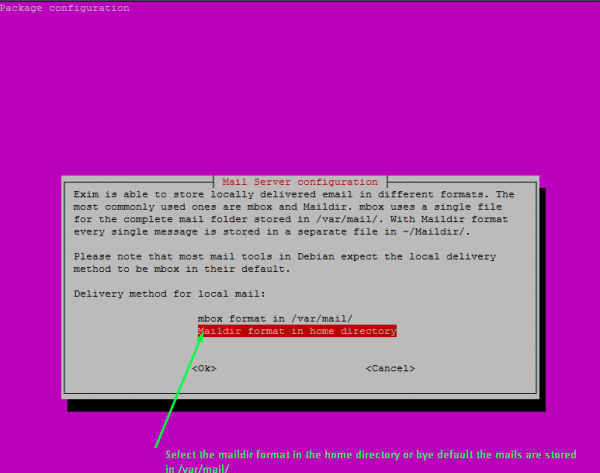
选择本地邮件的递送方式。这里,我在 主目录中选择了Maildir 格式。
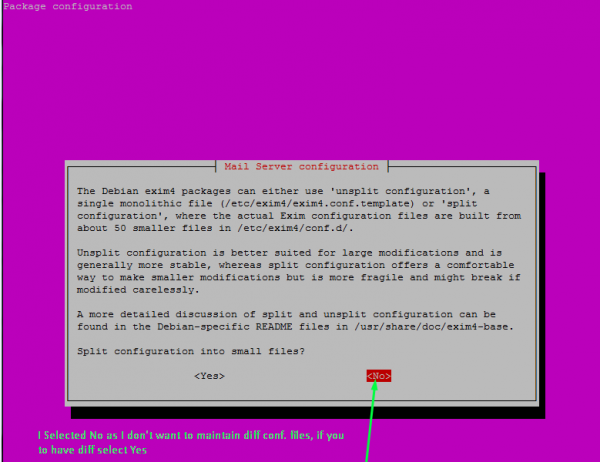
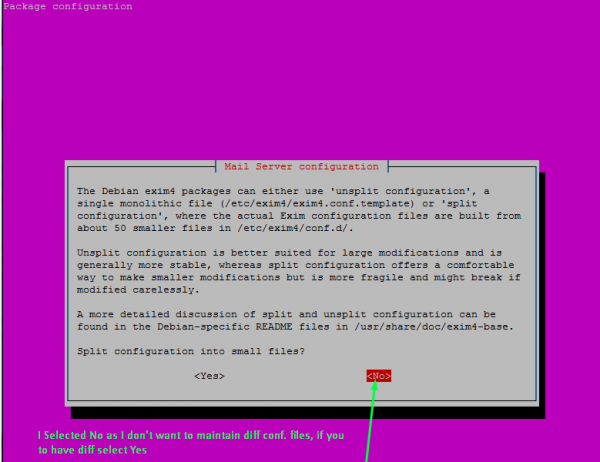
选择是否将配置拆分成小文件?或否。如果您希望将配置存储到小文件中,则可以选择是
。现在您已完成操作,并且您的 SMTP 服务器已准备好转发发送的任何通知电子邮件。使用此机器的 IP 地址,或者如果已注册域名,则在配置的 SMTP 服务器地址中使用域名。
配置完成后,我们可以使用相同的配置命令添加客户端,或者直接编辑配置文件,添加要与此 SMTP 服务器一起使用的附加客户端。
打开配置文件,编辑或添加客户端的 IP 地址或域名
# vi /etc/exim4/update-exim4.conf.conf
update-exim4.conf.conf 文件应如下所示 –
## Edit this file and /etc/mailname by hand and execute update-exim4.conf
# yourself or use 'dpkg-reconfigure exim4-config'#
# Please note that this is _not_ a dpkg-conffile and that automatically changes
# to this file might happen. The code handling this will honor your local
# changes, so this is usually fine, but will break local schemes that mess
# around with multiple versions of the file.
## update-exim4.conf uses this file to determine variable values to generate
# exim configuration macros for the configuration file.
## Most settings found in here do have corresponding questions in the
# Debconf configuration, but not all of them.
## This is a Debian specific file
dc_eximconfig_configtype='internet'
dc_other_hostnames='server.com'
dc_local_interfaces='127.0.0.1'
dc_readhost=''
dc_relay_domains='192.168.1.1'
dc_minimaldns='false'
dc_relay_nets='cgi.com'
dc_smarthost=''
CFILEMODE='644'
dc_use_split_config='false'
dc_hide_mailname=''
dc_mailname_in_oh='true'
dc_localdelivery='maildir_home'
现在,在配置中编辑以下以分号分隔的行
dc_relay_nets 用于添加客户端/服务器的 IP 地址
dc_relay_domains 用于添加客户端/服务器的域名
配置成功后,您可以使用此服务器发送或中继来自服务器的电子邮件,并使用客户端发送程序或项目的通知。
相关文章
有用资源
linux 参考教程 - 该教程包含有关 linux 的更多信息:https://www.cainiaomax.com/linux/

