
CSS 边距和填充
cssweb developmentfront end technology更新于 2025/11/27 18:52:17
对于边距,请使用 CSS margins 属性。margin 属性定义 HTML 元素周围的空间。
对于填充,padding 属性允许您指定元素内容与其边框之间应显示多少空间。
以下是在 CSS 中显示边距和填充的代码 −
示例
<!DOCTYPE html>
<html>
<head>
<style>
body {
   font-family: "Segoe UI", Tahoma, Geneva, Verdana, sans-serif;
}
.outer-div {
   border: 2px solid purple;
   width: 300px;
   height: 200px;
}
.inner-div {
   border: 2px solid green;
   margin: 20px;
   padding-left: 20px;
}
</style>
</head>
<body>
<h1>Margin and padding example</h1>
<div class="outer-div">
<div class="inner-div">
Some sample text inside the inner div which will be padded by 20px all sides.
</div>
</div>
</body>
</html>
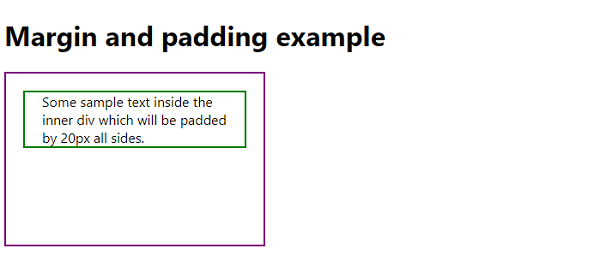
输出
上述代码将产生以下输出 −
相关文章
有用资源
css 参考教程 - 该教程包含有关 css 的更多信息:https://www.cainiaomax.com/css/

