
Firefox、Safari、Chrome、Opera 中的 CSS 不透明度
cssweb developmentfront end technology更新于 2025/11/27 18:20:17
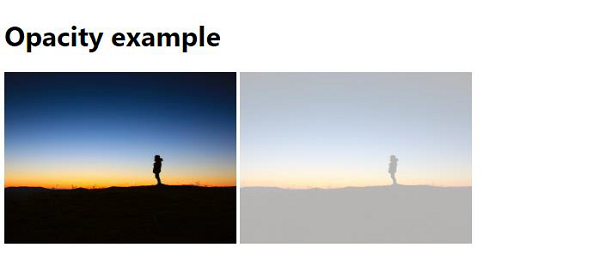
要在所有现代 Web 浏览器(例如 Firefox、Google Chrome、Opera 等)中设置不透明度,请使用 opacity 属性,并在 CSS 类 − 下设置。
transparent{
   opacity: 0.3;
}
以下是在现代浏览器中使用不透明度的代码 −
示例
<!DOCTYPE html>
<html>
<head>
<style>
body{
   font-family: 'Segoe UI', Tahoma, Geneva, Verdana, sans-serif;
}
img {
   width:270px;
   height:200px;
}
.transparent{
   opacity: 0.3;
}
</style>
</head>
<body>
<h1>Opacity example</h1>
<img src="https://i.picsum.photos/id/505/800/800.jpg" >
<img class="transparent" src="https://i.picsum.photos/id/505/800/800.jpg" >
</body>
</html>
输出
上述代码将产生以下输出 −
相关文章
有用资源
css 参考教程 - 该教程包含有关 css 的更多信息:https://www.cainiaomax.com/css/

