
使用 react-archer 在 React JS 中绘制 DOM 元素之间的箭头
react jsjavascript libraryfront end technology更新于 2025/11/19 11:24:17
在本文中,我们将了解如何在 React JS 中绘制类似流程图的箭头来连接不同的 DOM 元素。您可以使用此功能创建独特的网页设计。在这里,我们将使用 react-archer 包来绘制连接 DOM 元素的箭头。
DOM 元素类似于页面上的 DIV、HTML 和 BODY 元素。 您可以使用 CSS 为所有这些添加类,或者使用 JS 与它们交互。
示例
首先创建一个 React 项目 −
npx create-react-app tutorialpurpose
现在转到项目目录 −
cd tutorialpurpose
下载并安装 react-archer 包 −
npm install react-archer
我们将使用 react-archer 包添加箭头并连接不同的 DOM 元素。
现在,在 App.js 中插入以下代码行:−
import { ArcherContainer, ArcherElement } from "react-archer";

const rootStyle = { display: "flex", justifyContent: "center" };
const rowStyle = {
   margin: "200px 0",
   display: "flex",
   justifyContent: "space-between",
};

const boxStyle = { padding: "10px", border: "1px solid black" };

const App = () => {
   return (
      <div style={{ height: "500px", margin: "50px" }}>
         <ArcherContainer strokeColor="red">
            <div style={rootStyle}>
               <ArcherElement
                   id="root"
                   relations={[
                     {
                        targetId: "element2",
                        targetAnchor: "top",
                        sourceAnchor: "bottom",
                        style: { strokeDasharray: "5,5" },
                      },
                  ]}
                >
                <div style={boxStyle}>Root</div>
               </ArcherElement>
            </div>
            <div style={rowStyle}>
               <ArcherElement
               id="element2"
               relations={[
                  {
                     targetId: "element3",
                     targetAnchor: "left",
                     sourceAnchor: "right",
                     style: { strokeColor: "blue", strokeWidth: 1 },
                     label: <div style={{ marginTop: "-20px"}}>Arrow 2</div>,
                  },
               ]}
            >
            <div style={boxStyle}>Element 2</div>
                </ArcherElement>
                <ArcherElement id="element3">
                   <div style={boxStyle}>Element 3</div>
               </ArcherElement>

              <ArcherElement
                 id="element4"
                 relations={[
                    {
                       targetId: "root",
                       targetAnchor: "right",
                       sourceAnchor: "left",
                       label: "Arrow 3",
                   },
               ]}
            >
            <div style={boxStyle}>Element 4</div>
            </ArcherElement>
         </div>
      </ArcherContainer>
   </div>
   );
};
export default App;
解释
概念很简单。我们创建了一个 Archer 元素,其中包含我们的 DOM。
每个 Archer 元素都有一个 唯一 ID 和一个 relation 属性,该属性指示许多信息,例如 −
箭头应该从源 DOM 的哪个部分生成,
箭头应该指向的目标 DOM,以及
箭头应该指向哪一侧,等等。
所有这些信息都将在 relation 属性中定义。
输出
执行后,将产生以下输出 −
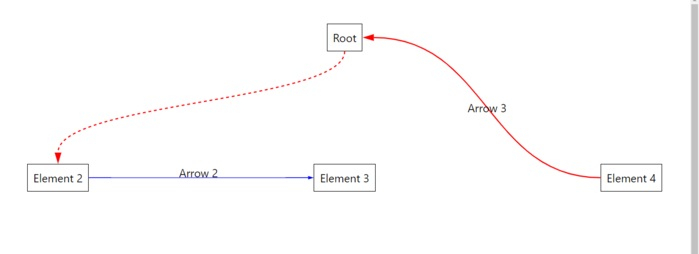
相关文章
有用资源
javascript 参考教程 - 该教程包含有关 javascript 的更多信息:https://www.cainiaomax.com/javascript/

