
PowerShell 中的异常处理
在本文中,我们将讨论以下几点。
PowerShell 中的异常是什么?
终止错误和非终止错误。
使用 Try / Catch 块。
将非终止错误转换为终止错误。
处理实际的异常消息。
PowerShell 中的异常是什么?
PowerShell 或其他编程语言中的异常是指可以处理的错误或意外结果。例如,执行时找不到文件,将数字除以零。
如果处理不当,异常可能会停止脚本执行。
终止错误和非终止错误
非终止错误不会停止脚本执行,即使在脚本中检测到非终止错误,脚本也会继续运行。以下是非终止错误的示例。
示例 1
if(Get-Service -Name DoesntExist) {
   Write-Output "Service Found"
}else {
   Write-Output "Service not found"
}
Write-Output "This Line will be printed"
输出

如您所见,即使未找到服务名称,Write-Output 也会打印出来。因此脚本将继续执行。
如果发现终止错误,则会停止脚本执行。如果您的程序没有设计处理此类错误的能力,则终止错误会被视为严重问题。有时,当我们需要在出现问题时终止脚本时,终止错误会很有用。
"Throw"命令用于终止脚本。
示例 2
if(Get-Service -Name DoesntExist) {
   Write-Output "Service Found"
}else {
   throw "Service not found"
}
Write-Output "This Line will be printed"
输出
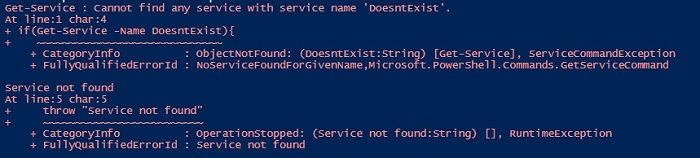
如您所见,由于"throw"命令终止,write-output 未打印。
使用 Try/Catch 块处理异常
我们将此代码写入 try/catch 块中,该块在编程语言中用于异常处理非常流行。
示例 3
try {
   if(Get-Service -Name DoesntExist) {
      Write-Output "Service Found"
   }else {
      Write-Output "Service not found"
   }
   Write-Output "This Line will be printed"
}catch {
   Write-Output "Error Occured"
}
输出

输出与示例1相同,此处无需使用try/catch块。我们将在脚本中做一些修改,使try/catch块在几分钟内更轻松地发挥作用。
让我们将示例2转换为try/catch块。
示例4
try {
   if(Get-Service -Name DoesntExist) {
      Write-Output "Service Found"
   }else {
      throw "Service not found"
   }
   Write-Output "This Line will be printed"
}catch {
   Write-Output "Error Occured"
}
输出

因此,throw 命令会终止脚本并转到 catch 代码块,并显示异常输出。但是,我们仍然会收到错误消息(红色),并且 catch 输出稍后会显示。
将非终止错误转换为终止错误
处理此异常的更好方法是使用 ErrorAction 参数或 $ErrorActionPreference 变量将非终止错误转换为终止错误。默认情况下,PowerShell 会将此变量的值设置为 Continue,因此在发生错误的情况下,程序将继续运行。如果我们将此变量或参数的值设置为"Stop"如果 cmdlet 发生错误,它会在 try 块中终止脚本,并在 catch 块中继续执行。
示例 5
try {
   if(Get-Service -Name DoesntExist -ErrorAction Stop) {
      Write-Output "Service Found"
   }else {
      Write-Output "Service not found"
   }
   Write-Output "This Line will be printed"
}catch {
   Write-Host "Error Occured" -f Red
}
输出
Error Occured
如您所见,由于服务不存在,它仅显示 catch 代码块。让我们使用 $ErrorActionPreference 变量,它是 -ErrorAction 参数的替代变量,但在整个脚本中都适用。
示例 6
$ErrorActionPreference = "Stop"
try {
   if(Get-Service -Name DoesntExist) {
      Write-Output "Service Found"
   }
}catch {
   Write-Host "Error Occured" -f Red
}
输出与上述相同。
处理实际错误消息
除了编写自定义错误消息外,您还可以直接捕获 cmdlet 生成的错误消息,如下所示。
示例 7
$ErrorActionPreference = "Stop"
try {
   if(Get-Service -Name DoesntExist) {
      Write-Output "Service Found"
   }
}catch {
   $_.Exception
}
输出


