
解释如何使用 PowerShell 进行安全密码加密。
很多时候,我们需要在 PowerShell 中使用密码,并将其传递给凭据参数,并且密码应始终是安全字符串,而不是纯文本。加密密码的方法如下所述。
a) Get-Credential 格式
我们有一种可以通过 cmdlet Get-Credential 存储用户名和密码的方法。它将提供 GUI 提示。您可以将此密码存储到变量中,并在稍后的命令中使用它。
$cred = Get-Credential
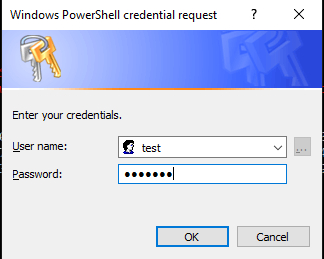
凭据存储在 $cred 变量中。以下是该变量的值。输出如下。
PS C:\WINDOWS\system32> $cred
UserName       Password
--------       --------
test       System.Security.SecureString
您可以看到密码存储在安全字符串中。您可以将上述变量与 cmdlet 支持的凭据参数一起使用。
例如:
Invoke-Command -ComputerName Test-PC -ScriptBlock {Get-Service} -
Credential $cred
您可以看到此密码在加密形式下的样子,为此,您需要使用 ConvertFrom-SecureString 命令。
PS C:\WINDOWS\system32> $cred.Password | ConvertFrom-SecureString 01000000d08c9ddf0115d1118c7a00c04fc297eb01000000fe83583138f0ce4bb0e3654f0529948100000000020000000000 106600000001000020000000cf8760de4e2ca7a28c8efd055c578dc7779f3984f25c1f9bc8c7a8ec50d97aa1000000000e80 00000002000020000000fb33efe90790e302e e738ad245b0b256d34e49728a08dfd2ef524da22f9bccaf100000003cf7a899 ea4c75edd7b4e418351f686040000000b21de677725588fb8f8bd589de058247171c103b48a50d06f152f25c8196935ca78f f7b1909bc5e76ad5c9cf1e2df497769aed3c1bb2f4035c26e6bdd7aa3875b)安全字符串格式
获取安全字符串中密码的另一种方法是使用带有 –AsSecureString 参数的 Read-Host 命令。
PS C:\WINDOWS\system32> $passwd = Read-Host "Enter Password" -AsSecureString Enter Password: *******您可以通过创建一个新的 PSCredential 对象,直接在支持 Credential 参数的 cmdlet 中使用此密码,如下例所示。
$username = Read-Host "Enter UserName" $passwd = Read-Host "Enter Password" -AsSecureString $creds = New-Object -TypeName System.Management.Automation.PSCredential -ArgumentList $username,$passwd Connect-VIServer -Server TestvCenter.lab -Credential $creds检查此密码变量时,它也是 Secure.String 格式,您可以使用 ConvertFrom-SecureString 管道命令再次检索加密密码。
PS C:\WINDOWS\system32> $passwd System.Security.SecureString PS C:\WINDOWS\system32> $passwd | ConvertFrom-SecureString 01000000d08c9ddf0115d1118c7a00c04fc297eb01000000fe83583138f0ce4bb0e3654f05299481000000000200000000001 06600000001000020000000d5439c95404cc4e81dbb83b557e58cec12b5047e441b22bd3dabca96bc231d39000000000e8000 000002000020000000a9c2b95f3363ecbd46beaf927a1779ff2f43e17fb0e3aadf0d2c9c3dedc5fb1e10000000439a72d5bd9 97aacd529f49425909151400000008ad5e497b74e054e21ea1232c6ae45a64af302d91df09c0768eacd57b08f6b86f9bc4244 75c2e14173edd287e8a9304c570104475d09ebd9ab4c419167222260一旦您的密码字符串被加密,您就可以直接使用它作为密码。您无需使用 ConvertFrom-SecureString 获取加密的密码,只需查看密码安全字符串即可。
c) 明文格式
如果密码是明文格式,您可以在支持Password参数的命令中直接使用明文密码,但不建议使用以下方法,因为它是明文格式,可能会导致严重的安全漏洞。请参阅以下示例。
Connect-VIServer -Server TestvCenter.lab -User "Testadmin" - Password "PowerShell"您可以将明文密码转换为安全字符串格式。当您将密码文本文件放置在安全位置,并且 PowerShell 需要使用非明文密码时,此功能非常有用。具体流程如下。
$passwd = "Test@123" | ConvertTo-SecureString -AsPlainText -Force
PS C:\WINDOWS\system32> $passwd System.Security.SecureString现在我们的密码已安全,我们可以将其用作凭证中的密码。这里,我们使用 $cred 参数连接名为 TestvCenter.lab 的 vCenter 服务器。
$creds = New-Object -TypeName System.Management.Automation.PSCredential -ArgumentList “test”,$passwd Connect-VIServer -Server TestvCenter.lab -Credential $creds您可以使用以下方法查看加密密码。它是文本编码格式,而不是原始密码。
PS C:\WINDOWS\system32> $passwd | ConvertFrom-SecureString 01000000d08c9ddf0115d1118c7a00c04fc297eb01000000fe83583138f0ce4bb0e3654f052994810000000002 0000000000106600000001000020000000358daf9fec158cf68ccf5e06bf0eb829953553f5e703df2ce0d97e8a 95f5761f000000000e8000000002000020000000cf65dea31f8f4082392f958cd836b22cff2b6d86c3ab29d235 2f56aa757300b520000000f9626238a73c899ebf61bd935651a8deb391e2615164779d461c679ad04bc1264000 00007050962ea9d8c67f051b9fcbdbee953dffa2cc2377905911814a8d87d3e7678914a3e0292cb24977767881 6391919c5518d6251a78f87b6efd990cb3eabe96e4如果您需要将此密码存储在文件中,则可以使用上述命令。
PS C:\WINDOWS\system32> $passwd | ConvertFrom-SecureString | Out-File C:\Passwd.txt但是,当您检索密码时,您需要再次转换为安全字符串格式,因为 credential 参数仅接受安全字符串。
PS C:\WINDOWS\system32> $passwd = (Get-Content C:\Passwd.txt) | ConvertTo-SecureString
PS C:\WINDOWS\system32> $passwd System.Security.SecureString您可以在支持的 cmdlet 的凭据参数中使用此密码。
相关文章

