
使用 CSS 修复父级元素折叠问题
cssweb developmentfront end technology更新于 2025/1/10 16:44:17
开发者在使用 CSS float 属性时面临的众多问题之一是,如果所有子元素都浮动,父容器就会折叠。为了避免父容器折叠,我们可以使用以下解决方案之一。
问题
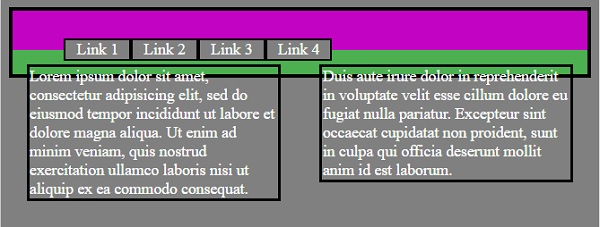
由于父容器内的所有内容都浮动,因此父容器会折叠。由于 CSS background-color 属性,只能看到容器的内边距。
示例
以下是需要修正的问题代码 −
<!DOCTYPE html>
<html>
<head>
<title>Avoid Parent Container Collapse</title>
<style>
body{
   background-color: grey;
   border: 4px solid black;
}
#navbar, #content{
   padding: 12px;
   color: white;
}
#navbar{
   background-color: #C303C3;
}
li {
   list-style: none;
   border: 2px solid black;
   width:4em;
   background-color: grey;
   text-align: center;
   float: left;
}
#content {
   background-color: #4CAF50;
}
#leftContent, #rightContent {
   border: 3px solid black;
   margin:2px;
}
#leftContent {
   width: 45%;
   float: left;
}
#rightContent {
   width: 45%;
   float: right;
}
</style>
<body>
<div id="navbar">
<ul>
<li>Link 1</li>
<li>Link 2</li>
<li>Link 3</li>
<li>Link 4</li>
</ul>
</div>
<div id="content">
<div id="leftContent">
Lorem ipsum dolor sit amet, consectetur adipisicing elit, sed do eiusmod tempor incididunt ut labore et dolore magna aliqua. Ut enim ad minim veniam,
quis nostrud exercitation ullamco laboris nisi ut aliquip ex ea commodo
consequat.
</div>
<div id="rightContent">
Duis aute irure dolor in reprehenderit in voluptate velit esse
cillum dolore eu fugiat nulla pariatur. Excepteur sint occaecat cupidatat non
proident, sunt in culpa qui officia deserunt mollit anim id est laborum.
</div>
</div>
</body>
</html>
输出
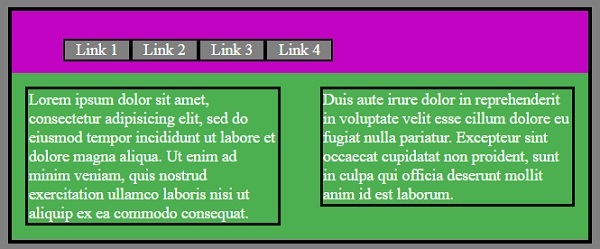
以下是问题的输出 -
解决方案 1
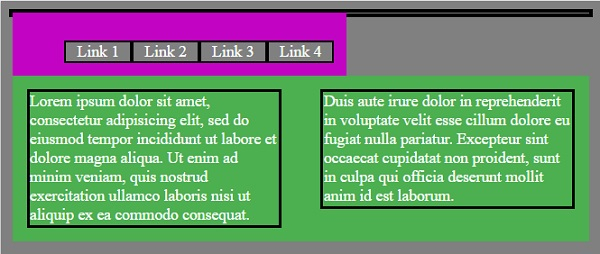
我们可以将 CSS float: left 应用于浮动元素的父容器。
此解决方案暂时解决了问题,因为现在父元素的父元素已折叠,并且浮动内容的父元素包裹着子元素。
以下是解决方案 1 − 的输出
解决方案 2
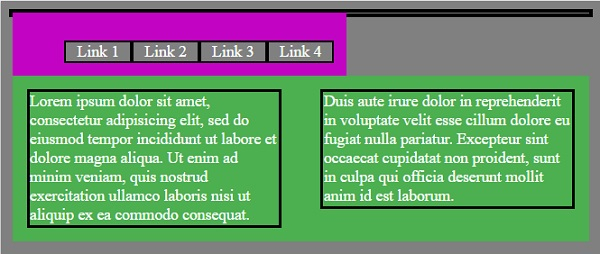
我们可以在浮动元素的父容器上使用 CSS overflow 属性。此解决方案效果良好,但由于缺乏逻辑性,因此未使用。
以下是解决方案 2 的输出 −
解决方案 3
我们可以在父容器底部添加一个空的 div,并使用 ‘clearfix’ 类名,其中包含以下内容。
.clearfix {
   clear: both;
}
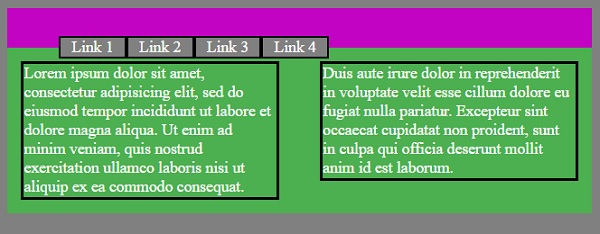
此解决方案解决了问题,但现在父容器底部出现了一个空的 div 元素,它不代表任何内容。
以下是解决方案 3 − 的输出
解决方案 4
我们可以向父容器添加一个使用伪元素 ‘after’ 的类,其中包含以下内容 −
.clearfix {
.clearfix::after {
   content: '';
   display: table;
   clear: both;
}
以下是解决方案 4 的输出 −
相关文章
有用资源
css 参考教程 - 该教程包含有关 css 的更多信息:https://www.cainiaomax.com/css/

