
使用 CSS 伪类
cssweb developmentfront end technology更新于 2025/1/10 17:48:17
我们可以使用 CSS 伪类为 HTML 中现有的元素添加特定的样式,这些伪类会选择具有特定状态的元素,例如(悬停、访问、禁用等)。
注意 − 为了区分 CSS 伪类和伪元素,在 CSS3 中,伪类使用单冒号表示法。
语法
以下是在元素上使用 CSS 伪类的语法 −
Selector:pseudo-class {
   css-property: /*value*/;
}
以下是所有可用的 CSS 伪类 −
| Sr.No | 伪类 &说明 |
|---|---|
| 1 | active 选择提到的处于活动状态的元素 |
| 2 | checked 选择每个已选中的提及元素 |
| 3 | disabled 选择每个已禁用的提及元素 |
| 4 | empty 选择每个没有子元素的提及元素 |
| 5 | enabled 选择每个已启用的提及元素 |
| 6 | first-child 选择其父元素中第一个子元素的所有提及元素 |
| 7 | first-of-type 选择其父元素中第一个提及元素的所有元素 |
| 8 | focus 选择具有焦点的提及元素 |
| 9 | hover 鼠标悬停时选择提及元素 |
| 10 | in-range 选择值在指定范围内的提及元素范围 |
| 11 | invalid 它会选择所有具有无效值的提及元素 |
| 12 | lang(language) 它会选择每个带有以"language"开头的 lang 属性值的提及元素 |
| 13 | last-child 它会选择每个提及的元素,这些元素是其父级的最后一个子元素 |
| 14 | last-of-type 它会选择每个提及的元素,这些元素是其父级的最后一个提及元素 |
| 15 | link 选择所有未访问的提及元素 |
| 16 | not(selector) 选择所有不属于提及元素的元素 |
| 17 | nth-child(n) 选择所有提及的元素,即其父元素的第 n 个子元素 |
| 18 | nth-last-child(n) 选择所有提及的元素,即其父元素的第 n 个子元素,从最后一个子元素开始计算 |
| 19 | nth-last-oftype(n) 它选择每个提到的元素,这些元素是其父级的第 n 个提到的元素,从最后一个子元素开始计算 |
| 20 | nth-of-type(n) 它选择每个提到的元素,这些元素是其父元素中第 n 个提到的元素 |
| 21 | only-of-type 它选择每个提到的元素,这些元素是其父元素中唯一提到的元素 |
| 22 | only-child 它选择每个提到的元素,这些元素是其父元素中唯一的子元素 |
| 23 | optional 它选择没有"必需"的提到的元素属性 |
| 24 | out-of-range 它选择具有指定范围之外值的提及元素 |
| 25 | read-only 它选择具有指定"只读"属性的提及元素 |
| 26 | read-write 它选择没有"只读"属性的提及元素 |
| 27 | required 它选择具有"必需"属性的提及元素属性已指定 |
| 28 | root 选择文档的根元素 |
| 29 | target 选择当前活动的提及元素(点击包含该锚点名称的 URL) |
| 30 | valid 选择所有具有有效值的提及元素 |
| 31 | visited 选择所有访问过的提及元素 |
示例
让我们看一个 CSS 示例伪类 −
<!DOCTYPE html>
<html>
<head>
<title>CSS Anchor Pseudo Classes</title>
</head>
<style>
div {
   color: #000;
   padding:20px;
   background-image: linear-gradient(135deg, grey 0%, white 100%);
   text-align: center;
}
.anchor {
   color: #FF8A00;
}
.anchor:last-child {
   color: #03A9F4;
}
.anchor:visited {
   color: #FEDC11;
}
.anchor:hover {
   color: #C303C3;
}
.anchor:active {
   color: #4CAF50;
}
</style>
<body>
<div>
<h1>Search Engines</h1>
<a class="anchor" href="https://www.google.com" target="_blank">Go To Google</a>
<a class="anchor" href="https://www.bing.com" target="_blank">Go To Bing</a>
</div>
</body>
</html>
输出
这将产生以下输出 −

示例
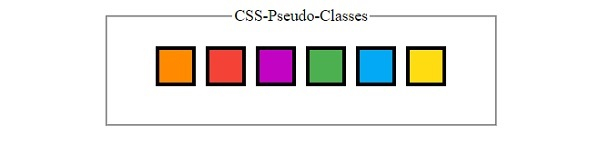
让我们看另一个 CSS 伪类的例子 −
<!DOCTYPE html>
<html>
<head>
<title>CSS Pseudo Classes</title>
<style>
form {
   width:70%;
   margin: 0 auto;
   text-align: center;
}
* {
   padding: 2px;
   margin:5px;
   box-sizing: border-box;
}
.child{
   display: inline-block;
   height: 40px;
   width: 40px;
   color: white;
   border: 4px solid black;
}
.child:nth-of-type(1){
   background-color: #FF8A00;
}
.child:nth-of-type(2){
   background-color: #F44336;
}
.child:nth-of-type(3){
   background-color: #C303C3;
}
.child:nth-of-type(4){
   background-color: #4CAF50;
}
.child:nth-of-type(5){
   background-color: #03A9F4;
}
.child:nth-of-type(6){
   background-color: #FEDC11;
}
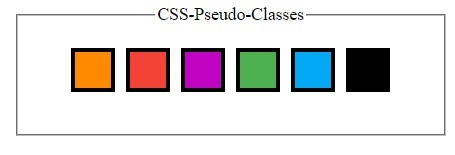
.child:hover{
   background-color: #000;
}
</style>
</head>
<body>
<form>
<fieldset>
<legend>CSS-Pseudo-Classes</legend>
<div id="container">
<div class="child"></div><div class="child"></div><div class="child"></div><div class="child"></div><div class="child"></div><div class="child"></div>
</div><br>
</body>
</html>
输出
这将产生以下输出 −
鼠标未悬停在 div 元素上时 −
鼠标悬停在 div 元素上时 −
相关文章
有用资源
css 参考教程 - 该教程包含有关 css 的更多信息:https://www.cainiaomax.com/css/

