
CSS 中的字体粗细
cssweb developmentfront end technology更新于 2025/1/19 7:08:17
CSS 的 font-weight 属性用于定义元素中文本字符的粗细。
语法
CSS font-weight 属性的语法如下 −
Selector {
   font-weight: /*value*/
}
示例
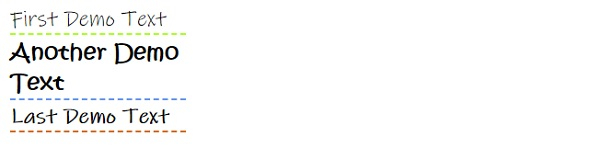
以下示例说明了 font-weight 属性 −
<!DOCTYPE html>
<html>
<head>
<style>
div {
   margin: 3px;
   font-family: "Ink Free";
   width: 30%;
   font-size: 24px;
}
#one {
   font-weight: normal;
   border-bottom: 2px dashed greenyellow;
}
#two {
   font-family: "Kristen ITC";
   font-weight: bolder;
   border-bottom: 2px dashed cornflowerblue;
}
#three {
   font-weight: bold;
   border-bottom: 2px dashed chocolate;
}
</style>
</head>
<body>
<div id="one">First Demo Text</div>
<div id="two">Another Demo Text</div>
<div id="three">Last Demo Text</div>
</body>
</html>
输出
这将给出以下输出 −
示例
<!DOCTYPE html>
<html>
<head>
<style>
[class|=lis] {
   font-style: italic;
   font-weight: bold;
}
li[class|="lis-ul"] {
   background-color: cadetblue;
   font-family: Helvetica;
   font-weight: 100;
   color: gainsboro;
   width: 20%;
}
</style>
</head>
<body>
<h2>Tutorials</h2>
<ol>
<li><p>C#</li>
<li class="lis-ul-2">DBMS</li>
<li class="lis-3">OS</li>
<li>Java</li>
<ul>
<li class="lis-ul-one">Core Java</li>
<li class="lis">Advance Java</li>
</ul>
</ol>
</body>
</html>
输出
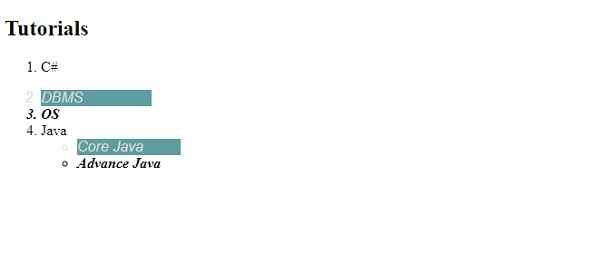
这将给出以下输出 −
相关文章
有用资源
css 参考教程 - 该教程包含有关 css 的更多信息:https://www.cainiaomax.com/css/

