如何使用 Powershell 向 XML 文件添加属性?
powershellmicrosoft technologiessoftware & coding
要向 XML 文件添加属性,我们首先需要添加元素,然后为其添加属性。
以下是 XML 文件的示例。
示例
<?xml version="1.0"?>
<catalog>
   <book id="bk101">
      <author>Gambardella, Matthew</author>
      <title>XML Developer's Guide</title>
      <genre>Computer</genre>
      <price>44.95</price>
      <publish_date>2000-10-01</publish_date>
      <description>An in-depth look at creating applications with XML.</description>
   </book>
</catalog>
以下命令将添加新元素,但文件不会被保存。我们将在添加属性后保存文件。
$file = "C:\Temp\SampleXML.xml"
$xmlfile = [xml](Get-Content $file)
$newbookelement = $xmlfile.CreateElement("book")
$newbookelementadd = $xmlfile.catalog.AppendChild($newbookelement)
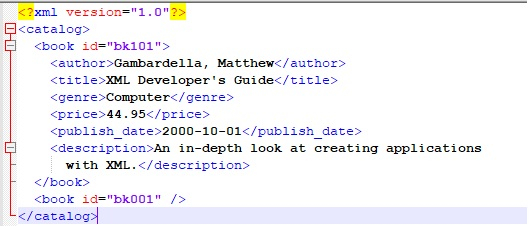
要插入属性并保存文件,
$newbookattribute = $newbookelementadd.SetAttribute("id","bk001")
$xmlfile.Save($file)
输出
要添加嵌套元素,或者如果我们需要在新建的创建节点使用以下代码,
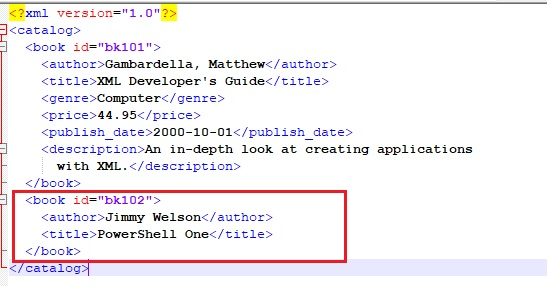
示例
$file = "C:\Temp\SampleXML.xml"
$xmlfile = [XML](Get-Content $file)
$newbooknode = $xmlfile.catalog.AppendChild($xmlfile.CreateElement("book"))
$newbooknode.SetAttribute("id","bk102")
$newauthorelement = $newbooknode.AppendChild($xmlfile.CreateElement("author"))
$newauthorelement.AppendChild($xmlfile.CreateTextNode("Jimmy Welson")) | Out-Null
$newtitleelement = $newbooknode.AppendChild($xmlfile.CreateElement("title"))
$newtitleelement.AppendChild($xmlfile.CreateTextNode("PowerShell One")) | OutNull
$xmlfile.save($file)
输出