如何在 JavaFX 中向图像添加滚动条?
javafxobject oriented programmingprogramming更新于 2026/1/7 8:12:17
滚动条包含一个拇指按钮、一个附在可滚动窗格上的左、右按钮。使用它可以上下滚动窗格(附在窗格上)。
在 JavaFX 中,javafx.scene.control.ScrollBar 表示滚动条。您可以创建实例化此类的滚动条。通常,滚动条与其他控件(如 ScrollPane、ListView 等)相关联。
将 ScrollBar 设置为图像
名为 value 的属性指定滚动条所表示的当前值,您可以使用 addListener() 方法向此属性添加侦听器。
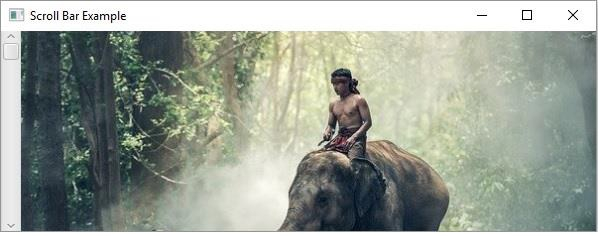
要将滚动条附加到图像 −
创建表示所需图像的 ImageView 对象。
创建一个窗格来保存图像视图,如滚动窗格、vBox 等。
向滚动条的 value 属性添加侦听器。
根据滚动条的方向,使用滚动条新值的负数设置布局窗格的 X/Y 布局。
示例
public class ScrollBarActionExample extends Application {
   public void start(Stage stage) throws FileNotFoundException {
      //教育标签
      Label label = new Label("Educational qualification:");
      Font font = Font.font("verdana", FontWeight.BOLD, FontPosture.REGULAR, 12);
      label.setFont(font);
      //教育资格列表视图
      ScrollBar scroll = new ScrollBar();
      scroll.setMin(0);
      scroll.setOrientation(Orientation.VERTICAL);
      scroll.setPrefHeight(200);
      scroll.setPrefWidth(20);
      //创建图像对象
      InputStream stream = new FileInputStream("D:\images\elephant.jpg");
      Image image = new Image(stream);
      //创建图像视图
      ImageView imageView = new ImageView();
      //将图像设置为图像视图
      imageView.setImage(image);
      //设置图像视图参数
      imageView.setX(5);
      imageView.setY(0);
      imageView.setFitWidth(595);
      imageView.setPreserveRatio(true);
      //将切换按钮添加到窗格
      VBox vBox = new VBox(5);
      vBox.getChildren().addAll(imageView);
      scroll.valueProperty().addListener((ObservableValue<? extends Number> ov, Number old_val, Number new_val) -> {
         vBox.setLayoutY(-new_val.doubleValue());
      });
      //设置舞台
      Group root = new Group();
      root.getChildren().addAll(vBox, scroll);
      Scene scene = new Scene(root, 595, 200, Color.BEIGE);
      stage.setTitle("Scroll Bar Example");
      stage.setScene(scene);
      stage.show();
   }
   public static void main(String args[]){
      launch(args);
   }
}
输出