
如何在 Laravel 中检查数据库连接?
laravelphpserver side programming更新于 2025/4/30 1:52:17
Laravel 数据库配置存储在 config/database.php 中。数据库配置列表列在此文件中。默认情况下,您需要告诉 Laravel 您将使用哪个数据库。
使用的默认数据库是 mysql,我们将坚持使用它并检查与 mysql 的数据库连接。
/*
|--------------------------------------------------------------------------
| Default Database Connection Name
|--------------------------------------------------------------------------
| Here you may specify which of the database connections below you wish
| to use as your default connection for all database work. Of course
| you may use many connections at once using the Database library.
|
*/
'default' => env('DB_CONNECTION', 'mysql'),
.env 文件具有数据库的环境配置,如下所示 -
DB_CONNECTION=mysql
DB_HOST=127.0.0.1
DB_PORT=3306
DB_DATABASE=test
DB_USERNAME=root
DB_PASSWORD=
当您开始使用数据库时,请确保在 .env 文件中输入与 mysql 数据库连接的所有有效详细信息。让我们尝试一个显示数据库连接的简单示例。
示例 1
<?php
namespace App\Http\Controllers;
use Illuminate\Http\Request;
use Illuminate\Support\Facades\DB;
class StudentController extends Controller{
   public function index() {
      try {
         $dbconnect = DB::connection()->getPDO();
         $dbname = DB::connection()->getDatabaseName();
         echo "Connected successfully to the database. Database name is :".$dbname;
      } catch(Exception $e) {
         echo "Error in connecting to the database";
      }
   }
}
输出
上述代码的输出为 −
Connected successfully to the database. Database name is :test
示例 2
另一种方法是,您可以在启动 Laravel 时测试数据库连接。您可以在 app/Providers/AppServiceProvider 中的 boot() 方法内添加数据库连接代码,如下所示 −
/**
* Bootstrap any application services.
*
* @return void
*/

public function boot(){
   try {
      DB::connection()->getPDO();
      dump('Database is connected. Database Name is : ' . DB::connection()->getDatabaseName());
   } catch (Exception $e) {
      dump('Database connection failed');
   }
}
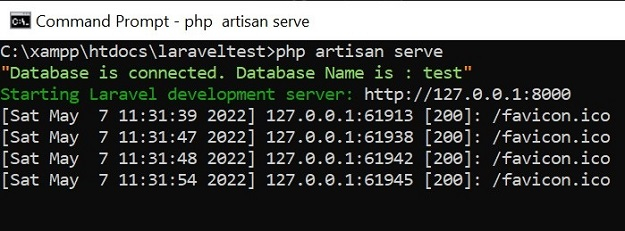
现在,当您执行 php artisan serve 时,您应该会看到数据库已连接或数据库连接失败的消息,如下面的屏幕截图所示 -
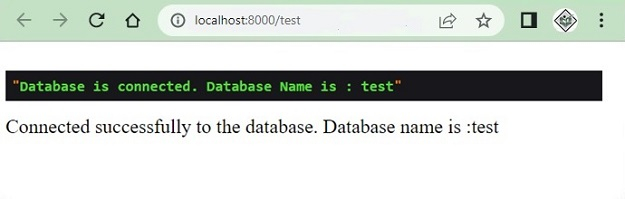
但上述方法的缺点是您也会在视图中看到它。例如 -
示例 3
另一种解决方法是,我们可以创建一个自定义命令并在其中添加数据库检查代码,并在需要时使用它。要创建自定义命令,请使用以下命令。
php artisan make:command testdbconnection
输出
上述代码的输出为 −
C:\xampp\htdocs\laraveltest>php artisan make:command testdbconnection
Console command created successfully.

C:\xampp\htdocs\laraveltest>
testdbconnection 的文件位于 app/console/commands 中。
testdbconnection.php
<?php
namespace App\Console\Commands;
use Illuminate\Console\Command;
use DB;
class testdbconnection extends Command{
   /**
   * The name and signature of the console command.
   * @var string
   */
   protected $signature = 'testdbconnection';

   /**
   * The console command description.
   * @var string
   */
   protected $description = 'Testing DB connection';

   /**
   * Create a new command instance.
   *
   * @return void
   */
   public function __construct() {
      parent::__construct();
   }

   /**
   * Execute the console command.
   *
   * @return int
   */ public function handle() {
      try {
         DB::connection()->getPDO();
         dump('Database is connected. Database Name is : ' . DB::connection()->getDatabaseName());
      } catch (Exception $e) {
         dump('Database connection failed');
      }
   }
}
更改命令名称、描述并在 handle() 方法内添加数据库连接代码,如上所示。现在打开 kernel.php 文件并在其中添加以下行 −
protected $commands = [
   Commands\testdbconnection::class
];
现在您可以测试您的命令,如下所示 -
C:\xampp\htdocs\laraveltest>php artisan testdbconnection
"Database is connected. Database Name is : test"

C:\xampp\htdocs\laraveltest>

