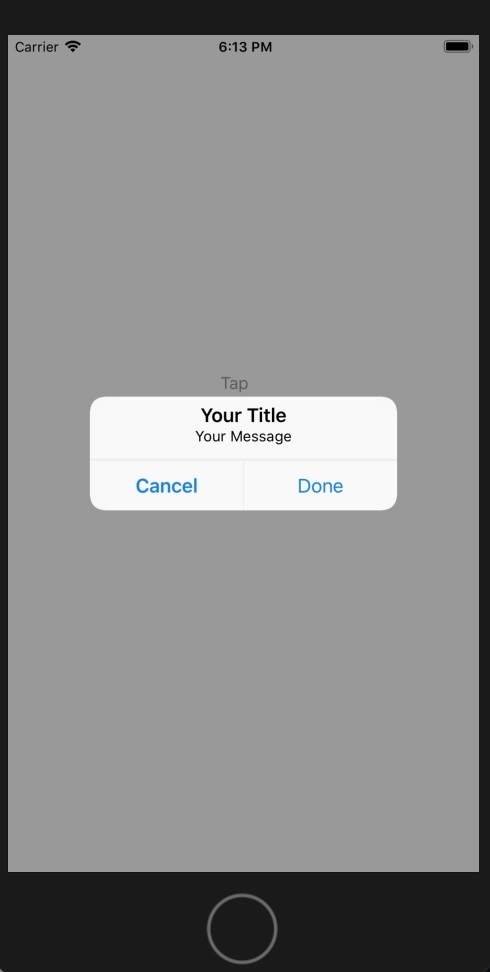
如何控制 iOS 中默认 Alert 对话框的宽度和高度?
iosmobile developmentapps/applications更新于 2026/2/13 11:52:17
在开发 iOS 应用程序时,有时您可能需要控制/操作 Alert 对话框的宽度和高度。如果您对此不熟悉,可能会遇到麻烦。
这里我们将了解如何控制默认警报框的宽度和高度。为了控制高度和宽度,我们将使用 NSLayoutConstraint。
要了解有关 UIAlertController 的更多信息,请参阅 −
https://developer.apple.com/documentation/uikit/uialertcontroller
在这里,我们将创建一个新项目,其中包含一个按钮,点击该按钮时,我们将显示带有自定义消息的警报。
步骤 1 − 打开 Xcode → 新建项目 → 单视图应用程序 →我们将其命名为"changeheightandwidth"
步骤 2 − 在 Main.storyboard 中创建一个按钮并将其命名为 tap,在 ViewController.swift 中创建 @IBAction 并将其命名为 btnAtap。
步骤 3 −在您的按钮方法中写入以下代码。
创建 UIAlertController 对象。
let alert = UIAlertController(title: "Your Title", message: "Your Message", preferredStyle: UIAlertController.Style.alert)
创建高度和宽度约束。
// 高度约束
let constraintHeight = NSLayoutConstraint(
   item: alert.view!, attribute: NSLayoutConstraint.Attribute.height, relatedBy: NSLayoutConstraint.Relation.equal, toItem: nil, attribute:
   NSLayoutConstraint.Attribute.notAnAttribute, multiplier: 1, constant: 100)
alert.view.addConstraint(constraintHeight)

// 宽度约束
let constraintWidth = NSLayoutConstraint(
   item: alert.view!, attribute: NSLayoutConstraint.Attribute.width, relatedBy: NSLayoutConstraint.Relation.equal, toItem: nil, attribute:
   NSLayoutConstraint.Attribute.notAnAttribute, multiplier: 1, constant: 300)
alert.view.addConstraint(constraintWidth)
显示带有操作的警报视图。
let cancel = UIAlertAction(title: "Cancel", style: .cancel, handler: nil)
alert.addAction(cancel)
let OKAY = UIAlertAction(title: "Done", style: .default, handler: nil)
alert.addAction(OKAY)
self.present(alert, animated: true, completion: nil)
步骤 4− 运行代码。
完整代码,
@IBAction func btnATap(_ sender: Any) {
   let alert = UIAlertController(title: "Your Title", message: "Your Message", preferredStyle: UIAlertController.Style.alert)

   // height constraint
   let constraintHeight = NSLayoutConstraint(
      item: alert.view!, attribute: NSLayoutConstraint.Attribute.height, relatedBy: NSLayoutConstraint.Relation.equal, toItem: nil, attribute:
      NSLayoutConstraint.Attribute.notAnAttribute, multiplier: 1, constant: 100)
   alert.view.addConstraint(constraintHeight)

   // width constraint
   let constraintWidth = NSLayoutConstraint(
      item: alert.view!, attribute: NSLayoutConstraint.Attribute.width, relatedBy: NSLayoutConstraint.Relation.equal, toItem: nil, attribute:
      NSLayoutConstraint.Attribute.notAnAttribute, multiplier: 1, constant: 300)
   alert.view.addConstraint(constraintWidth)

   let cancel = UIAlertAction(title: "Cancel", style: .cancel, handler: nil)
   alert.addAction(cancel)
   let OKAY = UIAlertAction(title: "Done", style: .default, handler: nil)
   alert.addAction(OKAY)
   self.present(alert, animated: true, completion: nil)
}