
如何在 Android 中将毫秒转换为日期格式?
androidapps/applicationsmobile development
此示例演示如何在 Android 中将毫秒转换为日期格式。
步骤 1 − 在 Android Studio 中创建一个新项目,前往"文件"->"新建项目",并填写所有必需的详细信息以创建新项目。
步骤 2 − 将以下代码添加到 res/layout/activity_main.xml。
<?xml version="1.0" encoding="utf-8"?>
<LinearLayout xmlns:android="http://schemas.android.com/apk/res/android"
   xmlns:tools="http://schemas.android.com/tools"
   android:layout_width="match_parent"
   android:layout_height="match_parent"
   android:orientation="vertical"
   android:padding="4dp"
   tools:context=".MainActivity">
   <TextView
      android:textStyle="bold"
      android:textSize="24sp"
      android:id="@+id/textView"
      android:layout_width="match_parent"
      android:layout_height="wrap_content"/>
</LinearLayout>
步骤 3 − 将以下代码添加到 src/MainActivity.java
import androidx.appcompat.app.AppCompatActivity;
import android.os.Bundle;
import android.widget.TextView;
import java.text.SimpleDateFormat;
public class MainActivity extends AppCompatActivity {
   TextView textView;
   @Override
   protected void onCreate(Bundle savedInstanceState) {
      super.onCreate(savedInstanceState);
      setContentView(R.layout.activity_main);
      textView = findViewById(R.id.textView);
      getDate();
   }
   private void getDate() {
      SimpleDateFormat simpleDateFormat = new SimpleDateFormat("dd/MM/yyyy");
      String dateString = simpleDateFormat.format(9897546853323L);
      textView.setText(String.format("Date: %s", dateString));
   }
}
步骤 4 − 将以下代码添加到 androidManifest.xml
<?xml version="1.0" encoding="utf-8"?>
<manifest xmlns:android="http://schemas.android.com/apk/res/android" package="app.com.sample">
   <application
      android:allowBackup="true"
      android:icon="@mipmap/ic_launcher"
      android:label="@string/app_name"
      android:roundIcon="@mipmap/ic_launcher_round"
      android:supportsRtl="true"
      android:theme="@style/AppTheme">
      <activity android:name=".MainActivity">
         <intent-filter>
            <action android:name="android.intent.action.MAIN" />
            <category android:name="android.intent.category.LAUNCHER" />
         </intent-filter>
      </activity>
   </application>
</manifest>
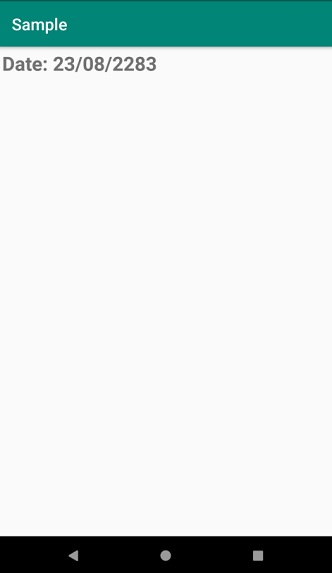
让我们尝试运行您的应用程序。假设您已将实际的 Android 移动设备连接到电脑。要从 Android Studio 运行该应用程序,请打开项目的某个 Activity 文件,然后点击工具栏上的"运行" 图标。选择您的移动设备作为选项,然后检查您的移动设备是否显示您的默认屏幕 −
点击此处下载项目代码。

