
如何使用 CSS 创建响应式表单?
cssweb developmentfront end technology更新于 2025/10/5 15:40:17
以下是使用 CSS 创建响应式表单的代码 −
示例
<!DOCTYPE html>
<html>
<head>
<meta name="viewport" content="width=device-width, initial-scale=1" />
<style>
body {
   font-family: Arial;
   font-size: 17px;
   padding: 8px;
}
* {
   box-sizing: border-box;
}
.Fields {
   display: flex;
   flex-wrap: wrap;
   padding: 20px;
   justify-content: space-around;
}
.Fields div {
   margin-right: 10px;
}
label {
   margin: 15px;
}
.formContainer {
   margin: 10px;
   background-color: #efffc9;
   padding: 5px 20px 15px 20px;
   border: 1px solid rgb(191, 246, 250);
   border-radius: 3px;
}
input[type="text"] {
   display: inline-block;
   width: 100%;
   margin-bottom: 20px;
   padding: 12px;
   border: 1px solid #ccc;
   border-radius: 3px;
}
label {
   margin-left: 20px;
   display: block;
}
.icon-formContainer {
   margin-bottom: 20px;
   padding: 7px 0;
   font-size: 24px;
}
.checkout {
   background-color: #4caf50;
   color: white;
   padding: 12px;
   margin: 10px 0;
   border: none;
   width: 100%;
   border-radius: 3px;
   cursor: pointer;
   font-size: 17px;
}
.checkout:hover {
   background-color: #45a049;
}
a {
   color: black;
}
span.price {
   float: right;
   color: grey;
}
@media (max-width: 657px) {
   .Fields {
      flex-direction: column-reverse;
   }
}
</style>
</head>
<body>
<h1 style="text-align: center;">Responsive Form Example</h1>
<div class="Fields">
<div>
<div class="formContainer">
<form>
<div class="Fields">
<div>
<h3>Register</h3>
<label for="fname">Full Name</label>
<input type="text" id="fname" name="firstname" />
<label for="email"> Email</label>
<input type="text" id="email" name="email" />
<label for="adr"> Address</label>
<input type="text" id="adr" name="address" />
</div>
<div>
<h3>Account Details</h3>
<label for="uname">Username</label>
<input type="text" id="uname" name="cardname" />
<label for="pass">Password</label>
<input type="text" id="pass" name="cardnumber" />
<div class="Fields">
<div>
<label for="accountAge">Account Age</label>
<input type="text" id="accountAge" name="accountAge" />
</div>
<div>
<label for="cvv">Security Question</label>
<input type="text" id="cvv" name="cvv" />
</div>
</div>
</div>
</div>
</form>
</div>
</div>
</div>
</body>
</html>
输出
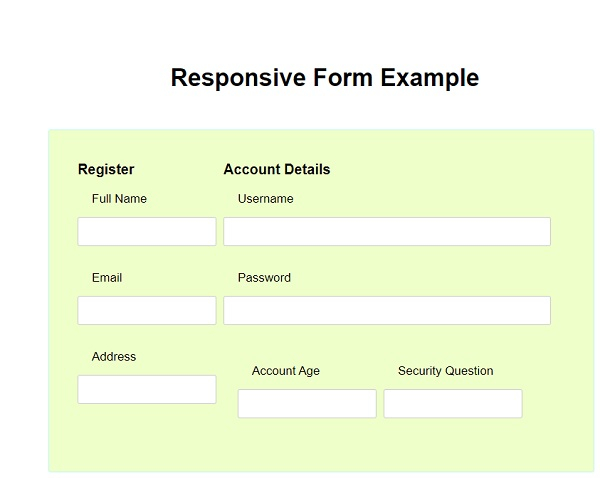
上述代码在较大屏幕上将产生以下输出 −
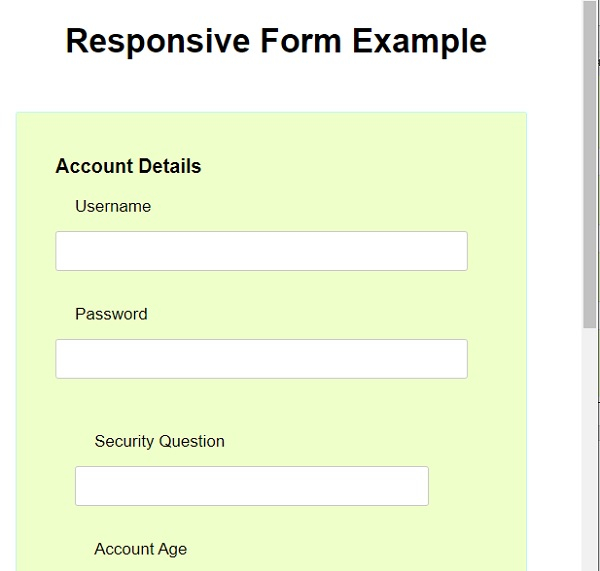
在较小的屏幕上,内容将按如下方式调整大小 −
相关文章
有用资源
css 参考教程 - 该教程包含有关 css 的更多信息:https://www.cainiaomax.com/css/

