
如何使用 CSS 创建响应式内联表单?
cssweb developmentfront end technology更新于 2025/10/5 16:12:17
以下是使用 CSS 创建响应式内联表单的代码 −
示例
<!DOCTYPE html>
<html>
<head>
<meta name="viewport" content="width=device-width, initial-scale=1" />
<style>
body {
   font-family: Arial, Helvetica, sans-serif;
}
* {
   box-sizing: border-box;
}
form {
   display: flex;
   flex-flow: row wrap;
   align-items: center;
}
form label {
   margin: 5px 10px 5px 0;
}
form input {
   margin: 5px 10px 5px 0;
   padding: 10px;
}
form button {
   padding: 10px 20px;
   font-size: 20px;
   background-color: rgb(39, 22, 141);
   border: 1px solid #ddd;
   color: white;
   cursor: pointer;
   font-weight: bolder;
   border-radius: 4px;
}
form button:hover {
   background-color: rgb(113, 65, 225);
}
@media (max-width: 800px) {
   form input {
      margin: 10px 0;
   }
   form {
      flex-direction: column;
      align-items: stretch;
   }
}
</style>
</head>
<body>
<h1>Responsive Inline Form Example</h1>
<form>
<label for="email">Email:</label>
<input type="email" id="email" placeholder="Enter email" name="email" />
<label for="pass">Password:</label>
<input type="password" id="pass" placeholder="Enter password" name="pass"/>
<button type="submit">Submit</button>
</form>
</body>
</html>
输出
上述代码将产生以下输出 −
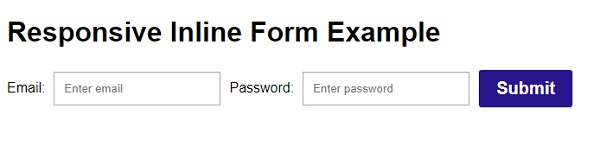
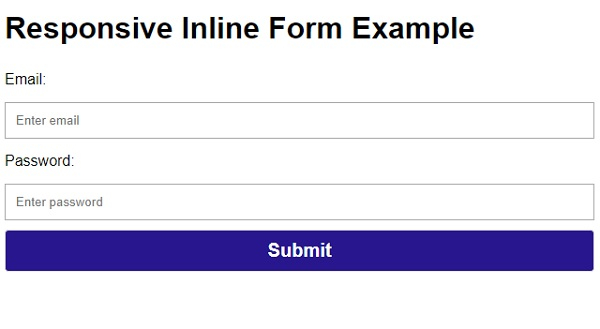
调整浏览器窗口大小时,元素将重新流动如下 −
相关文章
有用资源
css 参考教程 - 该教程包含有关 css 的更多信息:https://www.cainiaomax.com/css/

