如何使用 JavaFX 创建 StackPane?
javafxobject oriented programmingprogramming更新于 2026/1/9 6:36:17
创建应用程序所需的所有节点后,您可以使用布局排列它们。布局是计算给定空间中对象位置的过程。JavaFX 在 javafx.scene.layout 包中提供了各种布局。
堆栈窗格
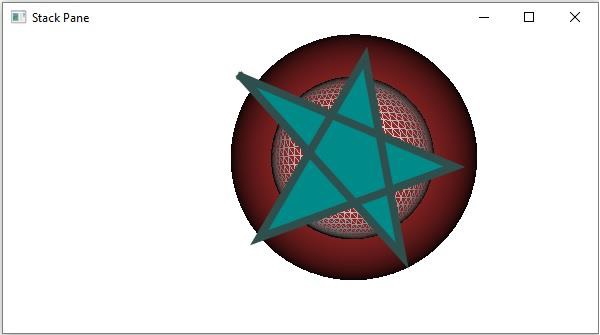
在此布局中,节点从下到上(一个接一个)排列为堆栈。您可以通过实例化 javafx.scene.layout.StackPane 类在应用程序中创建堆栈窗格。
您可以使用 setAlignment() 方法设置此窗格中节点的对齐方式。
同样,您可以使用 setMatgin() 方法为窗格内的节点设置边距。
要将节点添加到此窗格,您可以将它们作为构造函数的参数传递,也可以将它们添加到窗格的可观察列表中,如下所示 −
getChildren().addAll();
示例
import javafx.application.Application;
import javafx.collections.ObservableList;
import javafx.geometry.Insets;
import javafx.scene.PerspectiveCamera;
import javafx.scene.Scene;
import javafx.stage.Stage;
import javafx.scene.layout.StackPane;
import javafx.scene.paint.Color;
import javafx.scene.paint.PhongMaterial;
import javafx.scene.shape.CullFace;
import javafx.scene.shape.DrawMode;
import javafx.scene.shape.LineTo;
import javafx.scene.shape.MoveTo;
import javafx.scene.shape.Path;
import javafx.scene.shape.Sphere;
public class StackedPaneExample extends Application {
   public void start(Stage stage) {
      //绘制球体1
      Sphere sphere1 = new Sphere(80);
      sphere1.setDrawMode(DrawMode.LINE);
      //绘制球体2
      Sphere sphere2 = new Sphere();
      //设置 Box(立方体) 的属性
      sphere2.setRadius(120.0);
      //设置其他属性
      sphere2.setCullFace(CullFace.BACK);
      sphere2.setDrawMode(DrawMode.FILL);
      PhongMaterialmaterial = new PhongMaterial();
     material.setDiffuseColor(Color.BROWN);
      sphere2.setMaterial(material);
      //设置透视相机
      PerspectiveCameracam = new PerspectiveCamera();
      cam.setTranslateX(-50);
      cam.setTranslateY(25);
      cam.setTranslateZ(0);
      //绘制形状
      MoveTo moveTo = new MoveTo(208, 71);
      LineTo line1 = new LineTo(421, 161);
      LineTo line2 = new LineTo(226,232);
      LineTo line3 = new LineTo(332,52);
      LineTo line4 = new LineTo(369, 250);
      LineTo line5 = new LineTo(208, 71);
      //创建路径
      Path path = new Path(moveTo, line1, line2, line3, line4, line5);
      path.setFill(Color.DARKCYAN);
      path.setStrokeWidth(8.0);
      path.setStroke(Color.DARKSLATEGREY);
      //.setMaterial(material);
      //创建堆栈窗格
      StackPane stackPane = new StackPane();
      //设置圆的边距
      stackPane.setMargin(sphere2, new Insets(50, 50, 50, 50));
      //检索 Stack Pane 的可观察列表
      ObservableList list = stackPane.getChildren();
      //将所有节点添加到窗格
      list.addAll(sphere2, sphere1, path);
      //设置场景
      Scene scene = new Scene(stackPane, 595, 300);
      scene.setCamera(cam);
      stage.setTitle("Stack Pane");
      stage.setScene(scene);
      stage.show();
   }
   public static void main(String args[]){
      launch(args);
   }
}
输出