
如何使用 CSS Flex 创建容器的左右对齐
cssweb developmentfront end technology更新于 2024/5/16 7:40:17
语法
CSS flex 属性的语法如下 −
Selector {
   flex: /*value*/
}
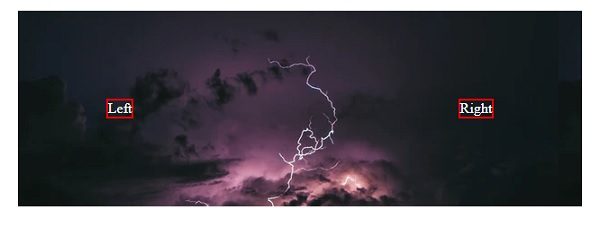
以下示例说明了 CSS flex 属性。
示例
<!DOCTYPE html>
<html>
   <head>
      <style>
         #container {
            display: flex;
            flex-direction: row;
            justify-content: space-between;
            margin: 2%;
            padding: 15%;
            align-self: center;
            background: url("https://images.unsplash.com/photo-1431440869543-efaf3388c585?ixid=MXwxMjA3fDB8MHxwaG90by1wYWdlfHx8fGVufDB8fHw%3D&ixlib=rb 1.2.1&auto=format&fit=stretch&w=600&q=80");
            color: white;
         }
         div > div {
            border: 2px solid red;
         }
      </style>
   </head>
   <body>
      <div id="container">
         <div>Left</div>
         <div>Right</div>
      </div>
   </body>
</html>
这将给出以下输出
示例
<!DOCTYPE html>
<html>
   <head>
      <style>
         #container {
            height: 250px;
            display: flex;
            flex-flow: column wrap;
            padding: 2%;
            background: url("https://images.unsplash.com/photo-1523830213227-f76e0415a976?ixid=MXwxMjA3fDB8MHx0b3BpYy1mZWVkfDE0fDZzTVZqVExTa2VRfHxlbnwwfHx8&ixlib=rb-1.2.1&auto=format&fit=crop&w=650&q=60") 0;
         }
         img {
            margin: 2%;
            width: 60px;
            border-radius: 25%;
         }
      </style>
   </head>
   <body>
      <div id="container">
         <img src="https://images.unsplash.com/photo-1502989642968-94fbdc9eace4?ixid=MXwxMjA3fDB8MHx0b3BpYy1mZWVkfDZ8NnNNVmpUTFNrZVF8fGVufDB8fHw%3D&ixlib=rb-1.2.1&auto=format&fit=crop&w=100&q=60" />
         <img src="https://images.unsplash.com/photo-1502989642968-94fbdc9eace4?ixid=MXwxMjA3fDB8MHx0b3BpYy1mZWVkfDZ8NnNNVmpUTFNrZVF8fGVufDB8fHw%3D&ixlib=rb-1.2.1&auto=format&fit=crop&w=100&q=60" />
         <img src="https://images.unsplash.com/photo-1502989642968-94fbdc9eace4?ixid=MXwxMjA3fDB8MHx0b3BpYy1mZWVkfDZ8NnNNVmpUTFNrZVF8fGVufDB8fHw%3D&ixlib=rb-1.2.1&auto=format&fit=crop&w=100&q=60" />
         <img src="https://images.unsplash.com/photo-1502989642968-94fbdc9eace4?ixid=MXwxMjA3fDB8MHx0b3BpYy1mZWVkfDZ8NnNNVmpUTFNrZVF8fGVufDB8fHw%3D&ixlib=rb-1.2.1&auto=format&fit=crop&w=100&q=60" />
         <img src="https://images.unsplash.com/photo-1502989642968-94fbdc9eace4?ixid=MXwxMjA3fDB8MHx0b3BpYy1mZWVkfDZ8NnNNVmpUTFNrZVF8fGVufDB8fHw%3D&ixlib=rb-1.2.1&auto=format&fit=crop&w=100&q=60" />
         <img src="https://images.unsplash.com/photo-1502989642968-94fbdc9eace4?ixid=MXwxMjA3fDB8MHx0b3BpYy1mZWVkfDZ8NnNNVmpUTFNrZVF8fGVufDB8fHw%3D&ixlib=rb-1.2.1&auto=format&fit=crop&w=100&q=60" />
         <img src="https://images.unsplash.com/photo-1502989642968-94fbdc9eace4?ixid=MXwxMjA3fDB8MHx0b3BpYy1mZWVkfDZ8NnNNVmpUTFNrZVF8fGVufDB8fHw%3D&ixlib=rb-1.2.1&auto=format&fit=crop&w=100&q=60" />
      </div>
   </body>
</html>
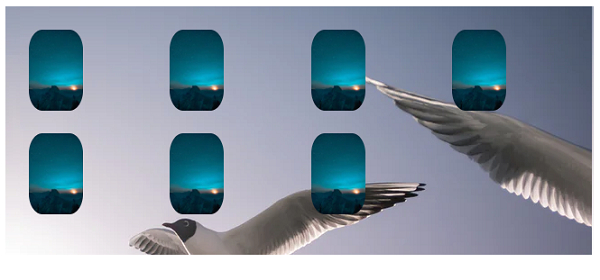
这将给出以下输出
相关文章
有用资源
css 参考教程 - 该教程包含有关 css 的更多信息:https://www.cainiaomax.com/css/

