
如何使用 OpenCV Java 库检测图像的关键点?
javaobject oriented programmingprogramming更新于 2025/10/8 11:24:17
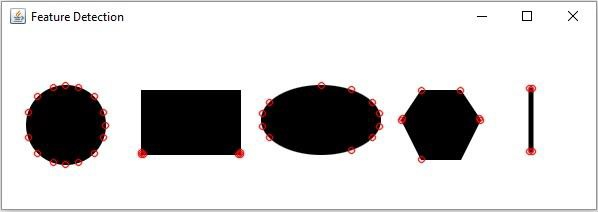
org.opencv.features2d.Feature2D(抽象)类的 detect() 方法检测给定图像的关键点。对于此方法,您需要传递一个表示源图像的 Mat 对象和一个空的 MatOfKeyPoint 对象来保存读取的关键点。
您可以使用 org.opencv.features2d.Features2d 类的 drawKeypoints() 方法在图像上绘制关键点。
注意
由于 Feature2D 是一个抽象类,因此您需要实例化它的一个子类来调用 detect() 方法。这里我们使用了 FastFeatureDetector 类。
Features2D 和 Features2d 是包中的两个不同类 features2d 不要混淆...
示例
import org.opencv.core.Core;
import org.opencv.core.Mat;
import org.opencv.core.MatOfKeyPoint;
import org.opencv.core.Scalar;
import org.opencv.features2d.FastFeatureDetector;
import org.opencv.features2d.Features2d;
import org.opencv.highgui.HighGui;z
import org.opencv.imgcodecs.Imgcodecs;
public class DetectingKeyPoints{
   public static void main(String args[]) throws Exception {
      //加载OpenCV核心库
      System.loadLibrary( Core.NATIVE_LIBRARY_NAME );
      //读取图像内容
      String file ="D:\Images\javafx_graphical.jpg";
      Mat src = Imgcodecs.imread(file);
      //读取图像关键点
      Mat dst = new Mat();
      MatOfKeyPoint matOfKeyPoints = new MatOfKeyPoint();
      FastFeatureDetector featureDetector = FastFeatureDetector.create();
      featureDetector.detect(src, matOfKeyPoints);
      //绘制检测到的关键点
      Features2d.drawKeypoints(src, matOfKeyPoints, dst, new Scalar(0, 0, 255));
      HighGui.imshow("Feature Detection", dst);
      HighGui.waitKey();
   }
}
输入图片

输出
相关文章
有用资源
java 参考教程 - 该教程包含有关 java 的更多信息:https://www.cainiaomax.com/java/

