
如何使用 PowerShell 获取 Windows 功能?
powershellmicrosoft technologiessoftware & coding
要使用 PowerShell 获取可用或已安装的 Windows 功能和角色,您需要使用 Get-WindowsFeature cmdlet。显然,Windows 功能和角色仅在服务器操作系统上可用,客户端操作系统上不可用。
如果您在 Windows Server 2008 及更高版本的服务器操作系统上使用 PowerShell 运行 Get-WindowsFeature,您将获得如下所示的输出。
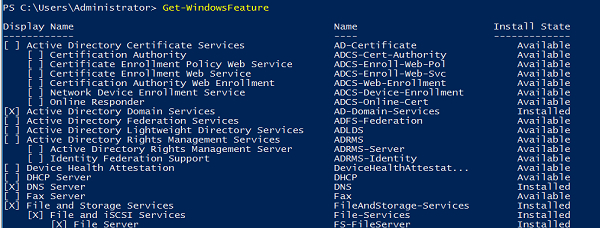
方框中的叉号表示该功能已安装。您还可以使用 ‘安装状态’ 来检查。
要仅获取服务器上已安装的功能,您需要筛选掉"已安装状态"功能。
Get-WindowsFeature | where{$_.InstallState -eq "Installed"}
输出
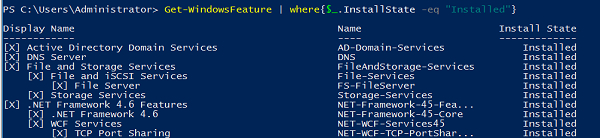
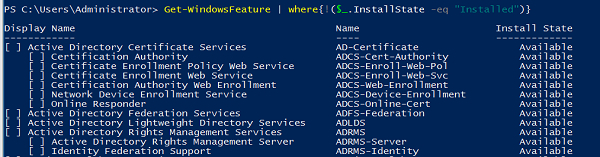
要获取未安装的 Windows 功能/角色,您需要筛选出"安装状态"属性值为"可用"或使用 已安装 值的 NOT 运算符。
Get-WindowsFeature | where{!($_.InstallState -eq "Installed")}
输出
如果您需要查找特定功能/角色,只需输入名称或显示名称即可。如果您不知道功能/角色的完整名称,可以使用通配符来完成搜索操作。例如:
Get-WindowsFeature *Remote*
输出

要检查远程服务器上已安装的功能,您需要使用 -计算机名 参数运行上述命令。例如,如果我们需要检索两个功能 RemoteAccess 和 ADRMS,则可以使用以下命令。
Get-WindowsFeature -ComputerName Test1-Win2k16 -Name ADRMS,Remoteaccess
输出

如果您需要从多个远程服务器检索 Windows 功能信息,则可以使用 Invoke-Command,因为带有 -ComputerName 参数的 Get-WindowsFeature 命令不支持数组,而使用 Invoke-Command,您还可以获取安装了特定功能的计算机名称。例如,
Invoke-Command -ComputerName Test1-Win2k16,Test1-Win2k12 -ScriptBlock{Get-WindowsFeature ADRMS,RemoteAccess}
输出

您还可以使用通配符 (*) 搜索 Windows 功能。例如,
Invoke-Command -ComputerName Test1-win2k16 -ScriptBlock{Get-WindowsFeature *Backup*}


