
如何使用 PowerShell 安装 Windows 功能?
powershellmicrosoft technologiessoftware & coding
要在服务器上安装 Windows 功能,可以使用 Install-WindowsFeature cmdlet。
Install-WindowsFeature Windows-Server-Backup -LogPath C:\Temp\Installfeatures.txt -Verbose
在上面的示例中,Windows-Server-Backup 功能将被安装在本地服务器上,日志将存储在 C:\Temp 位置,文件名为 InstallFeatures.txt。
PS C:\Users\Administrator> Install-WindowsFeature Windows-Server-Backup -LogPath C:\Temp\Installfeatures.txt -Verbose
VERBOSE: Installation started...
VERBOSE: Continue with installation?
VERBOSE: Prerequisite processing started...
VERBOSE: Prerequisite processing succeeded.
Success Restart Needed Exit Code Feature Result
------- -------------- --------- --------------
True No Success {Windows Server Backup}
VERBOSE: Installation succeeded.
您还可以使用管道命令安装此功能。
Get-WindowsFeature Windows-server-backup | Install-WindowsFeature -LogPath C:\Temp\Installfeatures.txt -Verbose
如果您的 Windows 功能包含子功能(例如 Web 服务器 (IIS)),并且还需要管理工具。
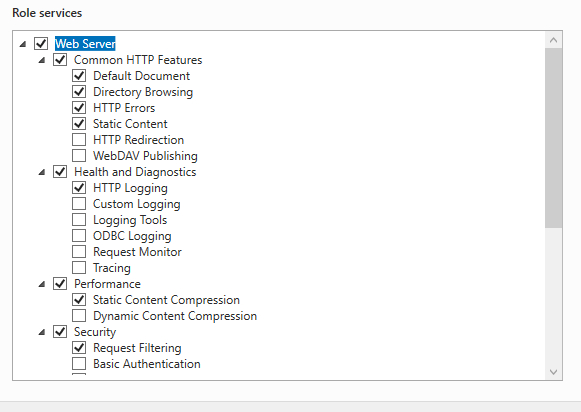
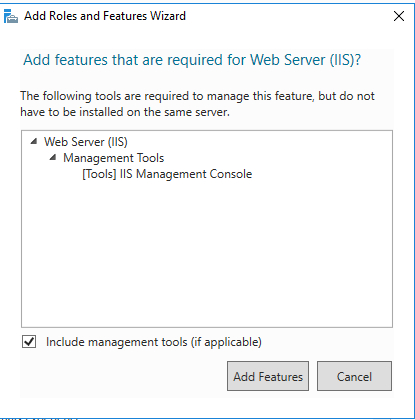
对于上述场景,我们将使用 -IncludeAllSubFeature 来包含角色,并使用 -IncludeManagementTools 来安装管理工具。
Install-WindowsFeature Web-Server -IncludeAllSubFeature -IncludeManagementTools -Source -Verbose
如果您安装任何功能时未提供源路径,请确保已加载与该特定操作系统相关的 Windows 操作系统磁盘,否则将生成源路径错误。
Install-WindowsFeature Web-Server -IncludeAllSubFeature -IncludeManagementTools -verbose VERBOSE: Installation started...
VERBOSE: Continue with installation?
VERBOSE: Prerequisite processing started...
VERBOSE: Prerequisite processing succeeded.
Success Restart Needed Exit Code Feature Result
------- -------------- --------- --------------
True No Success {Application Development, Application Init...
VERBOSE: Installation succeeded.
如果操作系统磁盘未挂载,则需要从相关操作系统光盘的 Source 目录下复制 SXS 文件夹,并将该目录作为源路径。例如,
Install-WindowsFeature Web-Server -IncludeAllSubFeature -IncludeManagementTools -Source C:\Temp\sxs\ -Verbose
PS C:\Users\Administrator> Install-WindowsFeature Web-Server -IncludeAllSubFeature -IncludeManagementTools -Source C:\Temp\sxs\ -Verbose VERBOSE: Installation started...
VERBOSE: Continue with installation?
VERBOSE: Prerequisite processing started...
VERBOSE: Prerequisite processing succeeded.
Success Restart Needed Exit Code Feature Result
------- -------------- --------- --------------
True No Success {Application Development, Application Init.
..
VERBOSE: Installation succeeded.
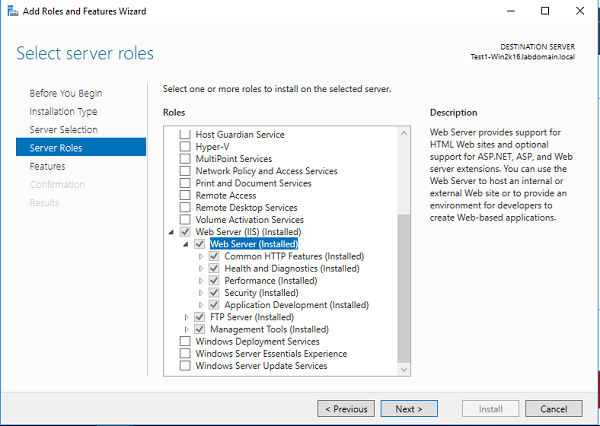
此 -Name 参数支持多个功能。因此,我们可以同时安装多个功能,例如 GUI。
help Install-WindowsFeature -Parameter Name -Name <Feature[]>
例如,
Install-WindowsFeature -Name Telnet-Client, Search-Service -Verbose
输出
Install-WindowsFeature -Name Telnet-Client, Search-Service -Verbose
VERBOSE: Installation started...
VERBOSE: Continue with installation?
VERBOSE: Prerequisite processing started...
VERBOSE: Prerequisite processing succeeded.
Success Restart Needed Exit Code Feature Result
------- -------------- --------- --------------
True No Success {Windows Search Service, Telnet Client}
VERBOSE: Installation succeeded.
要在远程计算机上安装 Windows 功能,可以使用 -ComputerName 参数。例如,
Install-WindowsFeature Telnet-Client -ComputerName Test1-Win2k16 -Verbose
输出
VERBOSE: Installation started...
VERBOSE: Continue with installation?
VERBOSE: Prerequisite processing started...
VERBOSE: Prerequisite processing succeeded.
Success Restart Needed Exit Code Feature Result
------- -------------- --------- --------------
True No Success {Telnet Client}
VERBOSE: Installation succeeded.
如果我们检查 `-ComputerName` 参数允许的数据类型,会发现它是字符串类型,而不是数组,因此我们只能传递一个计算机名称。
PS C:\Users\Administrator > help Install-WindowsFeature -Parameter ComputerName -ComputerName []
因此,要在多台计算机上安装功能,我们需要使用 `foreach` 循环遍历 `-ComputerName`,或者可以使用 `Invoke-Command` 方法。为了方便起见,我们将使用后一种方法。
Invoke-Command -ComputerName Test1-Win2k12, Test1-Win2k16 -ScriptBlock{Install-WindowsFeature Telnet-Client}


