
如何使用 PowerShell 获取 Windows 防火墙配置文件设置?
powershellmicrosoft technologiessoftware & coding
较新的 Windows 客户端和服务器操作系统,例如 Windows 10、Windows Server 2008 及更高版本,都支持高级防火墙版本,这些版本主要包含 3 个配置文件。
Domain
Public
Private profile.
要使用图形用户界面 (GUI) 获取设置,您需要在搜索框中搜索"高级安全 Windows 防火墙"或"高级安全 Windows Defender 防火墙"。然后,您可以在控制台中看到 3 个可用的配置文件。
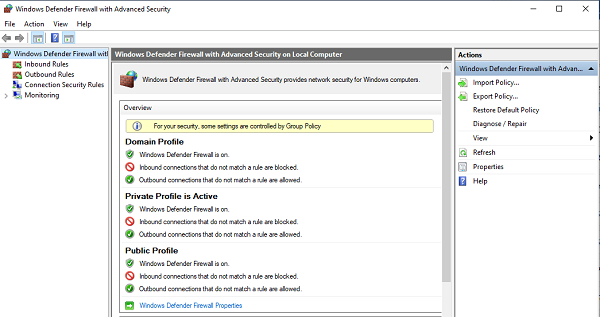
可以使用 PowerShell 命令 `Get-NetFirewallProfile` 查看上述相同的设置。
PS C:\> Get-NetFirewallProfile
Name : Domain
Enabled : True
DefaultInboundAction : NotConfigured
DefaultOutboundAction : NotConfigured
AllowInboundRules : NotConfigured
AllowLocalFirewallRules : NotConfigured
AllowLocalIPsecRules : NotConfigured
AllowUserApps : NotConfigured
AllowUserPorts : NotConfigured
AllowUnicastResponseToMulticast : NotConfigured
NotifyOnListen : True
EnableStealthModeForIPsec : NotConfigured
LogFileName : %systemroot%\system32\LogFiles\Firewall\pfirewall.log
LogMaxSizeKilobytes : 4096
LogAllowed : NotConfigured
LogBlocked : NotConfigured
LogIgnored : NotConfigured
DisabledInterfaceAliases : {NotConfigured}
Name : Private
Enabled : True
DefaultInboundAction : NotConfigured
DefaultOutboundAction : NotConfigured
AllowInboundRules : NotConfigured
AllowLocalFirewallRules : NotConfigured
AllowLocalIPsecRules : NotConfigured
AllowUserApps : NotConfigured
AllowUserPorts : NotConfigured
AllowUnicastResponseToMulticast : NotConfigured
NotifyOnListen : True
EnableStealthModeForIPsec : NotConfigured
LogFileName : %systemroot%\system32\LogFiles\Firewall\pfirewall.log
LogMaxSizeKilobytes : 4096
LogAllowed : NotConfigured
LogBlocked : NotConfigured
LogIgnored : NotConfigured
DisabledInterfaceAliases : {NotConfigured}
Name : Public Enabled : True
DefaultInboundAction : NotConfigured
DefaultOutboundAction : NotConfigured
AllowInboundRules : NotConfigured
AllowLocalFirewallRules : NotConfigured
AllowLocalIPsecRules : NotConfigured
AllowUserApps : NotConfigured
AllowUserPorts : NotConfigured
AllowUnicastResponseToMulticast : NotConfigured
NotifyOnListen : True
EnableStealthModeForIPsec : NotConfigured
LogFileName : %systemroot%\system32\LogFiles\Firewall\pfirewall.log
LogMaxSizeKilobytes : 4096
LogAllowed : NotConfigured
LogBlocked : NotConfigured
LogIgnored : NotConfigured
DisabledInterfaceAliases : {NotConfigured}
输出结果显示在详细视图中。如果您只需要检查配置文件名称及其是否已启用,请使用 select 命令。
Get-NetFirewallProfile | Select Name, Enabled
输出
Name Enabled ---- ------- Domain True Private True Public True
同样,您可以根据需要从上述输出中筛选不同的参数。
要获取远程计算机上的设置,您需要使用 Invoke-Command 或 PSSession 命令,因为此命令不支持直接使用 -ComputerName 参数。
Invoke-Command -ComputerName RemoteServerName -ScriptBlock{ Get-NetFirewallProfile | Select Name, Enabled}

