
如何使用 Java 通过 OpenCV 旋转图像?
javaobject oriented programmingprogramming更新于 2025/10/6 19:56:17
Imgproc 类的 warpAffine() 方法将仿射变换应用于指定图像。此方法接受 −
三个 Mat 对象,分别表示源、目标和变换矩阵。
一个整数值,表示输出图像的大小。
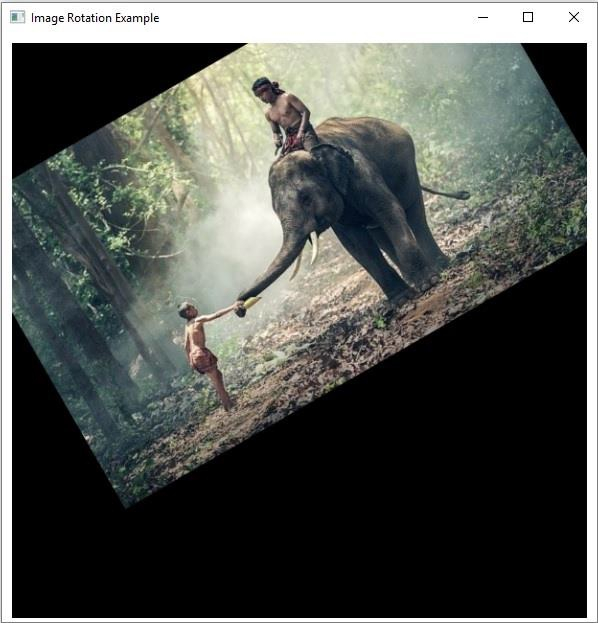
要旋转图像,请创建一个旋转矩阵并将其作为变换矩阵与其他参数一起传递给此方法。
示例
import java.awt.Image;
import java.awt.image.BufferedImage;
import java.io.IOException;
import javafx.application.Application;
import javafx.embed.swing.SwingFXUtils;
import javafx.scene.Group;
import javafx.scene.Scene;
import javafx.scene.image.ImageView;
import javafx.scene.image.WritableImage;
import javafx.stage.Stage;
import org.opencv.core.Core;
import org.opencv.core.Mat;
import org.opencv.core.Point;
import org.opencv.core.Size;
import org.opencv.highgui.HighGui;
import org.opencv.imgcodecs.Imgcodecs;
import org.opencv.imgproc.Imgproc;
public class RotatingAnImage extends Application {
   public void start(Stage stage) throws IOException {
      //加载 OpenCV 核心库
      System.loadLibrary( Core.NATIVE_LIBRARY_NAME );
      //读取图像数据
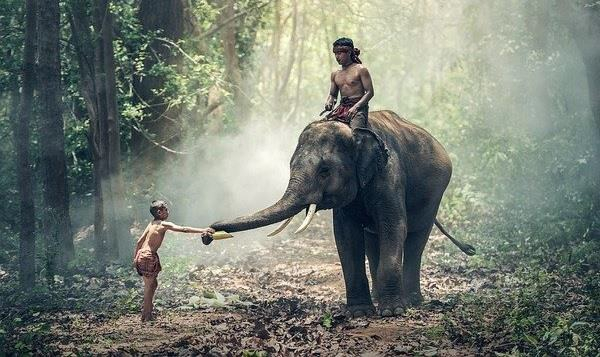
      String file ="D:\Images\elephant.jpg";
      Mat src = Imgcodecs.imread(file);
      //创建目标矩阵
      Mat dst = new Mat(src.rows(), src.cols(), src.type());
      // 创建 Point 对象
      Point point = new Point(300, 200);
      //创建转换矩阵
      Mat rotationMatrix = Imgproc.getRotationMatrix2D(point, 30, 1);
      // 创建 Size 类的对象
      Size size = new Size(src.cols(), src.cols());
      // 旋转给定图像
      Imgproc.warpAffine(src, dst, rotationMatrix, size);
      //将矩阵转换为 JavaFX 可写图像
      Image img = HighGui.toBufferedImage(dst);
      WritableImage writableImage= SwingFXUtils.toFXImage((BufferedImage) img, null);
      //设置图像视图
      ImageView imageView = new ImageView(writableImage);
      imageView.setX(10);
      imageView.setY(10);
      imageView.setFitWidth(575);
      imageView.setPreserveRatio(true);
      //设置场景对象
      Group root = new Group(imageView);
      Scene scene = new Scene(root, 595, 400);
      stage.setTitle("Image Rotation Example");
      stage.setScene(scene);
      stage.show();
   }
   public static void main(String args[]) {
      launch(args);
   }
}
输入图片
输出
执行上述程序时,它会生成以下输出 −
相关文章
有用资源
java 参考教程 - 该教程包含有关 java 的更多信息:https://www.cainiaomax.com/java/

