
图像处理/OpenCV 图像膨胀 Java 示例。
javaobject oriented programmingprogramming更新于 2025/10/6 19:24:17
侵蚀和膨胀是两种基本的形态学操作。顾名思义,形态学操作是根据图像形状处理图像的一组操作。
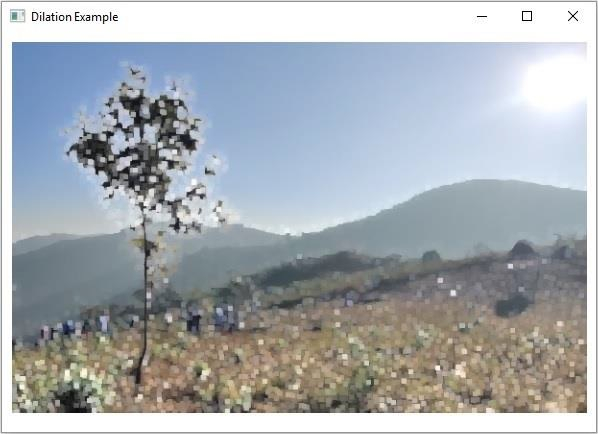
在膨胀操作期间,会将额外的像素添加到图像边界,在膨胀过程中添加的像素总数取决于所用结构元素的尺寸。
您可以使用 Imgproc 类的 dilate() 方法膨胀图像,此方法有三个 mat 对象代表源、目标和内核。
示例
import java.awt.Image;
import java.awt.image.BufferedImage;
import java.io.IOException;
import javafx.application.Application;
import javafx.embed.swing.SwingFXUtils;
import javafx.scene.Group;
import javafx.scene.Scene;
import javafx.scene.image.ImageView;
import javafx.scene.image.WritableImage;
import javafx.stage.Stage;
import org.opencv.core.Core;
import org.opencv.core.Mat;
import org.opencv.core.Size;
import org.opencv.highgui.HighGui;
import org.opencv.imgcodecs.Imgcodecs;
import org.opencv.imgproc.Imgproc;
public class ImageDilation extends Application {
   public void start(Stage stage) throws IOException {
      //加载 OpenCV 核心库
      System.loadLibrary( Core.NATIVE_LIBRARY_NAME );
      //读取图像数据
      String file ="D:\Images\lamma2.jpg";
      Mat src = Imgcodecs.imread(file);
      //创建目标矩阵
      Mat dst = new Mat(src.rows(), src.cols(), src.type());
      //准备核矩阵对象
      Mat kernel = Imgproc.getStructuringElement(Imgproc.MORPH_RECT, new Size((2*2) + 1, (2*2)+1));
      //对图像应用扩张
      Imgproc.dilate(src, dst, kernel);
      //将矩阵转换为 JavaFX 可写图像
      Image img = HighGui.toBufferedImage(dst);
      WritableImage writableImage= SwingFXUtils.toFXImage((BufferedImage) img, null);
      //设置图像视图
      ImageView imageView = new ImageView(writableImage);
      imageView.setX(10);
      imageView.setY(10);
      imageView.setFitWidth(575);
      imageView.setPreserveRatio(true);
      //设置 Scene 对象
      Group root = new Group(imageView);
      Scene scene = new Scene(root, 595, 400);
      stage.setTitle("Dilation Example");
      stage.setScene(scene);
      stage.show();
   }
   public static void main(String args[]) {
      launch(args);
   }
}
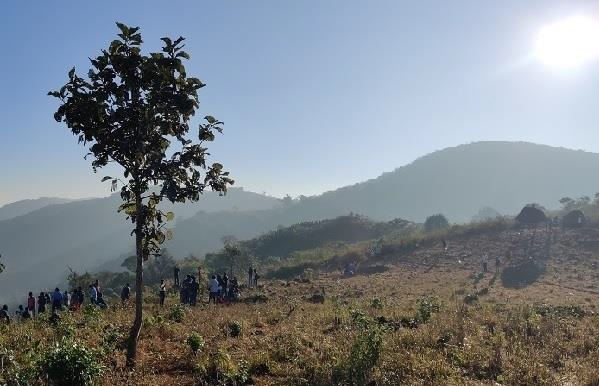
输入图片
输出
执行时,上述示例生成以下输出 −
相关文章
有用资源
java 参考教程 - 该教程包含有关 java 的更多信息:https://www.cainiaomax.com/java/

