如何在 JavaFX 中自动换行标签文本?
javafxobject oriented programmingprogramming更新于 2026/1/4 19:24:17
您可以使用 Label 组件在用户界面上显示文本元素/图像。它是一个不可编辑的文本控件,主要用于指定应用程序中其他节点的用途。
在 JavaFX 中,您可以通过实例化 javafx.scene.control.Label 类来创建标签。要创建标签,您需要实例化该类。
创建标签后,您可以分别使用 setMaxWidth() 和 setMaxHeight() 方法设置其最大宽度和最大高度。
设置标签的最大宽度后,超过指定宽度的内容将被截断。
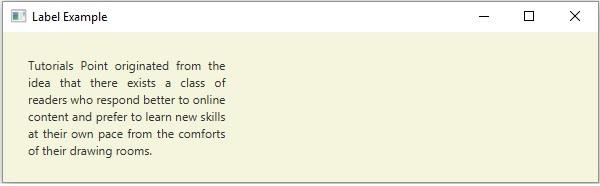
为了避免这种情况,您可以在指定宽度内自动换行文本,但需要调用 setWrapText() 方法。将 true 作为参数传递给此方法后,超过指定宽度的标签内容将被换到下一行。
示例
import javafx.application.Application;
import javafx.scene.Group;
import javafx.scene.Scene;
import javafx.scene.control.Label;
import javafx.scene.paint.Color;
import javafx.scene.text.TextAlignment;
import javafx.stage.Stage;
public class LabelWrapExample extends Application {
   public void start(Stage stage) {
      String text = "Tutorials Point originated from the idea that there exists a class
      of readers who respond better to online content and prefer to learn new skills at
      their own pace from the comforts of their drawing rooms.";
      //创建标签
      Label label = new Label(text);
      //包裹标签
      label.setWrapText(true);
      //设置标签的对齐方式
      label.setTextAlignment(TextAlignment.JUSTIFY);
      //设置标签的最大宽度
      label.setMaxWidth(200);
      //设置标签的位置
      label.setTranslateX(25);
      label.setTranslateY(25);
      Group root = new Group();
      root.getChildren().add(label);
      //设置舞台
      Scene scene = new Scene(root, 595, 150, Color.BEIGE);
      stage.setTitle("Label Example");
      stage.setScene(scene);
      stage.show();
   }
   public static void main(String args[]){
      launch(args);
   }
}
输出