
HTML frame 框架标签
htmlweb developmentfront end technology更新于 2026/1/30 5:32:17
<frame> 标签用于创建框架,并在 <frameset> 中定义一个窗口框架。
注意 − <frame> HTML5 中已弃用此标签。
| 属性 | 描述 |
|---|---|
| frameborder | 在框架周围显示边框 |
| longdesc | 包含框架内容详细描述的页面 |
| marginheight | 框架的上下边距 |
| marginwidth | 框架的左右边距 |
| name | 框架的名称 |
| noresize | 框架不是可调整大小 |
| scrolling | 是否在框架中显示滚动条 |
| src | 要在框架中显示的文档的 URL |
现在让我们看一个实现该标签的示例。
示例
<!DOCTYPE html>
<html>
<frameset cols="30%,30%,20%,20%">
   <frame src="https://www.cainiaomax.com/codingground.htm">
   <frame src="https://store.tutorialspoint.com/">
   <frame src="https://www.cainiaomax.com/tutorialslibrary.htm">
   <frame src="https://www.cainiaomax.com/programming_examples/">
</frameset>
</html>
输出
这将产生以下输出,在各个框架中显示不同的页面 −
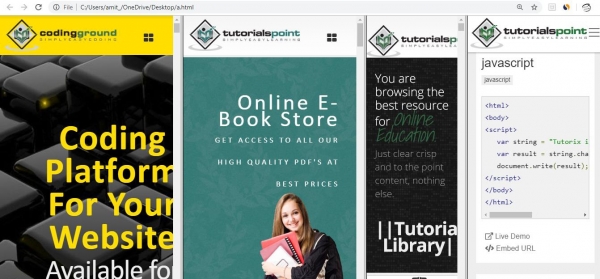
In the above example, we have four frames in a frameset −
<frameset cols="30%,30%,20%,20%">
   <frame src="https://www.cainiaomax.com/codingground.htm">
   <frame src="https://store.tutorialspoint.com/">
   <frame src="https://www.cainiaomax.com/tutorialslibrary.htm">
   <frame src="https://www.cainiaomax.com/programming_examples/">
</frameset>
框架集内的框架按 % 进行以下划分 −
frameset cols="30%,30%,20%,20%">
相关文章
有用资源
html 参考教程 - 该教程包含有关 html 的更多信息:https://www.cainiaomax.com/html/

