
应用 CSS 变换和缩放时保持图像质量
cssweb developmentfront end technology更新于 2024/5/16 9:48:17
CSS 图像渲染属性帮助我们设置图像缩放算法。
语法
CSS 图像渲染属性的语法如下 −
Selector {
   image-rendering: /*value*/
}
示例
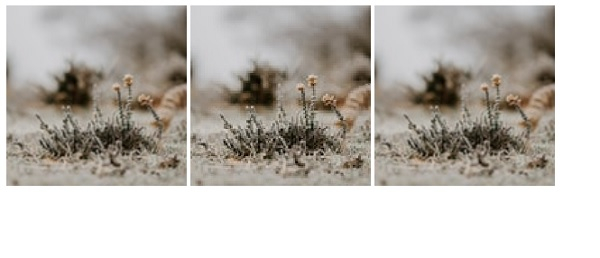
以下示例演示了 CSS 图像渲染属性。
<!DOCTYPE html>
<html>
   <head>
      <style>
         img {
            height: 200px;
            width: 200px;
         }
         #one {
            image-rendering: smooth
         }
         #two {
            image-rendering: pixelated
         }
         #three {
            image-rendering: crisp-edges
         }
      </style>
   </head>
   <body>
      <img id="one" src="https://images.unsplash.com/photo-1610208309350-766d71494a03?crop=entropy&cs=tinysrgb&fit=crop&fm=jpg&h=128&ixlib=rb-1.2.1&q=80&w=128" />
      <img id="two" src="https://images.unsplash.com/photo-1610208309350-766d71494a03?crop=entropy&cs=tinysrgb&fit=crop&fm=jpg&h=128&ixlib=rb-1.2.1&q=80&w=128" />
      <img id="three" src="https://images.unsplash.com/photo-1610208309350-766d71494a03?crop=entropy&cs=tinysrgb&fit=crop&fm=jpg&h=128&ixlib=rb-1.2.1&q=80&w=128" />
   </body>
</html>
这将给出以下输出
示例
<!DOCTYPE html>
<html>
   <head>
      <style>
         img {
            padding: 5%;
            border-radius: 40%;
            height: 20%;
            width: 20%;
         }
         #one {
            image-rendering: pixelated
         }
         #two {
            image-rendering: smooth
         }
         #three {
            image-rendering: crisp-edges
         }
      </style>
   </head>
   <body>
      <img id="one" src="https://images.unsplash.com/photo-1611090093783-a629a4d9f1a1?crop=entropy&cs=tinysrgb&fit=crop&fm=jpg&h=256&ixlib=rb-1.2.1&q=80&w=256" />
      <img id="two" src="https://images.unsplash.com/photo-1611090093783-a629a4d9f1a1?crop=entropy&cs=tinysrgb&fit=crop&fm=jpg&h=256&ixlib=rb-1.2.1&q=80&w=256" />
      <img id="three" src="https://images.unsplash.com/photo-1611090093783-a629a4d9f1a1?crop=entropy&cs=tinysrgb&fit=crop&fm=jpg&h=256&ixlib=rb-1.2.1&q=80&w=256" />
      <br/>
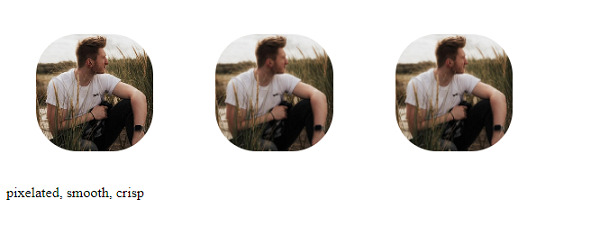
      pixelated, smooth, crisp
   </body>
</html>
这将给出以下输出
相关文章
有用资源
css 参考教程 - 该教程包含有关 css 的更多信息:https://www.cainiaomax.com/css/

