
使用 Django 中的 request.session 制作一个简单的计数器应用程序
pythonserver side programmingprogramming更新于 2025/10/1 6:36:17
在本文中,我们将了解如何制作一个超级简单的计数器应用程序,其中单击按钮将添加一个数字,即使您关闭选项卡并保留会话中的数据,它也会继续这样做。我们将了解如何使用会话制作一个简单的应用程序以及如何使用会话传输数据
示例
在 urls.py 中,添加以下行 −
来自 django.urls 导入路径
来自 django.urls.resolvers 导入 URLPattern
来自 .import views

urlpatterns = [
   path('', views.counterView, name='counter'),
]
这里我们在主页网址上设置视图。
在 views.py 中,添加以下行 −
from django.shortcuts import render

# 在此处创建您的视图。
def counterView(request):
   if request.method == "POST" and 'count' in request.POST:
      try:
         request.session['count'] +=1
      except:
           request.session['count'] = 0
   elif request.method == 'POST' and 'reset' in request.POST:
      request.session['count'] = 0
      return render(request,'counter.html')
这里我们创建了一个 POST 请求处理程序,我们将从前端发送一个数字并将其保存在 session 的 count 变量中。当从前端发送重置时,会话 count 变为 0
现在在 app 目录中创建一个 templates 文件夹,并在其中创建一个 counter.html,并写入以下内容−
<!DOCTYPE html>
<html lang="en">
<head>
   <meta charset="UTF-8">
   <meta http-equiv="X-UA-Compatible" content="IE=edge">
   <meta name="viewport" content="width=devicewidth, initial-scale=1.0">
   <title>Counter</title>
   <link href="https://cdn.jsdelivr.net/npm/bootstrap@5.0.1/
dist/css/bootstrap.min.css" rel="stylesheet" integrity="sha38
4-
+0n0xVW2eSR5OomGNYDnhzAbDsOXxcvSN1TPprVMTNDbiYZCxYbOOl7+AMvyT
G2x" crossorigin="anonymous">
</head>
<body>
   <style>
      body{
         background-color: palevioletred;
      }
      .counter form .count{
         border:none;
         outline: none;
         background-color:black;
         color: white;
      }
      .counter form .reset{
         border:none;
         outline: none;
         background-color:rgb(50, 181, 204);
      }
   </style>
   <div class="container counter text-center" style="margintop: 150px;">
      <h1 class="display-1 text-white">
         {% if request.session.count%}
         {{request.session.count}}
         {%else%}
         0
         {%endif%}</h1> <br> <br>
         <form method="post"> {% csrf_token %}
            <button name="count" class="count px-5 py-3 textwhite shadow-lg">Count</button>
         </form>
<br> <br>
      <form method="post"> {% csrf_token %}
         <button name="reset" class="reset px-5 py-3 textwhite shadow-lg">Reset</button>
      </form>
   </div>
</body>
</html>
这是我们在主页网址上呈现的前端。
输出
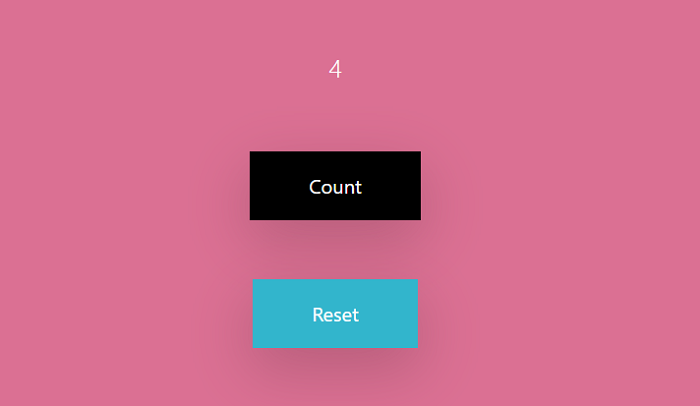
单击计数按钮将在数字中加 1,单击重置按钮将重置计数器为 0。
相关文章
有用资源
python 参考教程 - 该教程包含有关 python 的更多信息:https://www.cainiaomax.com/python/

