
在 Django 中制作 URL 缩短器应用程序
pythonserver side programmingprogramming更新于 2025/10/1 7:08:17
在本文中,我们将了解如何在 Django 中制作 URL 缩短器应用程序。这是一个简单的应用程序,它将长 URL 转换为短 URL。我们将使用 Python 库(而不是任何 Django 特定的库)来实现这一点,因此您可以在任何 Python 项目中使用此代码。
首先,创建一个 Django 项目和一个应用程序。进行一些基本设置,例如在 settings.py 中包含应用程序的 URL 以及在 INSTALLED_APPS 中包含应用程序。
示例
安装 pyshorteners 模块 −
pip install pyshorteners
在应用程序的 urls.py 中 −
from django.urls import path
from .views import url_shortner

urlpatterns = [
   path('', url_shortner.as_view(), name="url-shortner"),
]
在这里我们将视图集设置为主页 url 上的视图。
现在在 views.py −
from django.shortcuts import render
import pyshorteners
from django.views import View

class url_shortner(View):
   def post(self, request):
      long_url = 'url' in request.POST 和 request.POST['url']
      pys = pyshorteners.Shortener()
      short_url = pys.tinyurl.short(long_url)
      return render(request,'urlShortner.html', context={'short_url':short_url,'long_url':long_url})

   def get(self, request):
      return render(request,'urlShortner.html')
这里我们创建了一个带有两个请求处理程序函数的视图,get handler 将呈现前端 html,而 post handler 将获取长 URL 并使用短 URL 重新呈现我们的前端。
在 app 目录中创建一个 templates 文件夹,并在其中添加 urlShortner.html 并写入此 −
<!DOCTYPE html>
<html>
   <head>
      <title>Url Shortner</title>
   </head>
   <body>
        <div >
         <h1 >URL 缩短器应用程序</h1>
          <form method="POST">{% csrf_token %}
            <input type="url" name="url" placeholder="在此处输入链接" required>
            <button >缩短 URL</button>
         </form>
        </div>
      </div>
      {% if short_url %}
        <div>
         <h3>您的缩短 URL /h3>
         <div>
            <input type="url" id="short_url" value={{short_url}}> <button name="short-url">复制网址</button> <small id="copied" class="px-5"></small>
         </div>
         <br>
         <span><b>长 URL: </b></span> <a href="{{long_url}}">{{long_url}}</a>
      </div>
      {%endif%}
   </body>
</html>
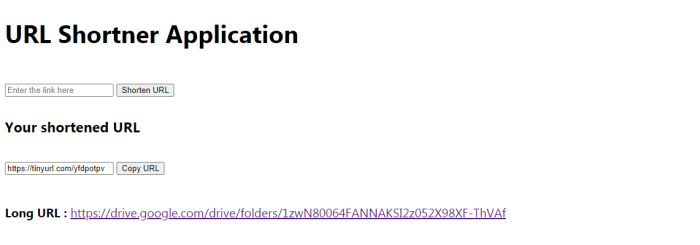
这是前端,它将获取长 URL 并发送请求,然后返回短 URL。
输出
相关文章
有用资源
python 参考教程 - 该教程包含有关 python 的更多信息:https://www.cainiaomax.com/python/

