
伪类和 CSS 类
cssweb developmentfront end technology更新于 2025/1/17 15:08:17
CSS 伪类可以与 CSS 类(而非元素本身)结合使用,从而为 HTML 元素提供更具选择性的方法。
示例
让我们看一个结合 CSS 伪类和 CSS 类的示例 −
<!DOCTYPE html>
<html>
<head>
<style>
div {
   margin: 10px;
   padding: 10px;
   text-align: center;
   border: 1px solid black;
}
.Italy:lang(it)::after {
   padding: 20px;
   content: '~ Italy';
   font-style: italic;
}
.Spain:lang(es)::after {
   padding: 8px;
   content: '~ Spain';
   font-style: italic;
}
.Germany:lang(nl)::after {
   padding: 20px;
   content: '~ Belgium';
   font-style: italic;
}
.Spain:lang(es){
   background-image: linear-gradient(red 25%, yellow 25%, yellow 75%, red 75%);
}
.Italy:lang(it){
   background-image:linear-gradient(90deg, #00ae00 33.3%, white 33.3%, white 66.6%, red 66.6%);
}
.Germany:lang(nl){
   background-image:linear-gradient(90deg, black 33.3%, yellow 33.3%, yellow 66.6%, red 66.6%);
}
</style>
</head>
<body>
<div class="Italy" lang='it'>Rome</div>
<div class="Germany" lang='nl'>Brussels</div>
<div class="Spain" lang='es'>Madrid</div>
</body>
</html>
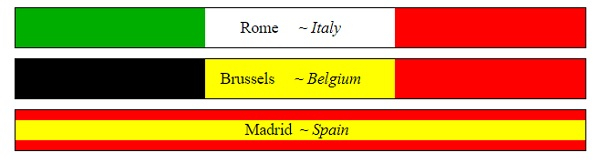
输出
以下是输出 −
示例
让我们看另一个结合 CSS 伪类和 CSS 类的示例−
<!DOCTYPE html>
<html>
<head>
<style>
form {
   width:70%;
   margin: 0 auto;
   text-align: center;
}
* {
   padding: 2px;
   margin:5px;
   box-sizing: border-box;
}
input[type="button"] {
   border-radius: 10px;
}
.child{
   display: inline-block;
   height: 40px;
   width: 40px;
   color: white;
   border: 4px solid black;
}
.child:nth-child(1){
   background-color: #FF8A00;
}
.child:nth-child(2){
   background-color: #F44336;
}
.child:nth-child(3){
   background-color: #C303C3;
}
.child:nth-child(4){
   background-color: #4CAF50;
}
.child:nth-child(5){
   background-color: #03A9F4;
}
.child:nth-child(6){
   background-color: #FEDC11;
}
</style>
</head>
<body>
<form>
<fieldset>
<legend>CSS Pseudo Classes and CSS Classes</legend>
<div id="container">
<div class="child"></div><div class="child"></div><div class="child"></div><div class="child"></div><div class="child"></div><div class="child"></div>
</div><br>
</body>
</html>
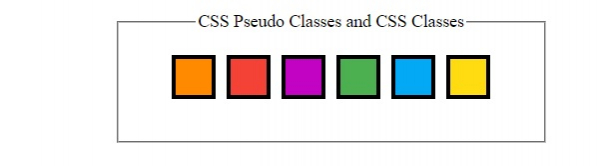
输出
这将产生以下输出 −
相关文章
有用资源
css 参考教程 - 该教程包含有关 css 的更多信息:https://www.cainiaomax.com/css/

